
fleet
 fleet copied to clipboard
 fleetdm
Script execution: Re-run script on a team
User story
As an IT admin (maintainer and admin in Fleet), I want to re-run a script on all macOS host in a team so that I can enforce specific configuration (ex. disable root user, empty unused folder).
I want to be able to automate running a script at an interval (ex. once per day) so I can keep the configuration for these hosts up to date.
Requirements
- Fleet Premium feature
- IT admin can rerun a script on all macOS hosts assigned to a team. We won't support running a script on all hosts in no team
- Activity feed item for running the script on a team (or no team)
- QA note: CLI/API enables automating script reruns at a certain interval (ex. daily)
- For example, IT admin might want to remove local Zoom files (messages, recording), from all hosts in a team, every day
Design
UI
https://www.figma.com/file/hdALBDsrti77QuDNSzLdkx/%F0%9F%9A%A7-Fleet-EE-(dev-ready%2C-scratchpad)?node-id=12488%3A329702
CLI usage
Add a --team_name flag to the fleetctl run-script command
$ fleetctl run-script --script_name=script_A.sh --team_name="Workstations"=Alex's MacBook
Script will run on all macOS hosts assigned to the team. This may cause the script to run more than once on some hosts. See which hosts ran the script ran in the Fleet UI here: <link-to-hosts-page-with-script-ran-filter>
- Runs the script on the specified host or team
--script_name(required) accepts name of a saved script.--host(required if--team_nameisn't provided) accepts a hostname or host ID.--team_name(required if--hostisn't provided) accepts a team name.
Errors
- If
--script_nameisn't specified, display this error:Error: No script selected. Please provide --script_name with a valid script name. - If
--hostor--team_nameisn't specified, display this error:Error: No host or team targeted. Please provide --host or --team_name. - If
--hostand--team_nameis specified, display this error:Error: Provide either --host or --team_name - If the script doesn't exist, display this error:
Error: The script doesn't exist. Please provide a saved script to run. - If the the user doesn't have permissions to run the script, display this error:
Error: Permission denied. You don't have permission to run this script. - If the --host doesn't exist, display this error:
Error: The host doesn't exist. Please provide a valid hostname or host ID. - If the --host is unable to run the script (not macOS), display this error:
Error: Can't run the script on this host. Please provide a macOS host. - If the host doesn't belong to the same team (or no team) as the script, display this error:
Error: The targeted host isn't assigned to the same team as the script. Please provide --host that are assigned to the same team. - If the script doesn't belong to the --team_name, display this error: `Error: The script isn't assigned to the targeted team. Please provide --team_name where the script is assigned.
Help pages
fleetctl
$ fleetctl -h
NAME:
   fleetctl

COMMANDS:
   ... REMAINS SAME BUT ADD:
   run-script                                 Run a script on one macOS host or on all macOS hosts in a team
fleetctl run-script
$ fleetctl run-script -h
NAME:
   fleetctl run-script -  Run a script on one macOS host or on all macOS hosts in a team

OPTIONS:
   --script_name                         The name of the script to run.
   --host                                       A host, specified by hostname or ID, the script will run on.
   --team_name                          The name of the team the script will run on.
Compatibility
REST API changes
TODO?
Database schema migrations
TODO?
Technical sub-tasks (if any)
N/A

Hey @zhumo @roperzh @lukeheath I added proposed CLI changes for rerunning a script in this issue's description (above).
I added proposed CLI changes for add/edit/delete a script in a separate issue here: https://github.com/fleetdm/fleet/issues/9537#issue-1560424540
When you get the chance, can you please take a look at both?
- Does the naming make sense?
- Does the behavior of add/edit/delete make sense?
- Does the output make sense?
- Do the errors/error messages make sense?
- Is this too complex?
@noahtalerman
- Will users be able to point multiple teams to one script? If so, then we should not assume that not specifying a target host would result in all the teams being run. This is because multiple teams might have a script with the same name. Instead, maybe we need some way to list all the scripts you have (scoped to team?) and then maybe you get a script ID which you pass to this command?
- Rather than linking people to the script list page, why not link them to the show page for each script?

Will users be able to point multiple teams to one script?
@zhumo yes.
we should not assume that not specifying a target host would result in all the teams being run
Great point. Adding something like a fleetctl get scripts (lists scripts) and updating --name flag to --id in fleetctl run-script makes sense.
Rather than linking people to the script list page, why not link them to the show page for each script?
I'm not sure what you mean by "show page." Currently, we aren't planning on a details page for individual scripts. That said, this made me realize that linking the user to a list of hosts that have successfully run the script is a better experience.
I'd vouch to either require --hosts or to get a confirmation prompt before running the script on all hosts in the team by default, feels like we're setting the IT admin for failure if it's in a hurry or didn't read the instructions carefully.

require --hosts
This makes sense to me. Let's require hosts.
In the UI, we want to provide a similar UX so that the IT admin confirms they want to rerun the script on all hosts:
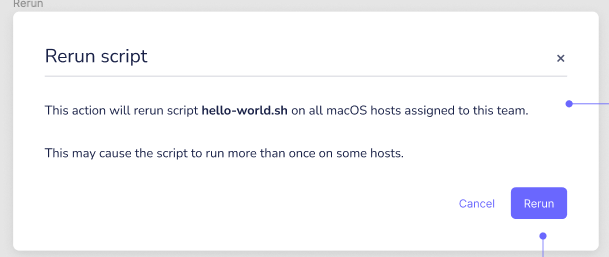
@roperzh I think we should reserve --hosts=all to allow the user to target all hosts assigned to the team. How would this work? Is this too complex?
I think we should reserve --hosts=all to allow the user to target all hosts assigned to the team. How would this work? Is this too complex?
@noahtalerman I think it's doable, not too complex, but note that for live queries, the UI has a similar feature where you can run queries for all hosts in a team, and we don't have the special all key, instead the UI collects all host ids that belong to the team and sends that.
I do like the option of having a special key (=all) so we can emulate the same behavior in the CLI, but wanted to raise this in case you'd want to think holistically about both CLI use cases.
@noahtalerman Nice job on the specs! Looks great.
I do like the option of having a special key (=all) so we can emulate the same behavior in the CLI, but wanted to raise this in case you'd want to think holistically about both CLI use cases.
@roperzh Thanks for bringing this up. I also like the idea of --hosts=all. If I want do something with all hosts, or all hosts on a team, it's burdensome to gather the ids. I'm in favor of using --hosts=all.
Will users be able to point multiple teams to one script?
@noahtalerman Will this require they gather host ids? What if we add a team flag so that you can run a script on all hosts in a team? Or a comma-separated list of teams.

What if we add a team flag so that you can run a script on all hosts in a team? Or a comma-separated list of teams.
@lukeheath hmm, I like this idea. We want to enable users to rerun a script, on an interval, against hosts on one or more teams.
I think adding a required --teams flag that accepts a comma-separated list of teams is a better solution than adding something like a fleetctl get scripts (lists scripts) and updating --name flag to --id in fleetctl run-script command.
Why? The fleetctl query command has a similar UX: It accepts --hosts and --labels flags. A CLI user will have an easier time recognizing scripts by name when compared to ID.
Decisions and action items from today's "Script CLI" call (2022-01-31):
- Decision: You can't target all hosts on no team. Allow running a script on specific hosts that are on no team with
--hostsflag.- Why? We'd like users to segment target host by team. Not supporting this encourages users to place hosts in a team. Supporting this adds complexity: Something like adding a reserved "No team" value for
--team.
- Why? We'd like users to segment target host by team. Not supporting this encourages users to place hosts in a team. Supporting this adds complexity: Something like adding a reserved "No team" value for
- Decision: Allow
--team_nameOR--hostsfor targeting. One is required. User can't supply both.- Error if the
--hostsdon't belong to the same team (or no team). - Why? Use cases are (1) re-running the script on all hosts in a team and (2) re-running the script on specific host(s). Supporting the ability to supply
--team_nameAND--hostsadds unnecessary complexity: Have to handle specifying--team_name=Team Aand--hosts=host_on_Team_B.
- Error if the
- Decision:
--team_nameallows one team. If user wants to run the same script on two teams they have to run two commands.- Why? Supporting multiple teams adds complexity: Have to handle specifying --teams=Team A,Team B and --script_name=script_on_team_A
@lukeheath @roperzh @zhumo I updated the proposed CLI specs (in this issue's description) after discussing the above with Luke^^
Please let me know if you have any thoughts/feedback!
@noahtalerman @lukeheath in the UI, if I want to upload the same script to multiple teams, I would need to upload them separately right? The system thinks that scripts uploaded via the UI are different scripts. This would imply that each uploaded script must have unique names in order to accommodate the CLI, right? If that's the case, then 1. I think the UI would be kind of annoying... I don't think I should have to change the name of the script for the team and 2. if I upload scripts via UI, then try to run them via CLI (due to some automation perhaps), then the name would be ambiguous. That would imply that we need some kind of script ID rather than using script name.
^ is this true?
if I want to upload the same script to multiple teams, I would need to upload them separately right? The system thinks that scripts uploaded via the UI are different scripts.
Right.
This would imply that each uploaded script must have unique names in order to accommodate the CLI, right?
@zhumo hmm, not necessarily. We can accommodate the CLI by enforcing that hosts (--hosts OR --team_name) are the same team as the script (--script_name). cc @lukeheath
I think this is better UX than supplying the script's ID because I think the workflow for the CLI user will look like this: View git repo with scripts and team YAML docs => find script that I want to run and see which team it's on => run script by name.
I think we can rely on the user will to know (1) which hosts they're trying to run the script on (and which team they're on) and (2) which team the script is assigned to.
I think the UI would be kind of annoying... I don't think I should have to change the name of the script for the team
Agreed.
@lukeheath @roperzh heads up, I made the following changes to the specs after chatting with @zhumo:
- Update
--hosts(plural) to--host(singular).--hostaccepts one host (hostname or ID). Why? I've observed that, most of the time, users rerun a script on one host at a time when remediating an issue or troubleshooting remotely.
I suspect we'll hear about a need for more targeting options (other than one host or all hosts in a team). It's likely we'll come back to this later (after April launch).
@lukeheath I'd like to prioritize this story after the Manage scripts and Enable read-only agent stories. Ideally, we'd be able to include the MVP of all 3 stories in the next release. This way, we can get feedback from beta users on managing and rerunning scripts.
Do you think that's workable? Will we need to reduce the scope of any of these stories?
@noahtalerman I don't think we will have the capacity to finish rerunning scripts in the next sprint. Let's hop on a call to discuss.
@lukeheath and @noahtalerman: Maybe we can punt on everything except re-running on one host in the UI (2022-02-15)
Luke: I'll check in with Roberto. Maybe we'll be able to bring this in to next sprint (not sure).
@noahtalerman @lukeheath can we re-visit this? I have added another customer to this issue & the request is that you would be able to execute scripts on mulitple hosts from the UI, e.g., on a Team, or on a selected list of hosts from the Hosts page.

Hey @nonpunctual, if you think we should consider prioritizing this please add it to the feature fest board. Thanks!
@noahtalerman Your original user story seems to imply a "remediation" type feature / workflow where a script would be executed to push a device back into state based on a policy failure & that these scripts would be executed on some interval to check state rather than running when the policy failure occurred.
This seems like a good idea. It also seems more like an epic than a single FR.
The problem is the rest of the comments. Many of these issues are sliced & diced beyond recognition making it impossible to say if "it" should be revisited or not. Using this issue as an example:
- What was actually planned & estimated?
- What has actually been done related to this work that might impact estimation?
- What was "punted" in the planning?
- The point of contention seemed to be that scripts are isolated to Team
- This is still the case in the API
- If you want to run Script 1 on Team A & Team B does it require a separate upload?
- If so, that needs to be addressed
- One of the comments above highlights a gitops workflow for running scripts
- what if customers aren't using gitops?