
fleet
 fleet copied to clipboard
 fleetdm
No operating system information is shown for a Windows 10 LTSC 2019 host
Fleet version: main
Operating system: Windows 10 LTSC 2019
Web browser: None
🧑💻 Expected behavior
Operating system information should be displayed for a Windows 10 LTSC 2019 host.
💥 Actual behavior
No operating system information is displayed for a Windows 10 LTSC 2019 host. This happens even when osquery returns the expected OS codename details as part of the os_version table.
More info
The problem is on the Hosts section of the Fleet dashboard. There are 3 hosts on the screenshot below, and only the Windows 10 LTSC 2019 host is missing the Operating system information.
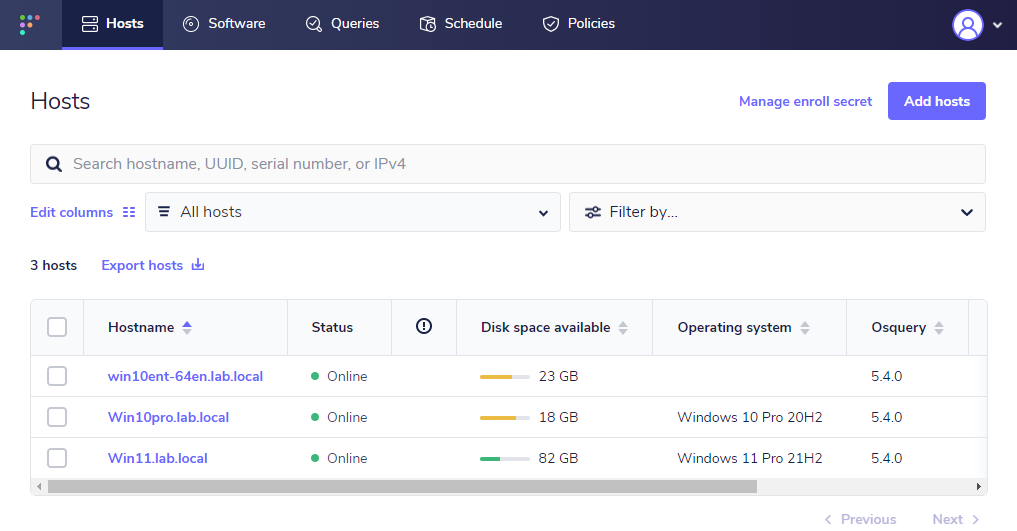
The issue was observed in a test AD lab environment. A dedicated Fleet Server + a bunch of windows hosts were used during the test.
Querying the os_version table for this problematic host shows that the expected codename information is returned by Osquery as can be seen below
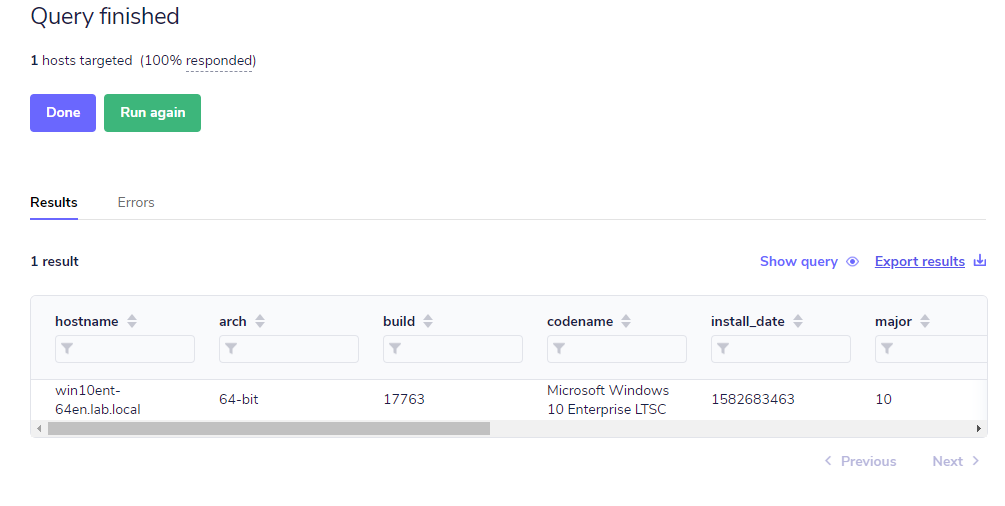
I'm also leaving here the raw response details of the query
"host_hostname","arch","build","codename","install_date","major","minor","name","patch","platform","platform_like","version"
"win10ent-64en.lab.local","64-bit","17763","Microsoft Windows 10 Enterprise LTSC","1582683463","10","0","Microsoft Windows 10 Enterprise LTSC","","windows","windows","10.0.17763"
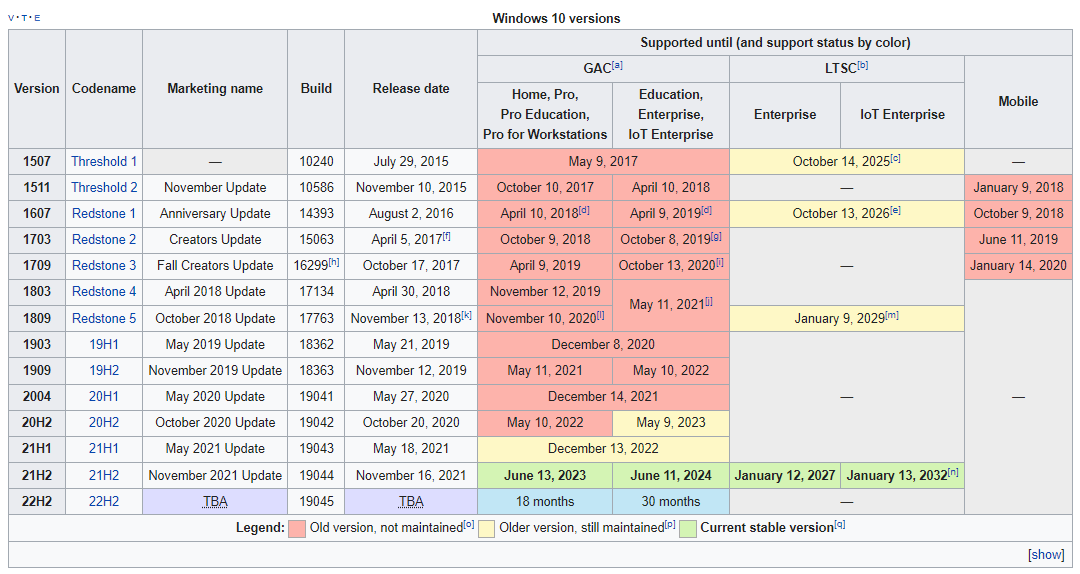
Just for reference, here is the list of Windows 10 versions still being maintained by Microsoft. I plan to test the older LTSC versions once this issue is fixed.

@gillespi314 Lucas mentioned that you might be working on related issues currently?

@zwass, not currently, but I did last sprint so I can take a closer look if that makes sense for folks

@marcosd4h, would you please let me know your results when running the following live query:
                SELECT
			os.name,
			r.data
		FROM
			os_version os,
			(
				SELECT
					data
				FROM
					registry
				WHERE
					path = 'HKEY_LOCAL_MACHINE\\SOFTWARE\\Microsoft\\Windows NT\\CurrentVersion\\DisplayVersion') r
		LIMIT 1
The query returns empty. It seems that the DisplayVersion is not present on the registry. I've manually checked that on the test VM I'm using. Screenshot below

Thanks! It seems like we'll need product to take a closer look at this and see how they'd like to handle this case.
@noahtalerman, @lukeheath it seems like the windows query that was specified for #6475 does not work for all windows versions.
Maybe we should just use codename if the other values we would have used are blank?
@noahtalerman Assigning this bug to you for product direction on how we should handle this case. Just let me know if I can help!

Thanks for looping me in!
@gillespi314 for the operating system Version in Fleet, let's fall back to using the ReleaseID (from the CurrentVersion section of the Windows registry) if the DisplayName doesn't exist.
The goal is to inform the user which Windows operating systems are currently supported by Microsoft as reported by https://endoflife.date/windows.
endoflife.date reports Windows 10 LTSC 2019 as Windows 10, version 1809 (LTS). We'd like Fleet to report this as Windows 10 Enterprise LTSC 1809 (name + version) so that users use what they see in Fleet to find the match on endoflife.date.
In the registry screenshot Marcos provided, the ReleaseID is 1809.
So, when visiting the Home page in Fleet, I would expect the Fleet UI/API to display Windows 10 Enterprise LTSC as the Name and 1809 as the Version:
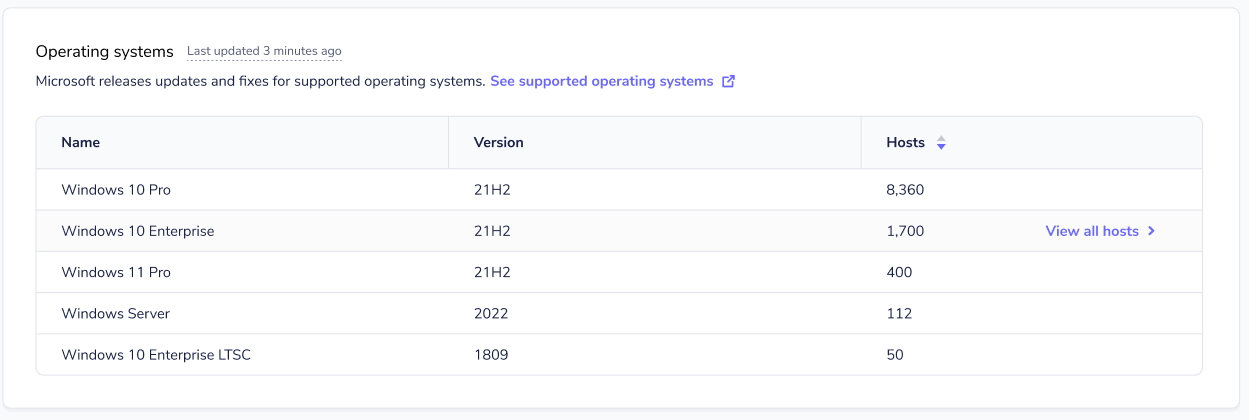
When visiting the Hosts page in Fleet, I would expect the Fleet UI/API to display Windows 10 Enterprise LTSC 1809.

@marcosd4h, I've opened a PR that I believe should resolve this issue. Would you mind trying it out in your environment? Thanks!
