

 flatcar
docker container are not getting started in flatcar version 2983.2.1 and also with 3033.2.4
we have a build dated 02-feb-2022 with 2983.2.1 which is working fine and the docker is also working but now when we are creating a new build either with 2983.2.1 or 3033.2.4 version and post configuring it, while executing - we are getting this error.
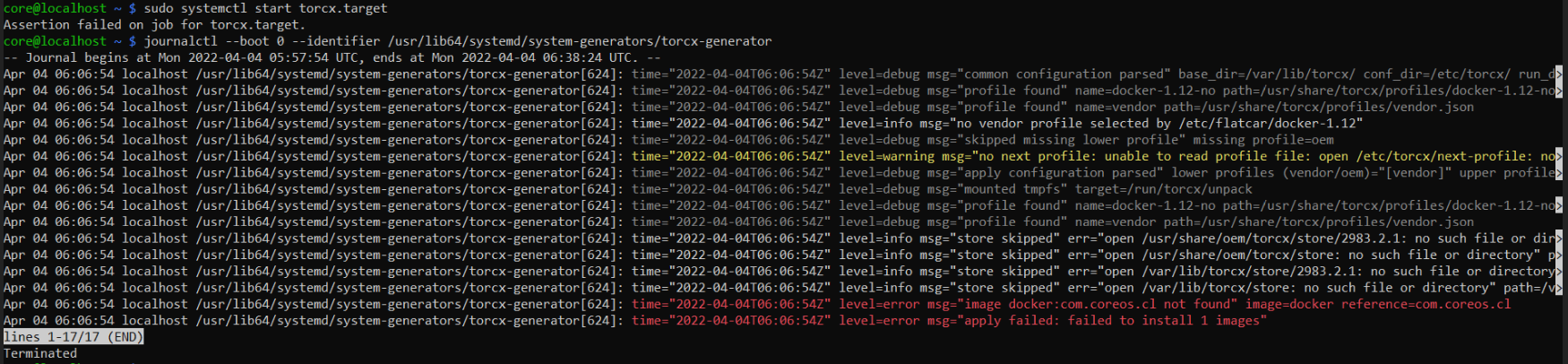

Hi @Akshaybaisla, can you:
- paste the output of
ls -la /usr/share/torcx/store - share what steps you are performing in post-configuring? Please be as detailed as you can.

Hi @jepio,
- Run cork command - "cork -d create --manifest-branch=flatcar-stable-3033.2.4 --manifest-name=release.xml --manifest-url https://github.com/flatcar-linux/manifest.git --sdk-version=3033.0.0".
- Run command- "cork enter".
- Once inside chroot. Run these command #once inside chroot set the password. "./set_shared_user_password.sh" #set build target as amd64 "./setup_board --default --board=amd64-usr" #Delete shared password file: "sudo rm -f /etc/shared_user_passwd.txt" "#Exit chroot by typing Ctrl+D"
- Run a command to generate 2 docker images
- Generate VMX file and then generate ova image.
- Run the OVA image and then while running "docker ps" or "docker images" output comes "The program docker is managed by torcx, which did not run."

What exactly are steps 4 or 5?
A torcx package for docker is built during ./build_packages step but installed when ./build_image is done. You need to run the following steps after step 3 to generate a valid image:
./build_packages --board=amd64-usr
./build_image --board=amd64-usr
./image_to_vm.sh --format=vmware_ova
You can also accomplish the same as set_shared_user_password.sh by providing an ignition config at runtime that sets the password: https://www.flatcar.org/docs/latest/provisioning/cl-config/examples/#users-and-groups.
Steps- ./build_packages and ./build_image already exist in our code even then docker containers are not working
./build_packages builds a torcx package for docker (https://github.com/flatcar-linux/scripts/blob/main/build_packages#L304-L307), and ./build_image installs that torcx package into the image at /usr/share/torcx/store (https://github.com/flatcar-linux/scripts/blob/main/build_library/build_image_util.sh#L593-L611). They also need to be executed within the chroot. You can find the built torcx packages inside the chroot under ~/trunk/src/build/torcx/. Without the correct torcx package inside the image, docker will not work.
Are you able to share your whole script so that we can help you find the issue? It might be easier to debug this in our matrix channel: https://app.element.io/#/room/#flatcar:matrix.org.
@Akshaybaisla did you get a chance to give another try on this issue? Can we assist you further?

I'll go ahead and close this issue. Please feel free to reopen this issue if you get a chance to try again the suggested steps :)