

 flameshot-org
Move cursor with arrows (keyboard)
Feature Description
In greenshot you can move the cursor with the keyboard to adjust the cross - that's very nice when doing region snaps and want to be pixel perfect..
So as long as the magnifier is active it would be very nice to move the point with the arrows on the keyboard

I'm not against the idea, but it needs some fine-tuning. The arrows at the moment change the size of the region. We should not break an existing feature while adding a new one unless we have a good reason. Lets discuss that and get to a solid design

@zenturacp Is what you are asking for different than the current Resize/Move Selection by 1px, which has keyboard arrow (or SHIFT + arrow) shortcuts by default?
Edit: OK, I understand what you mean now. It's not a bad idea, especially on higher res monitors.

Yes exactly @gstarch - on lowres no problem but on highres i need to crop the picture afterwards if there is 1px line too much etc.. I simply cant see it on the monitor if im 1px off..
In greenshot the magnification also shows the selection and then the cursor moves the magnify glass when im exactly where i want to be i can just hit the mouse and move to other point and then arrange with keyboard and release ..
Indeed very very acurate
I don't know how to combine the magnification with the keyboard movement. At the moment we have also this magnifier which let you have pixel-by-pixel movement. I don't have high-res monitor to see the experience, hence I'm asking if this helps. You can activate it via:
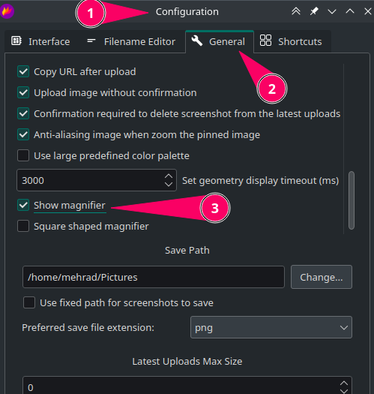
Exaclty i use it - but it's quite time consuming to move it and the mouse it not like really good at precission..
In greenshot its so much easier because 1 tap at the arrow up moves up 1 pixel and holding just moves the cursor continuos, then if i need to reference some point up i just hold the mouse and just press they keyboard..
Please try and install greenshot and test it - if possible, its very easy to go to the exact point / corner of a button etc. also the magnifyer is bigger so its easier to see a bigger picture of the area.
In greenshot its so much easier because 1 tap at the arrow up moves up 1 pixel and holding just moves the cursor continuos, then if i need to reference some point up i just hold the mouse and just press they keyboard..
can you explain how do you select which handle you are want to move?do you hover, or while holding the mouse you tap the arrow keys?
Please try and install greenshot and test it - if possible
Sorry, I refuse to use Windows, and I don't have macOS either (using PopOS on my macbook pro). If you can record a short video to demo how it works or explain it, it would help to converge to a design. With a clear design it would much easier to move forward and towards implementation.
also the magnifyer is bigger so its easier to see a bigger picture of the area.
Perhaps this can be another feature request to make the diameter of the magnifier and the zoom level configurable to accommodate high-res displays. I don't know, but perhaps we can also use a keybinding to slow the mouse sensitivity (so the mouse should physically travel longer for the same on-screen distance) to help the user be more precise. But that is also another feature request, plus perhaps maintaining it cross-platform would not be smooth.
Bump. I would also like to see this feature, it would make it much easier to take an accurate screenshot as described by zenturacp above. When Windows was my main OS, I used ShareX to take screenshots and it had this feature. And I'd like to reiterate that just having the magnifier isn't enough, but combining it with the arrow key functionality to move the region pixel by pixel makes the process a breeze.

Bump. I would also like to see this feature, it would make it much easier to take an accurate screenshot as described by zenturacp above. When Windows was my main OS, I used ShareX to take screenshots and it had this feature. And I'd like to reiterate that just having the magnifier isn't enough, but combining it with the arrow key functionality to move the region pixel by pixel makes the process a breeze.
Are you still using Windows @Igetin? I did the change in a fork and tested it - and it works, but have only build for Windows to test, it was a mess so need to redo it again, and make new binaries
It breaks the old stuff though - if just the crosshair snaps and follows the corner point it would actually be solved with the implemented SHIFT + Arrows solution in place, i will try and check if that's a valid solution and test that
Are you still using Windows @Igetin?
No, I'm on Fedora Linux 40.
@Igetin - i will spend some time testing something that does not break existing features - then if you are okay i will reach out and you can test
Im the meantime can you confirm @Igetin that snapping and placing the cross hair on the point where it modifies the selection are would be the wanted feature when using SHIFT+ARROW keys
When performing a manual capture via flameshot gui, I would expect it to work as follows.
When a screenshot area has not yet been selected, pressing an arrow key should simply move the cursor by one pixel to the corresponding direction. If the magnifier is enabled, its view should update accordingly.
When dragging the corner of an existing selection (by holding the left mouse button on it), the arrow keys should move that vertex of the rectangle by one pixel to the corresponding direction. For example, if the top left corner is held with the mouse, and the key ▼ key is pressed, that vertex of the rectangle should move one pixel downwards. Effectively this means that the rectangle's height is reduced by one pixel from its top edge. The magnifier view should update here as well.
When none of the corners of the selection is being held with the mouse, the arrow keys should just move the whole rectangle (which is how it currently works).
I like @Igetin approach, maybe because I have also used Greenshot in Windows and that's similar to how it works. I was planning to give it a try like that, but I think there's one scenario that it's not covered in those three bulletpoints:
When a screenshot area has already been selected but user wants to start a new selection, in this case Flameshot wouldn't allow the user to move the mouse cursor by 1px since pressing arrow keys would move the existing selection instead.
I saw that in the shortcuts' configuration panel there's still room for Ctrl+[arrow key], so another solution could be using that combination to move mouse cursor by 1px instead of the selected area. It would go like this:
When dragging the corner of an existing selection (by holding the left mouse button on it), the shortcut Ctrl+[arrow key] should move by 1px in the corresponding direction:
- The mouse cursor.
- The magnifier view when it's enabled.
- That vertex of the rectangle, effectively updating the size of the selected area.
In any other scenario, the shortcut Ctrl+[arrow key] should move by 1px in the corresponding direction:
- The mouse cursor.
- The magnifier view when it's enabled.
With this implementation, Flameshot would work identically for users that don't need or are not used to this new feature, while allowing to have it for those (like me) who really miss it.
