

 flameshot-org
flameshot gui delayed compared to tray icon click
Flameshot Version
Flameshot v12.0.0 (b4737f8a) Compiled with Qt 5.15.4
Installation Type
User repository (AUR)
Operating System type and version
linux: 5.18.5-1-MANJARO (KDE)
Description
Starting a gui screenshot is noticably slower (up to a second of delay) when invoked through flameshot gui or a comparable KDE keyboard shortcut compared to clicking on the tray icon.
Steps to reproduce
- Have flameshot running
- Click on tray icon
- Observe near instant start of gui
- Run
flameshot guiin a terminal - Observe a delayed start of the gui
Screenshots or screen recordings
No response
System Information
System:
  Host: nitronp51551 Kernel: 5.18.5-1-MANJARO arch: x86_64 bits: 64
    Desktop: KDE Plasma v: 5.24.5 Distro: Manjaro Linux
Graphics:
  Device-1: Intel UHD Graphics 620 driver: i915 v: kernel
  Device-2: NVIDIA GP107M [GeForce GTX 1050 Mobile] driver: N/A
  Display: x11 server: X.Org v: 21.1.3 with: Xwayland v: 22.1.2 driver: X:
    loaded: modesetting gpu: i915 resolution: 1: 1920x1080~60Hz
    2: 1920x1080~60Hz
  OpenGL: renderer: Mesa Intel UHD Graphics 620 (KBL GT2) v: 4.6 Mesa 22.1.1
Display configuration: Internal and external display side by side
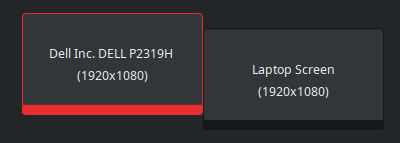

I am on Manjaro KDE and cannot reproduce this. when daemon is running, both left-click on tray icon and flameshot gui open in the same rate.
The only major differences I see between my setup and yours are:
- I have 3 monitors
- I use proprietary Nvidia driver and you use Mesa
❯  inxi --width 80 --system --graphics
System:
  Host: Chrstphr Kernel: 5.15.50-1-MANJARO arch: x86_64 bits: 64
    Desktop: KDE Plasma v: 5.24.5 Distro: Manjaro Linux
Graphics:
  Device-1: Intel Xeon E3-1200 v3/4th Gen Core Processor Integrated Graphics
    driver: i915 v: kernel
  Device-2: NVIDIA GP106 [GeForce GTX 1060 6GB] driver: nvidia v: 515.57
  Display: x11 server: X.Org v: 21.1.3 driver: X: loaded: modesetting,nvidia
    gpu: i915 resolution: 1: 1080x1920~60Hz 2: 1080x1920~60Hz 3: 1920x1080~60Hz
  OpenGL: renderer: NVIDIA GeForce GTX 1060 6GB/PCIe/SSE2
    v: 4.6.0 NVIDIA 515.57
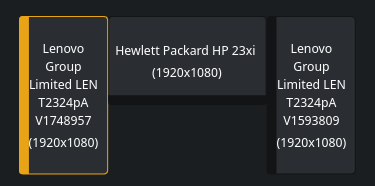
Do you see the same lag when you unplug your external monitor?

Do you see the same lag when you unplug your external monitor?
I can confirm that the delay is still there with no external monitors plugged in.
I can reproduce this. A good way to test is having this page focused before you take a screenshot, with scrollbar all to the top. Then you click (or press) to take screenshot and immediately press End keyboard key to scroll to the bottom of the page.
In a perfect world of 0 delay, Flameshot should be fast enough to take a screenshot from the top of the page, before the page scrolling caused by End key.
My results:
- If I press
Endimmediately after clicking tray icon, Flameshot is unable to take a screenshot from the top of the page. - If I press
Endvery quickly but not immediately, Flameshot is able to take a screenshot from the top of the page only if done by clicking tray icon. Other ways like keyboard shortcut (usually PrintScreen),flameshot guior evenTake screenshotfrom tray icon context menu (right-click) are noticeably slower in this test, I need to delay the pressing ofEndfor like 1 second for those other methods to be able to take a screenshot from the top of the page.
So Flameshot is never "0 delay", but clicking tray icon is clearly faster than any other method.
How to make keyboard shortcut to be as fast as clicking tray icon?
System:
  Host: ---- Kernel: 5.18.11-1-default arch: x86_64 bits: 64
    Desktop: KDE Plasma v: 5.25.3 Distro: openSUSE Tumbleweed 20220725
Graphics:
  Device-1: AMD Ellesmere [Radeon RX 470/480/570/570X/580/580X/590]
    driver: amdgpu v: kernel
  Display: wayland server: X.org v: 1.21.1.4 with: Xwayland v: 22.1.3
    compositor: kwin_wayland driver: X: loaded: modesetting unloaded: fbdev,vesa
    gpu: amdgpu resolution: 2560x1080
  OpenGL: renderer: AMD Radeon RX 570 Series (polaris10 LLVM 14.0.6 DRM 3.46
  5.18.11-1-default)
    v: 4.6 Mesa 22.1.3

For me, this issue arose in the v11 release when moving away from D-Bus calls: See my recordings here for a different issue: https://github.com/flameshot-org/flameshot/issues/2409#issuecomment-1139227535
System:
  Host: spin Kernel: 5.19.2-arch1-1 arch: x86_64 bits: 64 Desktop: bspwm
    v: 0.9.10 Distro: Arch Linux
Graphics:
  Device-1: Intel UHD Graphics 620 driver: i915 v: kernel
  Device-2: Chicony HD WebCam type: USB driver: N/A
  Display: x11 server: X.org v: 1.21.1.4 driver: X: loaded: modesetting
    gpu: i915 resolution: 1920x1080~60Hz
  OpenGL: renderer: Mesa Intel UHD Graphics 620 (KBL GT2) v: 4.6 Mesa 22.1.6
Starting flameshot from the tray is quick - I might record another video just for good measure
Flameshot v0.10.2 Compiled with Qt 5.15.2
https://user-images.githubusercontent.com/30280397/185726411-d9b6a179-b4c6-4733-bb38-a97a96500320.mp4
Flameshot v12.1.0 (-) Compiled with Qt 5.15.5
https://user-images.githubusercontent.com/30280397/185726413-e846e433-8e40-410c-a4a5-d675b760c7d1.mp4

I have the same issue with linux 6.6.6, flameshot 12.1.0-3, kwayland5 5.112.0-1, wayland 1.22.0-1, plasma-wayland-session 5.27.10-1. It is a delay of 2 or 3 seconds.
Using PRINT as hotkey to take a screenshot via flameshot, as set in KDE shortcuts menu is very slow, even when flameshot is running in the tray already. I have disabled all flameshot notifications and also disabled "check for update".
Please advise how to further debug this.
In above-mentioned configuration, I experience these delays:
- 1 second delay when clicking flameshot tray icon before flameshot overlay is shown
- 3 second delay when pressing PRINT shortcut with flameshot tray icon running
Multi-monitor setup with 2x monitors via displaylink and 1x monitor via HDMI.