

 flameshot-org
When an object selected, arrow keys move them instead of changing the region
Feature Description
In the current implementation (a6144df3), when an object is selected, the user can modify it's properties (change size, color, order/layer), but if an arrow key is pressed Flameshot use that input to change the size of the selected region. I think it would be good if the arrow keys be used for precise movement of the selected objects. This would also be consistent with what I explained earlier as well.
I additionally propose to have the Shift+arrow keys for 10x move. This is the same behavior as in Inkscape and LibreOffice Draw. The only difference is that in LibreOffice Draw:
- the arrow keys move the object about 5 units/pixels
- the Alt+arrow keys move the object about 1 units/pixels
- the Shift+arrow keys move the object about 10 units/pixels
certain things are very hard to do in the current form of Flameshot (e.g having multiple arrows originating form the same point) that with the implementation of this feature would become trivial (unless snapping is introduced)


@vozdeckyl thanks for your contributions (past, present and hopefully future) 🤗
Hi @mmahmoudian & @borgmanJeremy, I've got something that works, but I haven't implemented the "undo" functionality. Would you like to have that, too? I'm not sure at what point the object should be added onto the undo stack. When one releases the arrow key? At the moment when you press the undo button after moving the object with arrow keys, the object itself is removed (or whichever operation is the most recent is undone).
I've got something that works, but I haven't implemented the "undo" functionality. Would you like to have that, too
I'm on a road trip and don't have access to my computer to test. In few days I'll be back and can check it out.
I'm not sure at what point the object should be added onto the undo stack. When one releases the arrow key?
This is a very common issue that does not have one correct answer. Fortunately, in our case it is relatively simple (and I don't know how complicated it is from code dev perspective). The following is my suggestion:
one action can be defined as sum of all identical amd consecutive changes before a cool-down period (e.g 200ms) is over. The advantage of this compared to arrow key release is that the user can repeatedly use the same key and yet all of it will be bundled as one action.
If this is hard to implement or it will add a huge overhead, I would go with key release as you suggested.
Hi @mmahmoudian, thank you for your reply. I hope you've enjoyed your trip. I've implemented the undo feature with the cooldown period of 200ms: link.
However, there is a catch. For some reason, the first move is never recorded and I don't know why. I didn't have a lot of time to investigate. I thought maybe you all could have a quick look if you don't notice anything obvious.
Steps to reproduce:
- create an object (rectangle, for example)
- select the object by clicking on it
- press Shift+Left once
- press the undo button
- the object disappears instead of moving back to its original position
- now repeat steps 1-4, it works this time!
There is a different but related problem, which could provide some clue as to what is going on:
- add 4 rectangles
- select any one of them
- press Shift+Left once
- all of the objects diassappear
I feel like it must be something stupid about the undo stack that I misunderstood. It always happens once and then everything works as it should. Weird! 😕
Do you mind making this a PR even in a draft state? It makes it easier to look through the code and do testing. Great work BTW
@vozdeckyl I love it. Works beautifully. The only issue is what you yourself caught about disappearing. I also realized that the undo does not completely return the object to it's initial state. In the following video I draw some reference vertical lines and then a yellow solid rectangle. then I use Shiftleft arrow to move the box, then wait for some moments to exhaust the cool-down, and then Ctrlz, and I repeat this process multiple times. Ideally the yellow box should every time go back to the first reference line, but with every iteration, it moves slightly to the left:
https://user-images.githubusercontent.com/390889/177812879-4f74da52-b45f-4e83-acdd-838d8c0330e3.mp4
When I press Shift+left arrow, you can see some initial jump, and the constant movement of the yellow box, the reason of that is not me releasing the buttons, but rather it is the same delay that you will see when you press a button on your keyboard until it starts repeating the key.
Hi @mmahmoudian, I am aware of the second issue you mentioned. This is caused by the way a keyboard behaves. When you press a key and keep it pressed there is a delay between the first singnal and the second signal. So the movement is actually divided into two steps: the first jump & the rest of the jumps. In your video, you would get the object to its original position by pressing Ctrl+Z twice. One would think that this would be solved by increasing the 200ms interval such that the it is larger than the delay. Obviously I've tried this (I set the interval to 1000ms), but the issue presisted. I have no idea why...
Maybe we will need to completely re-work this and use KeyRelease instead. I.e. the object starts moving when a key is pressed and doesn't stop until the key is released, at which point it will also be added to the stack. I'm happy to hear your opinions!
Maybe we will need to completely re-work this and use KeyRelease instead
Makes sense to me. Although I don't quite know the implications of such change. In the project I have worked, keyrelease is generally a more suited option as it tends to reduce the computational resource demand. I'm way far from expert in C++ or Qt to know the best solution here.
Hi @mmahmoudian & @borgmanJeremy , I've implemented this new feature using a different method using the key releases. Please see dev-lvozdeck-move-objects-different-method. I had to hard-code the shortcuts for moving/resizing the frame and so the user won't be able to change them to something else. I don't think that's an issue. Why would anyone ever want to have it set to anything else than (Shift+) arrow keys anyway? I didn't have much time to play around with it, but everything seems to work fine - including the undo function. Let me know what you think!
I built against 8c834fa and I cannot move anything anymore, not even the region.
Very unlikely that the issue is from my side as what I did is very minimal:
git clone --single-branch \
          --depth 2 \
          --branch dev-lvozdeck-move-objects-different-method \
          https://github.com/vozdeckyl/flameshot.git

rm -rf build

clang-format -i $(git ls-files "*.cpp" "*.h")

mkdir build
cd build
cmake ../
make -j$(nproc --ignore 1)

pkill flameshot
sleep 1
./src/flameshot
Would you please confirm that you have pushed the changes you meant to push?
Hi @mmahmoudian,
Thanks for testing this. When I run it like you did, it doesn't work either. Try running it with ./src/flameshot gui. I need to look into why this is happening.
Actually I take it back. It seems to be working for me either way (I'm pretty sure it didn't work just the first time.... or maybe I'm just going crazy). I don't know what's wrong. I made sure I pushed the correct changes. I have the same commit checked out as you do. I event created a separate folder and did a fresh install there following exactly the same commands as you did. I'm failing to reproduce your bug.
Hi @mmahmoudian,
I think I found the issue. It has something to do with the config file. If the config file doesn't exist or is empty it doesn't work. So when I removed the config file it stopped working. When the config file contains ignoreUpdateToVersion=12.1.0 it does work.
So in order for you to make it work, you need to click on "Ignore" when it asks you to update to the newer version and then restart the app. If you click on "Later" or don't do anything, it won't work. Let me know if this works. In the meantime I'll try to fix this.
While testing it I got a segfault, but I have no idea what did I do to cause that.
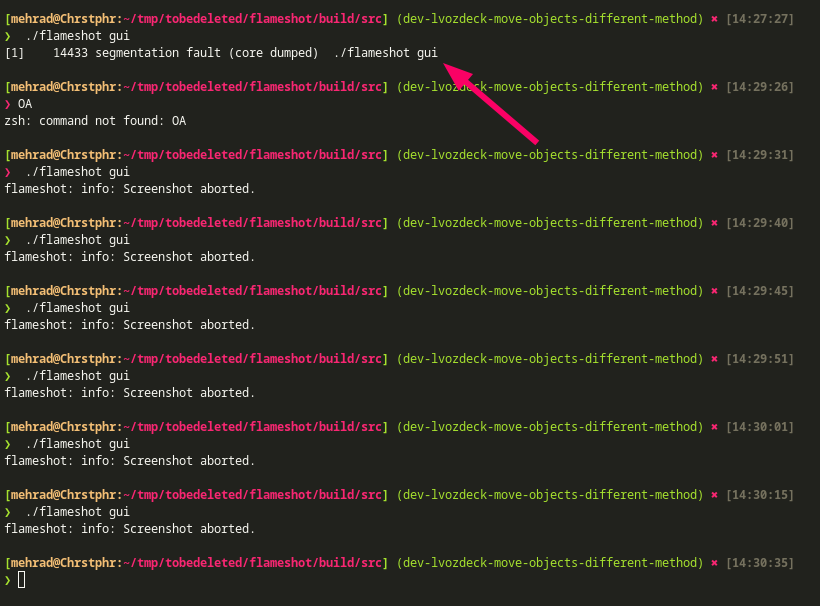
I also found a bug that has nothing to do with your changes. 🤓 I'll keep testing
Hi @mmahmoudian,
so the problem was in the update notification widget. It stole the focus, even after it was hidden. I fixed this by setting the focus policy of the main capture widget to Qt::StrongFocus. It should work now. As for the segfault - I don't know.
For the record, the bug I found is now filed under #2804 which is somehow related to this issue and potentially can be solved by the PR @vozdeckyl will make
@vozdeckyl would you please add these last 2 days commits (n=8) to the PR you created (#2769 ). It looks good to me and we need to get comments from other devs. Cheers.
@vozdeckyl I believe it is ready feature-wise, and just need code review from @borgmanJeremy, but I know that he has been very busy lately. Perhaps @veracioux can in the meanwhile give us his opinion about the code.
@vozdeckyl @mmahmoudian @borgmanJeremy I am against hardcoding the keyboard shortcuts. It breaks an existing feature that people may rely upon. I myself rebind the movement keys to vim-like bindings (H, J, K, L and with Shift modifier for resizing). I'll look into the issue that arises from not hardcoding the shortcuts and try to fix it.
Another thing to keep in mind (if you agree with me that the shortcuts should not be hardcoded) is how to handle conflicts. For example, if someone binds Shift+Left to something, how should we reconcile that with Shift+Left as a shortcut to move the tool object left by 10 px.
Possible solutions:
- Disable the conflicting shortcuts (arrows, Shift+arrows, Alt+arrows) while the tool object is selected
- Move tool object using the same shortcuts used to move the selection and move by 10px using the shortcuts configured to resize the selection. This leaves us undecided on what to do with Alt+arrows (which was requested in the issue but not implemented in the PR if I see correctly).
- For default moving of the tool object use the same bindings as for moving the selection. Add configurable bindings for
move tool by 10pxandmove tool by 1px, for each direction - so 8 new bindings.
All options have their pros and cons and, personally, I can't decide. Over to you.

I'll vote for option 1 and my reasons are:
- it is more intuitive and inline with other software i've used
- it is not cluttering the shortcuts, so less chance of collision
And the next best one is the 3rd option imho since it gives more control to user, although it might cause confusion and subsequently misconfiguration