

 flameshot-org
Open With doesn't function on Windows
Flameshot version 0.8.3
Describe the bug
The "Open With" appears to do nothing on Windows
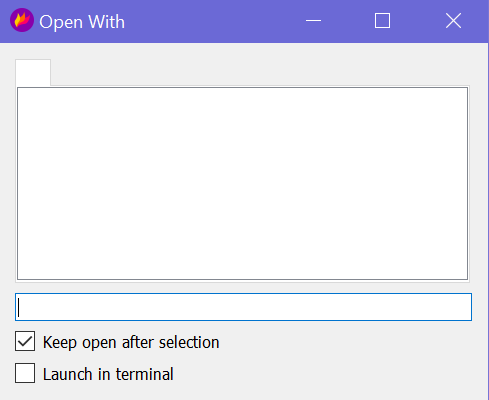
There's no clue what the white box or the text box do I tried putting in a path to an executable, and hitting enter but nothing happened. There's no clue how this dialog is supposed to work
To Reproduce Click the button to open application while in capture mode
Expected behavior Some way to pick an application or even a path to an exe, and have it launched
System Information Windows 10

Thanks for reporting this. The code currently is very platform (linux) specific for "Open With". It needs to be ported to other platforms.

Hi I have thought about this issue and took ideas from #1868 into consideration.
First I thought about following this ListPrograms approach which I found/forked from another Github repository. This really finds all installed software on Windows, but doesn't provide information about the name of the corresponding Exe file (but only the installation folder).
So I was thinking about this approach:
I'm no coder so I'll only chime in enough to say file extensions and their associated available programs are listed in the registry here: \HKEY_CURRENT_USER\Software\Microsoft\Windows\CurrentVersion\Explorer\FileExts For example: .png files shown below

Originally posted by @resp3ct in https://github.com/flameshot-org/flameshot/issues/1868#issuecomment-1144030964 This approach provides information about which exe files are associated with image files - but it doesn't tell me where the exe files are located.
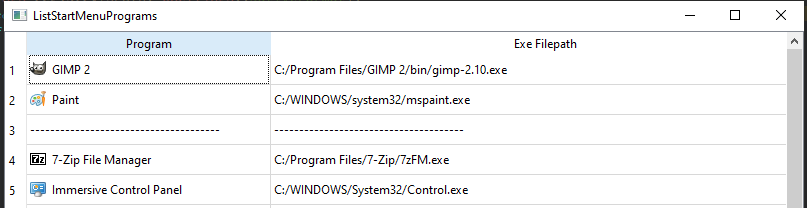
My proposal is some kind of porting the Linux approach, which is creating the list of applications by going through all .desktop files. For Windows one could go through all apps, which are listed in the Start Menu (which consists of .lnk files). I created a "proof of concept application", which collects all global installed (for all users) start menu apps and current users start menu apps + some filtering of apps, which most probably are not interesting for image editing - e.g. Administrative or System Tools. Since Windows .lnk files don't have app categories like Linux .desktop files, I'm combining the apps from the .lnk files with the information from above registry keys, so that apps which are associated to image file extensions are shown first.
Example result of my POC app:
Before trying to integrate this approach in flameshoot, I wanted to discuss what you think about it and if this a useful approach or maybe too over engineered! Much more simple approach would be to let Windows users decide for one application, which will be opened once "Open With" button is pressed!

Hi, Has this been fixed, or is there away to fix this locally/manually on Windows?

It seems to me that the most straightforward solution, rather than reinventing the wheel, would be for the windows version to simply run the command openwith "FILEPATH" which would launch windows built-in "Open With" selector.

Hi, Has this been fixed, or is there away to fix this locally/manually on Windows?
Fix was merged into master branch, so I strongly assume it will be included in the next release.
If you are looking for a manual workaround anyway, checkout https://github.com/flameshot-org/flameshot/issues/1868#issuecomment-1143920629
This issue still occurs version:
Flameshot v12.1.0 (96c2c82e) Compiled with Qt 5.15.2 winnt: 10.0.19045 windows: 10
