

 fkhadra
Toast immediately disappears after update of promise toast
I have this toast:
toast.promise(
    resolveAfter3Sec,
    {
      pending: 'Promise is pending',
      success: 'Promise resolved 👌',
    },
    {toastId}
)
My axios layer (in interceptor) is updating toast by its id in case of error:
if (toastId && toast.isActive(toastId)) {
        update(toastId, {
            type: type,
            render: reasonTranslation,
            isLoading: false,
            autoClose: 5000,
        });
    } else {
        toast(reasonTranslation, {
            type: type,
            autoClose: 5000,
            isLoading: false,
            toastId: toastId ?? `${error.code}/${messageKey}`,
        });
    }
If error happens, toast is updated but immediately hidden.
If I stop the execution in this point for a while, it works as expected
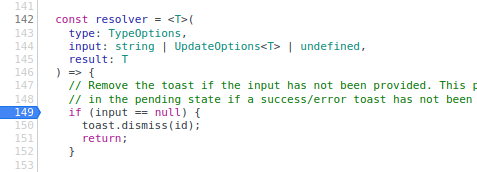


I have an example here
    const toastId = toast(`Start`);

    toast.update(toastId, {
      render: "This instantly closes the toast :(",
      position: "top-right",
      autoClose: false,
      hideProgressBar: false,
      closeOnClick: true,
      pauseOnHover: true,
      draggable: false,
      progress: 1,
      theme: "light",
    });
Seems like updating the toast with progress 1 always closes it and disregards the "autoClose" property

@spectre-akapelon when you set progress it becomes controlled so autoClose has no effect there
Yes... but why?
The scenario of uploading a file 0% 33% 66% 100% and then letting the user see the toast stay there for a couple of seconds (whatever the autoClose is) is perfectly valid.
I believe the shown progress controlled by the developer and the internal progress i.e. when the toast closes, should be two completely separate things. I don't see why they are connected.
In your case all you have to do is to update the toast each time there is some progress.
progress: 0 progress: 0.33 Till 1
Yes and then it goes away instantly while i don't want it to
I want the toast to stay there. Maybe for a predefined time span, maybe until the user closes it.
But i certainly don't want to ignore my autoClose:false just because the progress is 1
Ok got your use case. What you can do when you reach 100%. Update the toast with progress null and autoclose with the desired value
Yes, this is kiiiiind of what i'm doing now.
I'm setting the value to Math.min(progress, 1 - Number.EPSILON) so that it never reaches 1 and then do my 'autoClose'