

 fission-codes
CLI-to-CLI account linking does not complete
Summary
Linking an account from one CLI to a second CLI does not complete.
Problem
It is not possible to link CLIs across desktops/laptops.
Impact
Users may not be able to link their account across desktops/laptops.
Solution
Not known.
Detail
Describe the bug
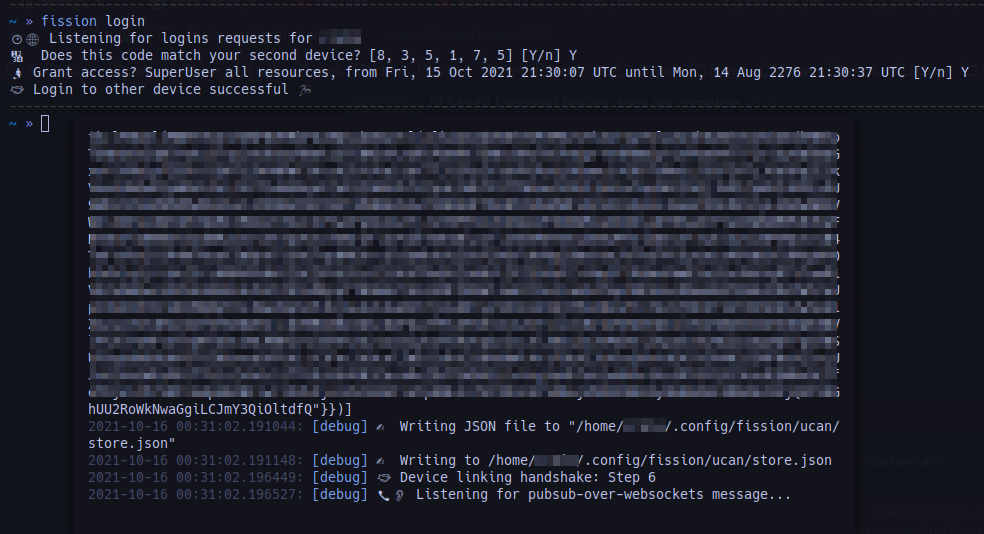
When linking CLI accounts, the process does not complete. The "from" machine with an account completes the entire process, but the "to" machine hangs after displaying the confirmation code.
To Reproduce Steps to reproduce the behavior:
- Start with a "from" machine with an account and a "to" machine that does not have an account set up
- Run
fission loginon the "from" machine - Run
fission setupon the "to" machine - Verify confirmation codes and grant permission to link on the "from" machine
- The "from" machine reports successful linking, but the "to" machine continues to listen.
Expected behavior
Linking should complete with the "to" machine linked.
Desktop (please complete the following information):
- OS ("to" machine): Ubuntu 18.04
- OS ("from" machine): Ubuntu 20.04 VM in VirtualBox
- Version: Both machines using the CLI at 2.14.0.0
TODO:
- [ ] Is still reproducible? [April 4, 2022]

Additional note. In verbose mode, the last few log messages on the "to" machine are:
2021-05-20 11:22:15.727418: [debug] ✍️  Writing JSON file to "/home/thuselem/.config/fission/ucan/store.json"
2021-05-20 11:22:15.727534: [debug] ✍️  Writing to /home/thuselem/.config/fission/ucan/store.json
2021-05-20 11:22:15.729781: [debug] 🤝 Device linking handshake: Step 6
2021-05-20 11:22:15.729925: [debug] 📞👂 Listening for pubsub-over-websockets message...
open firefox mobile https://auth.fission.codes/
2021-10-16 00:38:40.541187: [warn] 🙋 JSON error: Error in $: Failed reading: not a valid json value at 'did:key:ZuW1o1ShFJYc6DvGYe7NTt689NoL3EWETys6qQcj4MQM'
2021-10-16 00:38:40.541333: [debug] 📞👂 Listening for pubsub-over-websockets message...
2021-10-16 00:38:42.549908: [debug] Received message over websockets: did:key:1ShFJYc6DvGYe7NTt689NoL3EWETys6qQcj4MQMscx287ktHthiXZeU6jVHP72bmwESVhxqBh68PJwGUWqPsG2JABApnsARcgCNRKeHGMeeFuvgRNKMkRrofouT7Sfg9soN7JyZDD1im9FLDDh3Ffu7xYjybriRM7BP5esQvuZqFqTofx2QgfvzKMUAZzYfNnkUBNN5Q3EGNpR4PcYVg4yEjD8E7KfzN6iNPzRdJ9nudU
2021-10-16 00:38:42.550098: [warn] 🙋 JSON error: Error in $: Failed reading: not a valid json value at 'did:key:mgx9UZuW1o1ShFJYc6DvGYe7NTt689NoL3EWETys6qQcj4MQMscx'
2021-10-16 00:38:42.550241: [debug] 📞👂 Listening for pubsub-over-websockets message.
username login: cretm
cli to cli version: 2.16.1.0


@bmann I do not want to change data and cannot use this account on other devices, sadness.
@creio we're having trouble reproducing the issue. To help us narrow it down: what are the OSes of the devices that you're trying to link?

Okay I managed to reproduce the issue on Arch specifically!
I made an Arch build that appear to work (here being linked from macOS). I haven't dug into what the specific issue is yet, but my guess is perhaps a different version of a dylib.
$ cat /etc/os-release
NAME="Arch Linux"
# ...and more output...

$ fission setup
🌱 Setting up environment
🪐 Downloading managed IPFS for Linux
🕐🎛️  Configuring managed IPFS
🔑 Setting up keys
🏠 Do you have an existing account? [Y/n] y
🔗 Please open auth.fission.codes on a signed-in device
📛 Please enter your username: expede-15-10-21
🔢 Confirmation code: [3, 0, 1, 9, 7, 9]
🎛️  Initializing user config file
✅ Done! Welcome to Fission, expede-15-10-21 ✨

$ fission whoami
💻 Currently logged in as: expede-15-10-21
(Also managed to register & publish an app, but we don't need all of the output)
I've attached the Arch binary used in the above. @creio please give that a try and let me know if it also works on your Arch! fission-arch-x86_64-2.16.1.0.zip
Ah, apologies, it's still showing the same behaviour the other way around though. Linking Arch -> macOS leaves the macOS side hanging 🤔 I'll continue digging into this.