
profiler
 profiler copied to clipboard
 firefox-devtools
Resize columns in TreeView
Supports moving the border between two columns for resizing. Double clicking on the border resets it.
Related to #4203 which adds sort buttons to the TreeView. Both PRs add typical table functionality which is currently missing.

Codecov Report
Base: 88.56% // Head: 88.59% // Increases project coverage by +0.03% :tada:
Coverage data is based on head (
e938fd4) compared to base (8468d62). Patch coverage: 97.08% of modified lines in pull request are covered.
:exclamation: Current head e938fd4 differs from pull request most recent head 6f73df6. Consider uploading reports for the commit 6f73df6 to get more accurate results
Additional details and impacted files
@@            Coverage Diff             @@
##             main    #4204      +/-   ##
==========================================
+ Coverage   88.56%   88.59%   +0.03%
==========================================
  Files         282      282
  Lines       25342    25435      +93
  Branches     6820     6844      +24
==========================================
+ Hits        22444    22534      +90
- Misses       2696     2698       +2
- Partials      202      203       +1
| Impacted Files | Coverage Δ | |
|---|---|---|
| src/components/app/ZipFileViewer.js | 68.83% <ø> (ø) |
|
| src/components/calltree/CallTree.js | 91.11% <50.00%> (-1.03%) |
:arrow_down: |
| src/selectors/profile.js | 95.66% <66.66%> (-0.55%) |
:arrow_down: |
| src/actions/profile-view.js | 89.79% <100.00%> (+0.03%) |
:arrow_up: |
| src/components/marker-table/index.js | 88.57% <100.00%> (+0.16%) |
:arrow_up: |
| src/components/shared/TreeView.js | 82.33% <100.00%> (+4.91%) |
:arrow_up: |
| src/reducers/profile-view.js | 96.42% <100.00%> (+0.15%) |
:arrow_up: |
Help us with your feedback. Take ten seconds to tell us how you rate us. Have a feature suggestion? Share it here.
:umbrella: View full report at Codecov.
:loudspeaker: Do you have feedback about the report comment? Let us know in this issue.
![codecov[bot] avatar](https://avatars.githubusercontent.com/in/254?v=4 "Published by a pub.dev verified publisher")
Have you looked at the SplitterLayout from the react-splitter-layout library that we have? It solves the resizing issue in an easier way. Also we use it to have a resizable sidebar panel and bottom panel. I think using something like this could be better to have a more consistent resizing UX across the profiler UI.
For example, when you hover over this resizable area in sidebar, you'll see that the mouse cursor changes and the border becomes thicker that indicates resizable area. It would be great to have something similar to this in terms of UX.
But I'm not sure if it's going to be easy or not considering our table layout is a bit different here and also considering that we have a virtual list.

The splitter layout is not applicable (besides: it seems to be an unmaintained project), the TreeView is too different from just two div containers.
But I'll change the cursor so it feel the same from a UX perspective.
The cursor now changes but testing it is really difficult with the current testing facilities, so I would rather not spend too much time on testing such a simple feature.
In the deploy preview I noticed that, on mouseup after resize dragging, I often also trigger the column sort when I don't mean to.
Also, resizing is canceled when the mouse leaves the tree view area. Instead, resizing should continue regardless of the mouse position, until mouseup. You can use mousemove/mouseup handlers on window, like we do in many other places. These handlers give you mousemove and mouseup events even if the mouse leaves the browser tab during the drag.

In the deploy preview I noticed that, on mouseup after resize dragging, I often also trigger the column sort when I don't mean to.
Interesting, I'm going to look into that (it should enough to call stopPropagation on the events).
Also, resizing is canceled when the mouse leaves the tree view area. Instead, resizing should continue regardless of the mouse position, until mouseup. You can use mousemove/mouseup handlers on window, like we do in many other places. These handlers give you mousemove and mouseup events even if the mouse leaves the browser tab during the drag.
I only noticed that after working on the touch PR, so yes I will implement this way.
Quick thoughts about the resizing.
- Generally I like the idea of using css variables but I'm not sure this fits well with the "react way" in this case. I think this would be easier to pass values as integer props to the TreeView. Also you're setting some state to the CSS and we try to avoid that as well.
TreeViewis generic, therefore if course it needs to handle the resize gesture, but otherwise everything related to getting or saving the state will be outside of theTreeView. Therefore the API I'm thinking of could be:- a new property for the sizes:
fixedColumnSizes. We need to take care that the object should not change if the sizes don't change so that we don't trigger a full render each time, but if we store it in redux, and change it only when the user does the gesture, we shouldn't need any more special code for that.. - a new property for the callback:
onColumnSizesChangethat would take the array of the new sizes as a parameter, called whenever the user changed the size.
- a new property for the sizes:
- On the "user of the TreeView" side, the function passed to
onColumnSizesChangewould change some redux state (probably) while the data passed tofixedColumnSizeswould be retrieved from redux directly. - The flow is: the user changes the column size (even by 1 px before even the user releases mouseup), TreeView calls
onColumnSizesChange, the caller (eg MarkerTable) updates redux, redux' observers run (all mapStateToProps functions), the one in MarkerTable retrieve the new sizes, rerenders and feed them to TreeView, and finally TreeView render the new sizes directly usingstyleproperties. This may seem complex and long but this is actually fairly quick (we do something similar with theSelectioncomponent that you already know). Otherwise: maybe it's better to only callonColumnSizesChangewhen the user doesmouseup, and otherwise keep the sizes locally whilemousemove. But because this is more complex (suddenly we have 2 states: one inside the component, one in redux; instead of just 1), I think I'd try the first proposal first. - Even though we can't reuse the splitter layout library for this, I like it how we do it for the sidebar: we have an element that's handling all the resize, we show only its border by default, but change its background color on hover. Having an element for that has the benefit that we don't need all these DOM operations (which we try to avoid in React because this can easily break in the future) + getBoundingClientRect. Also I see on the deploy preview that currently resizing also triggers the sort, I believe this could also avoid this problem. It's also much easier to set the cursor for this element.
- With your current implementation of setting all event handlers on the tree view (or is it the mouseleave?), it's too easy to end the gesture. For example you can start dragging the column, if you move the mouse a bit too much up then the gesture ends. I believe it's incorrect.
There are various ways to fix this, but probably the most compatible way is like we do in
Selection.jsthat you already know: onmousedown, attach event handlers formousemoveandmouseupon the document, with some code to remove them as well (including incomponentWillUnmount). FTR other ways I can think of is callingsetCaptureon the event (works only in Firefox), orsetPointerCapture(when using pointer events), but we found them less reliable.
Also I believe it would be good to not base this work on top of the other PR but do a separate PR.
I hope this helps and that you'll be able to work on this. I'd also be happy to help on that if necessary. I'm also sorry that it took so long to give you feedback.

Just one question:
Even though we can't reuse the splitter layout library for this, I like it how we do it for the sidebar: we have an element that's handling all the resize, we show only its border by default,
Do you want me to add an element (div with borders) in between every cells as a divider?
Just one question:
Even though we can't reuse the splitter layout library for this, I like it how we do it for the sidebar: we have an element that's handling all the resize, we show only its border by default,
Do you want me to add an element (div with borders) in between every cells as a divider?
Interestingly I thought of this during the night :-)
So to answer this fully:
- adding an extra element as a divider sounds indeed the right solution to me
- however I was thinking where to add it, and now I feel like it would be better to add it inside the column -- like we're doing currently using a pseudo-element, except it would be a real element. Having it inside the column makes it easier (I believe) to know which column will react to moving the divider.
But these are details and I haven't tried this, so I'm not opposed to other solutions that would be simpler.
adding an extra element as a divider sounds indeed the right solution to me
I thought about this (and tried to implement it), but it requires many changes in the CSS and has its own flaws:
I want to make the area where I can start my drag wider than just the shown small line. Making the divider element wider is problematic, as this element would then have to overlap with the cell elements. This is far hackier then just running over all columns and getting their x-coordinates when we get a mouse-down event.
Besides: We should only listen to mouse-down events when the users clicks inside the container, registering handlers for this event on window is therefore not a good solution.
adding an extra element as a divider sounds indeed the right solution to me
I thought about this (and tried to implement it), but it requires many changes in the CSS and has its own flaws:
I want to make the area where I can start my drag wider than just the shown small line. Making the divider element wider is problematic, as this element would then have to overlap with the cell elements. This is far hackier then just running over all columns and getting their x-coordinates when we get a mouse-down event.
I looked at what Google Spreadsheets does, this is pretty similar to what I suggest:
Screencast_20220922_174906.webm
(I couldn't find which HTML elements this was though).
We clearly see that the handle is at the left of the border. It's ~5px large, but has a right border of 1px as the border for the column. It gets its background only on hover. This is very similar to the splitter we already have.
I also found this example: https://mpjrpm.sse.codesandbox.io/ which does it basically the same way. position: absolute along with setting position: relative on the cell makes it easy to overlap.
Another option:
The devtools' network monitor does it like this:
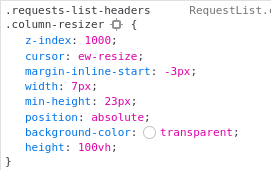
IMO the CSS is more complex (position: absolute to remove it from the flow + negative margin from half the width - 0.5px to move it left at the center of the border) but why not. It allows to use a wider element (7px instead of 5 for example).
That's 3 lines of CSS, I find it less hacky than having to do a querySelector with a CSS selector in the middle of some react code.
jsbin (https://jsbin.com/?html,output) does it like the devtools network monitor.
Besides: We should only listen to mouse-down events when the users clicks inside the container, registering handlers for this event on window is therefore not a good solution.
mousedown events should indeed stay on the container. But in the mousedown event handler, event handlers for mousemove and mouseup are registered on the document. They are removed on mouseup. You can mostly copy what we did in Selection.js. This is needed because without this, we need to take care that the mouse stays inside the table header, and this is really not great.
This sounds reasonable. I'll work on it tomorrow/monday and incorporate the suggestions.
I'm going to start from scratch and force push it here. These also separates it from the sorting PR a bit.
@parttimenerd Instead of going back and forth with comments I decided to move forward and change all the small issues I was seeing. I also rebased and added a test. Also now the previously failing test is passing, but honestly I'm not sure why.
Visible changes:
- the divider now has a correct height (previously they were going too high in the header), by using flex. This also removed the need to specify a border bottom and top.
- the dividers that are resizable have a double border, which shows clearly to the user that they are resizable
- the double click works as expected
- the cursor is now correct while resizing in all panels. I made the conscious choice to make it show in the treeview only.
Some invisible changes include simplifications and performance improvements.
Can you please have a look at each of these commits and tell me if this looks good to you?
Thanks for your good work and patience. The changes all look good to me.