
flutterfire
 flutterfire copied to clipboard
 firebase
🐛 [firebase_core] CSP Violation in Firebase Core
I am building a flutter app for a chrome extension, which does not allow ANY CSP violations at all (using manifest v3). Recently I integrated firebase firestore, however I would get console errors refusing to execute scripts due to CSP in production builds. This broke the app, which loaded with only a white background.
These were the scripts added:
 (I am using firebase_core and cloud_firestore)
These are the console errors:
 (Note the 'DIRTY_manual_CSP_fix.js' errors)
DIRTY_manual_CSP_fix.js
My initial thought was 'well, lets add this code manually into a script and execute it myself' since the main.dart.js build obviously depended on window.ff_trigger_firebase_* to properly execute.
This is the file mentioned above, but this only kicks the problem upstairs and still violates CSP as it dynamically imports files from 'https://www.gstatic.com/firebasejs/9.9.0/firebase-*' which chrome does not like (errors above)
For reference, my file 'DIRTY_manual_CSP_fix.js is pasted below:
[
  ["firebase_core", "https://www.gstatic.com/firebasejs/9.9.0/firebase-app.js"],
  ["firebase_core", "https://www.gstatic.com/firebasejs/9.9.0/firebase-app.js"],
  ["app_check", "https://www.gstatic.com/firebasejs/9.9.0/firebase-remote-config.js"]
].forEach((b) => {
  window["ff_trigger_" + b[0]] = async (callback) => {
    callback(await import(b[1])); // <-- Errors on this line, line 8
  }; // <-- Some errors on this line, assuming from callback inside main.dart.js? line 9
});
--csp flag for flutter builds
You might be thinking, 'why don't you add the --csp flag when building?'
Simply to get anything to work as a chrome extension I have been doing this from the start. To confirm: ALL of these builds are with the --csp flag enabled.
The full build command I use it:
flutter build web --web-renderer html --csp
Other references:
This is not the first mention of this issue, issue #80221 mentions nearly the exact build finding the same issue and cause:
The HTML renderer has issues with `style-src: self`:
 This is the code causing the issue:

When building with --profile the CSP error is caused somewhere in file html_dart2js.dart
Originally posted by @codemasterover9000 in https://github.com/flutter/flutter/issues/80221#issuecomment-922924596
Potential Solution
There is only one solution to using the firebase client library in flutter and a strict CSP policy, which I am forced to do. This is to manually copy the script files and include them in the production bundle, which is possible but not a good nor elegant solution.
Reproduction:
I have added a minimal reproducible repository here: https://github.com/ActuallyHappening/SchoolBoxStyling/tree/master/csp_firebase_bug
I have included the faulty build, with the --csp flag enabled (full build command used flutter build web --csp --web-renderer html).
To see error, open chrome://extensions/ (chrome extensions page), turn on dev mode, and select 'load unpacked', choosing the build/web folder.
When you click the extensions icon, you should see a white screen. Right click and inspect, view console, and share in my annoyance. The same errors appear.
For reference:
The manifest file I used is pasted below. Note that adding a CSP option is optional, as it is implied.
{
    "manifest_version": 3,
    "version": "1.0",
    "name": "csp_firebase_bug",
    "description": "A new Flutter project.",

    "action": {
        "default_popup": "index.html"
    }
}
My actual manifest includes an explicit "content_security_policy" (CSP) key, pasted below. Removing this does nothing to solve the issue, as chrome implies this anyway. Adding a nonce or extra keys to the 'script-src' or 'object-src' results in chrome not even parsing the manifest when loading the extension.
    "content_security_policy": {
        "extension_pages": "script-src 'self' ; object-src 'self'"
    },
The dart code that triggers the firebase_core plugin to inject its own script DOM nodes seems to be this:
import 'package:flutter/material.dart';
import 'package:firebase_core/firebase_core.dart';

void main() async {
  WidgetsFlutterBinding.ensureInitialized();
  await Firebase.initializeApp();
  runApp(const MyApp());
}
// ... boilerplate template code below, using flutter create
In the minimal reproducible example, the console logs and script tags added were:

 (all)
(all)
 (just scripts)
This is my pubspec.yaml from the example repo. I have 1 extra dependancy, firebase_core, and nothing else:
dependencies:
  flutter:
    sdk: flutter


  # The following adds the Cupertino Icons font to your application.
  # Use with the CupertinoIcons class for iOS style icons.
  cupertino_icons: ^1.0.2
  firebase_core: ^2.1.0
Final thoughts
I would appreciate any insight into solving this problem, and ideally a feature flag for the firebase_core plugin that solves this CSP issue.
Flutter is an amazing tool, but I have resorted to using the lower level firebase REST API to load data into my app, using dio and the dio_http_cache packages.

I have spent hours trying to solve this any way I can, and now I am encountering an error concerning including random JS files in the source of a chrome extension. I have the files downloaded, but they for some reason don't show up in the sources tab. I may as well post screenshots
Sources tab (note no DIRTY folder or anything in it):
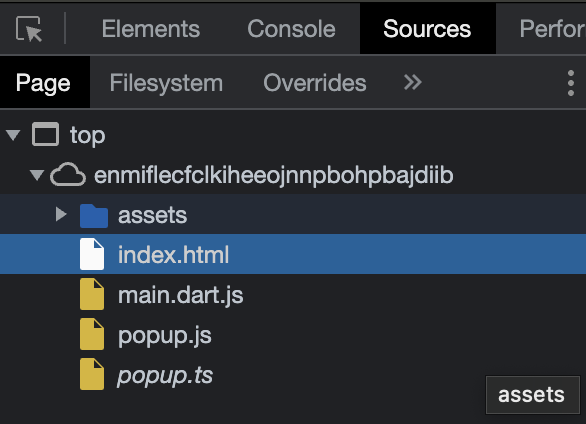
The folder that the extension is loaded from:

I have encountered so many problems I'm just giving up. Flutter + firebase is excellent when CSP is not as strict as a chrome extension.
A clean solution to this problem would be including the CDN linked js files in production builds, so that no CDN is needed.
Don't have much experience with chrome extensions, however I'm not sure what the solution here would be if cross origin scripts are not allowed.
What is the issue with using the csp flag?
It is actually possible to tell FlutterFire to not both loading the scripts from the cdn, however this still requires you load them in from somewhere else. Maybe a build script to download them locally is the best option here?
I've also got vauge memories of being able to specify external domains in the manifest file for situations like this. Not on a computer right now so can't easily check.


Don't have much experience with chrome extensions, however I'm not sure what the solution here would be if cross origin scripts are not allowed.
What is the issue with using the csp flag?
It is actually possible to tell FlutterFire to not both loading the scripts from the cdn, however this still requires you load them in from somewhere else. Maybe a build script to download them locally is the best option here?
I've also got vauge memories of being able to specify external domains in the manifest file for situations like this. Not on a computer right now so can't easily check.
Please enlighten me!
Concerning flutterfire, how can I specify no external CDN? Currently I just curl ... > something.js so have the files already downloaded locally.
How do I specify flutter-fire build flags / options / configuration anyway? Would there just be a .yaml file in the root project dir?
I can certainly write a simple build script, if I know how to change where flutterfire loads its scripts from
About specifying external domains in the manifest.json, how? I am using manifest v3, which through experimentation has EXTREMELY strict policies over executing external scripts

Hey all, For the people who just need it to work, I got this to work, check my SO answer here
https://stackoverflow.com/a/74822988/6727914

Thanks, @tolotrasamue I was able to get this working with your trick. But still, firebase auth throws are not implemented on signInWithCredential. Also, libraries like shared_preference are not working!
I tried the solution that was proposed in by @tolotrasamuel but I'm still facing the same issue unfortunately :(
Here's what I did exactly: I downloaded firebase-app-check.js, firebase-app.js, firebase-firestore.js, firebase-remote-config.js and put them in a local folder called firebase.
I then created a file called engine.js that calls the code you mention in your answer then I included this file in my index.html inside a script tag with the type "module" within the body section. I fixed all the calls to CDN inside the downloaded files so that they point to my local files.
I'm using : firebase_core: ^2.8.0 and cloud_firestore: ^4.4.5
@tolotrasamuel and @mohanish2504 can you please tell me if these are the only steps necessary or are there other steps that I'm missing?

I tried the solution that was proposed in by @tolotrasamuel but I'm still facing the same issue unfortunately :(
Here's what I did exactly: I downloaded firebase-app-check.js, firebase-app.js, firebase-firestore.js, firebase-remote-config.js and put them in a local folder called firebase.
I then created a file called engine.js that calls the code you mention in your answer then I included this file in my index.html inside a script tag with the type "module" within the body section. I fixed all the calls to CDN inside the downloaded files so that they point to my local files.
I'm using : firebase_core: ^2.8.0 and cloud_firestore: ^4.4.5
@tolotrasamuel and @mohanish2504 can you please tell me if these are the only steps necessary or are there other steps that I'm missing?
@sniper0110 can you share code buddy.
Ok @mohanish2504
Here's my index.html file
<!DOCTYPE html>
<html style="height: 600px; width: 600px">
  <head>
    <meta charset="UTF-8" />
    <title>App</title>
  </head>
  <body>
    <script src="engine.js"></script>
    <script src="main.dart.js" type="application/javascript"></script>
  </body>
</html>
Here's my manifest.json file:
{
    "name": "app",
    "short_name": "app",
    "description": "A new Flutter project.",
    "version": "1.0.0",
    "content_security_policy": {
        "extension_pages": "script-src 'self' http://localhost:* http://127.0.0.1:*; object-src 'self'"
    },
    "action": {
        "default_popup": "index.html",
        "default_icon": "icons/Icon-192.png"
    },
    "manifest_version": 3,
    "permissions":[
        "identity"
    ]

}
Here's my engine.js file which I use to call local firebase js files:
console.log('calling engine.js file...')

  window.ff_trigger_firebase_core = async (callback) => {
    callback(await import("./firebase/firebase-app.js"));
  };

  window.ff_trigger_firebase_app_check = async (callback) => {
    callback(await import("./firebase/firebase-app-check.js"));
  };

  window.ff_trigger_firebase_remote_config = async (callback) => {
    callback(await import("./firebase/firebase-remote-config.js"));
  };

  window.ff_trigger_firebase_firestore = async (callback) => {
    callback(await import("./firebase/firebase-firestore.js"));
  };
This is the part that's causing the CSP issues:
Inside my main.dart file:
  await Firebase.initializeApp(
    options: DefaultFirebaseOptions.web,
  );
I just realized something strange! Although I am still seeing those CSP issues in the console, the Firebase app is actually being initialized now! So I can confirm that the changes that I made actually had an impact. But I still need to find a way to address those CSP issues. This could be a blocking point when I'll try to submit my extension to chrome store for review.
If anyone or @sniper0110 can share a repo of extension in this google group to discuss whether it will be a problem.

Hello everyone, any news on this? I tried the solution proposed in the SO but its not working.

This solution works https://github.com/firebase/flutterfire/discussions/9222#discussioncomment-3429674
But first check if the firebase product you need works on chrome extensions: https://firebase.google.com/docs/web/environments-js-sdk
steps, in terminal:
mkdir firebase-npm
inside the dir create the files
package.json
{
  "name": "firebase-npm",
  "version": "1.0.0",
  "description": "",
  "main": "index.js",
  "scripts": {
    "build": "webpack"
  },
  "keywords": [],
  "author": "",
  "license": "ISC",
  "dependencies": {
    "firebase": "^10.10.0"
  },
  "devDependencies": {
    "webpack": "^5.91.0",
    "webpack-cli": "^5.1.4"
  }
}
firebase.js
import * as firebaseCore from 'firebase/app';
import * as firebaseRemoteConfig from 'firebase/remote-config';

window.firebase_core = firebaseCore;
window.firebase_remote_config = firebaseRemoteConfig;
webpack.config.js
const path = require('path');

module.exports = {
  entry: './firebase.js', // Your source file
  output: {
    filename: 'bundle.js', // Compiled file
    path: path.resolve(__dirname, 'dist'), // Output directory
  },
  mode: 'production', // Use 'development' for development build
};
.gitignore
/node_modules
/dist
then, in terminal, inside the directory run npm run build. Take the generated dist/bundle.js and move it into web directory (in the flutter project).
Inside the <body> of web/index.html add as the first entry <script type="application/javascript" src="bundle.js"></script>

Since @AlexDochioiu provided a working solution, I'll close this. Feel free to reopen if needed.
