
firebase-js-sdk
 firebase-js-sdk copied to clipboard
 firebase
Issue with Android Cordova Build using Firebase
*note I've posted a similar issue in the Meteor project as well. https://github.com/meteor/meteor/issues/12025 Also, If there is a known issue with Firebase & Cordova builds for Android, I may just need pointed in that direction.
Meteor Version 2.7.1, Mac OS 10.15.7, Android 11, SDK target and min version 31, chromium
- Firebase Storage
[REQUIRED] Describe the problem
** Edit, I have traced the log statements and referenced code down to the Firebase NPM module. I have also retitled this post to include firebase module incompatibility as the root cause.
Expected Behavior: I expect my metoer build resulting apk to load on my device and for the app to look at least similar to my web build in the browser.
Actual Behavior: My app seems to load "half way", it seems that after the javascript is loaded it fails and the remainder of my app just doesn't render. Header seems to load fine, and body does not. I was able to connect the app to the Chrome Android debugging tool and I grabbed this stack trace.
Seems to be caused by firebase npm module being used. Works on browser version, doesn't work in mobile Android build. Uncaught TypeError: G.values is not a function or its return value is not iterable at Y (b12a56a9ec3e7086e5e026710e72aee8e8f80440.js?meteor_js_resource=true:164:2115) at Oe (b12a56a9ec3e7086e5e026710e72aee8e8f80440.js?meteor_js_resource=true:261:19) at e (b12a56a9ec3e7086e5e026710e72aee8e8f80440.js?meteor_js_resource=true:261:163) at g (b12a56a9ec3e7086e5e026710e72aee8e8f80440.js?meteor_js_resource=true:7:1094) at d.n [as require] (b12a56a9ec3e7086e5e026710e72aee8e8f80440.js?meteor_js_resource=true:7:3652) at d.i [as link] (b12a56a9ec3e7086e5e026710e72aee8e8f80440.js?meteor_js_resource=true:9:4030) at e (b12a56a9ec3e7086e5e026710e72aee8e8f80440.js?meteor_js_resource=true:130:86505) at g (b12a56a9ec3e7086e5e026710e72aee8e8f80440.js?meteor_js_resource=true:7:1094) at d.n [as require] (b12a56a9ec3e7086e5e026710e72aee8e8f80440.js?meteor_js_resource=true:7:3652) at d.i [as link] (b12a56a9ec3e7086e5e026710e72aee8e8f80440.js?meteor_js_resource=true:9:4030) b12a56a9ec3e7086e5e026710e72aee8e8f80440.js?meteor_js_resource=true:1581 Uncaught TypeError: Cannot read properties of undefined (reading 'public') at b12a56a9ec3e7086e5e026710e72aee8e8f80440.js?meteor_js_resource=true:1581:3782 at a (b12a56a9ec3e7086e5e026710e72aee8e8f80440.js?meteor_js_resource=true:1:5756) at Channel.s (b12a56a9ec3e7086e5e026710e72aee8e8f80440.js?meteor_js_resource=true:1:5692) at Channel.fire (cordova.js:872:23) at cordova.js:232:49
Additional Notes: I grabbed the stacktrace by running the chrome Android debugging. I've attempted to get this working by both using the generated apk in meteor build and also loading the resulting project into Android Studio and building a signed APK and the same thing happens. I've traced the code referenced in the stacktrace to the Firebase NPM module. Seems like there is an incompatibility issue with meteor mobile and firebase.

I couldn't figure out how to label this issue, so I've labeled it for a human to triage. Hang tight.

Hi @hgarcia101685, thanks for reaching out. To help me take a better look into it, a reproducible example would be ideal, we'd likely need to be able to run it locally to tinker with the logs and timing of things to determine what's failing.

Hey @hgarcia101685. We need more information to resolve this issue but there hasn't been an update in 5 weekdays. I'm marking the issue as stale and if there are no new updates in the next 5 days I will close it automatically.
If you have more information that will help us get to the bottom of this, just add a comment!
Sorry for the delay.
You don't need a full example to reproduce. If you attempt to import firebase at all on the client side in a meteor app and try to build for Android using cordova, it causes this issue to occur.
import firebase from 'firebase/app' << depending on how you have it setup, may look different.
One additional piece of info is that this appears to have been introduced in version 9.0.0. I have downgraded to version 8.10.0 for now.
Sorry if it was just a typo but you can't import firebase from 'firebase/app' in version 9. Version 9 was a breaking change and the import syntax has changed drastically. Migration guide: https://firebase.google.com/docs/web/modular-upgrade
If it was just a typo and you did migrate all your code to use the new modular imports, can you give us a corrected one line index.js (or whatever the entry point file is in Meteor projects), just like the one above, that causes the problem?
If you don't want to migrate your code, you can still use the old way if you import from the compat packages (firebase/app-compat, firebase/storage-compat, etc.) as described in the migration guide above.
Again, sorry if you've already migrated and it was just a simple typo up above, but a glimpse of how you're importing Firebase would be really helpful either way.

Yes, that was definitely a typo from something I was trying earlier to get it to work.
Also, just to note that the imports work fine on the web version of the app. It's only when I try to create the mobile version that I run into the issue.
Here is the actual source code on the index file that loads firebase:
import React, {Component} from 'react'; import * as PropTypes from 'prop-types'; import {withRouter} from 'react-router-dom'; import {Meteor} from 'meteor/meteor'; import {toast} from 'react-toastify'; import { initializeApp } from "firebase/app"; //import { getAnalytics } from "firebase/analytics"; import { getStorage, ref, uploadBytesResumable, getDownloadURL } from "firebase/storage";
import AppConfig from '../../constants/AppConfig';
const { FIREBASE_KEY, FIREBASE_AUTH_DOMAIN, FIREBASE_DB_URL, FIREBASE_PROJECT_ID, FIREBASE_STORAGE_BUCKET, FIREBASE_MESSENGER_ID, GOOGLE_APP_ID, MEASUREMENT_ID} = AppConfig;
const firebaseConfig = { apiKey: FIREBASE_KEY, authDomain: FIREBASE_AUTH_DOMAIN, projectId: FIREBASE_PROJECT_ID, storageBucket: FIREBASE_STORAGE_BUCKET, messagingSenderId: FIREBASE_MESSENGER_ID, appId: GOOGLE_APP_ID, measurementId: MEASUREMENT_ID }; // // Initialize Firebase const firebaseApp = initializeApp(firebaseConfig);
Is there any way you can get the line number or text of the Firebase code that is causing the problem? We can try to look into this ourselves but we're not familiar with Meteor and it will take some time to get up to speed on it and figure out how to debug in it, so it might take a while to get to the bottom of this.
I tried searching the firebase source for the occurence of G.values() but I didn't find it. Unfortunately the stack trace is the only clue that I have. It seems to call G.values() from Y, then Oe, then e. Not sure what these obscure methods are.
@hgarcia101685 and @hsubox76 you can search in the following snippet:
/**
 * @license
 * Copyright 2019 Google LLC
 *
 * Licensed under the Apache License, Version 2.0 (the "License");
 * you may not use this file except in compliance with the License.
 * You may obtain a copy of the License at
 *
 *   http://www.apache.org/licenses/LICENSE-2.0
 *
 * Unless required by applicable law or agreed to in writing, software
 * distributed under the License is distributed on an "AS IS" BASIS,
 * WITHOUT WARRANTIES OR CONDITIONS OF ANY KIND, either express or implied.
 * See the License for the specific language governing permissions and
 * limitations under the License.
 */const oe=q;function ae(e,t={}){if("object"!=typeof t){const e=undefined;t={name:t}}const r=Object.assign({name:V,automaticDataCollectionEnabled:!1},t),n=r.name;if("string"!=typeof n||!n)throw re.create("bad-app-name",{appName:String(n)});const a=G.get(n);if(a){if(u(e,a.options)&&u(r,a.config))return a;throw re.create("duplicate-app",{appName:n})}const i=new o(n);for(const o of K.values())i.addComponent(o);const s=new ne(e,r,i);return G.set(n,s),s}function ie(e=V){const t=G.get(e);if(!t)throw re.create("no-app",{appName:e});return t}function se(){return Array.from(G.values())}async function le(e){const t=e.name;G.has(t)&&(G.delete(t),await Promise.all(e.container.getProviders().map((e=>e.delete()))),e.isDeleted=!0)}function ue(e,t,r){var o;let a=null!==(o=H[e])&&void 0!==o?o:e;r&&(a+=`-${r}`);const i=a.match(/\s|\//),s=t.match(/\s|\//);if(i||s){const e=[`Unable to register library "${a}" with version "${t}":`];return i&&e.push(`library name "${a}" contains illegal characters (whitespace or "/")`),i&&s&&e.push("and"),s&&e.push(`version name "${t}" contains illegal characters (whitespace or "/")`),void g.warn(e.join(" "))}Q(new n(`${a}-version`,(()=>({library:a,version:t})),"VERSION"))}function ce(e,t){if(null!==e&&"function"!=typeof e)throw re.create("invalid-log-argument");i(e,t)}function fe(e){s(e)}

@hsubox76 I'll try to provide some more details about Meteor. First of all, I am the maintainer of one of the more popular MeteorJS packages for Push notifications. A Meteor package is basically a 3rd party library designed for Meteor similar to the NPM package.
Meteor has an option to recompile a NPM library from the node_modules folder, using Babel. Meteor has no option to recompile a NPM library from inside a Meteor package (Meteor packages can depend on NPM libraries). What I did was to remove the NPM dependency on [email protected] from the Meteor package and I added the NPM library directly in the Node project (Meteor is a NodeJS framework) so that I can recompile it with Babel with these defaults: (for reference: https://guide.meteor.com/using-npm-packages.html#recompile)
"presets": [
    ["@babel/env",
      {
        "targets": "defaults"
      }
    ]
  ]
Unfortunately this didn't help. Without recompilation the error was related to U.values() and after the recompilation the error referred to G.values() but it is basically like U was replaced by G.
I build a couple of very large projects with many dependencies and unfortunately the firebase library is the only one that affect my projects while ... I need it, it is not like I have alternatives. I now understand that all projects that depend on my Meteor packages for Push notifications, have issues with the front end in different browsers (Yandex on Android is the easiest to experiment with).
@paulincai Thanks for responding!
If I follow correctly, it sounds like you've hit a wall with this as well.
Fwiw, Version 8.10.0 of firebase seems to be working fine as of now. So however not ideal, it may be the best solution for all of us for the time being.
TBH, I really don't understand the inner workings of NPM/Node to try to find a hack around this, and I think it should be up to the maintainers of this code base(or maybe meteor's) to resolve in the long term. I've filed a similar ticket in Meteor's repo, to no avail.
Thanks again for chiming in!
@hgarcia101685 and @hsubox76 you can search in the following snippet:
/**
 * @license
 * Copyright 2019 Google LLC
 *
 * Licensed under the Apache License, Version 2.0 (the "License");
 * you may not use this file except in compliance with the License.
 * You may obtain a copy of the License at
 *
 *   http://www.apache.org/licenses/LICENSE-2.0
 *
 * Unless required by applicable law or agreed to in writing, software
 * distributed under the License is distributed on an "AS IS" BASIS,
 * WITHOUT WARRANTIES OR CONDITIONS OF ANY KIND, either express or implied.
 * See the License for the specific language governing permissions and
 * limitations under the License.
 */const oe=q;function ae(e,t={}){if("object"!=typeof t){const e=undefined;t={name:t}}const r=Object.assign({name:V,automaticDataCollectionEnabled:!1},t),n=r.name;if("string"!=typeof n||!n)throw re.create("bad-app-name",{appName:String(n)});const a=G.get(n);if(a){if(u(e,a.options)&&u(r,a.config))return a;throw re.create("duplicate-app",{appName:n})}const i=new o(n);for(const o of K.values())i.addComponent(o);const s=new ne(e,r,i);return G.set(n,s),s}function ie(e=V){const t=G.get(e);if(!t)throw re.create("no-app",{appName:e});return t}function se(){return Array.from(G.values())}async function le(e){const t=e.name;G.has(t)&&(G.delete(t),await Promise.all(e.container.getProviders().map((e=>e.delete()))),e.isDeleted=!0)}function ue(e,t,r){var o;let a=null!==(o=H[e])&&void 0!==o?o:e;r&&(a+=`-${r}`);const i=a.match(/\s|\//),s=t.match(/\s|\//);if(i||s){const e=[`Unable to register library "${a}" with version "${t}":`];return i&&e.push(`library name "${a}" contains illegal characters (whitespace or "/")`),i&&s&&e.push("and"),s&&e.push(`version name "${t}" contains illegal characters (whitespace or "/")`),void g.warn(e.join(" "))}Q(new n(`${a}-version`,(()=>({library:a,version:t})),"VERSION"))}function ce(e,t){if(null!==e&&"function"!=typeof e)throw re.create("invalid-log-argument");i(e,t)}function fe(e){s(e)}
What file is this from?
@hsubox76 this is https://www.npmjs.com/package/firebase/v/9.1.3 As mentioned above this problem did not exist up to V 8.
Sorry, I meant the file path, like for example node_modules/firebase/firebase-app-compat.js. I can't seem to find code like that in any of our built bundles, but there are a lot of places to look so I might have just missed the right file.
@hsubox76 I don't know because this shows up in the compiled version included in the SPA javascript bundle. Could you please help me with this: ... In Chrome, go to the bundle file: https://www.fofa.football/5f96ae1ec622fc2e246ba36d78ca75a1cbb3c0ed.js?meteor_js_resource=true and in the Network tab, select the file and then select Preview. Then search for G.values(). You should find it at line 765.
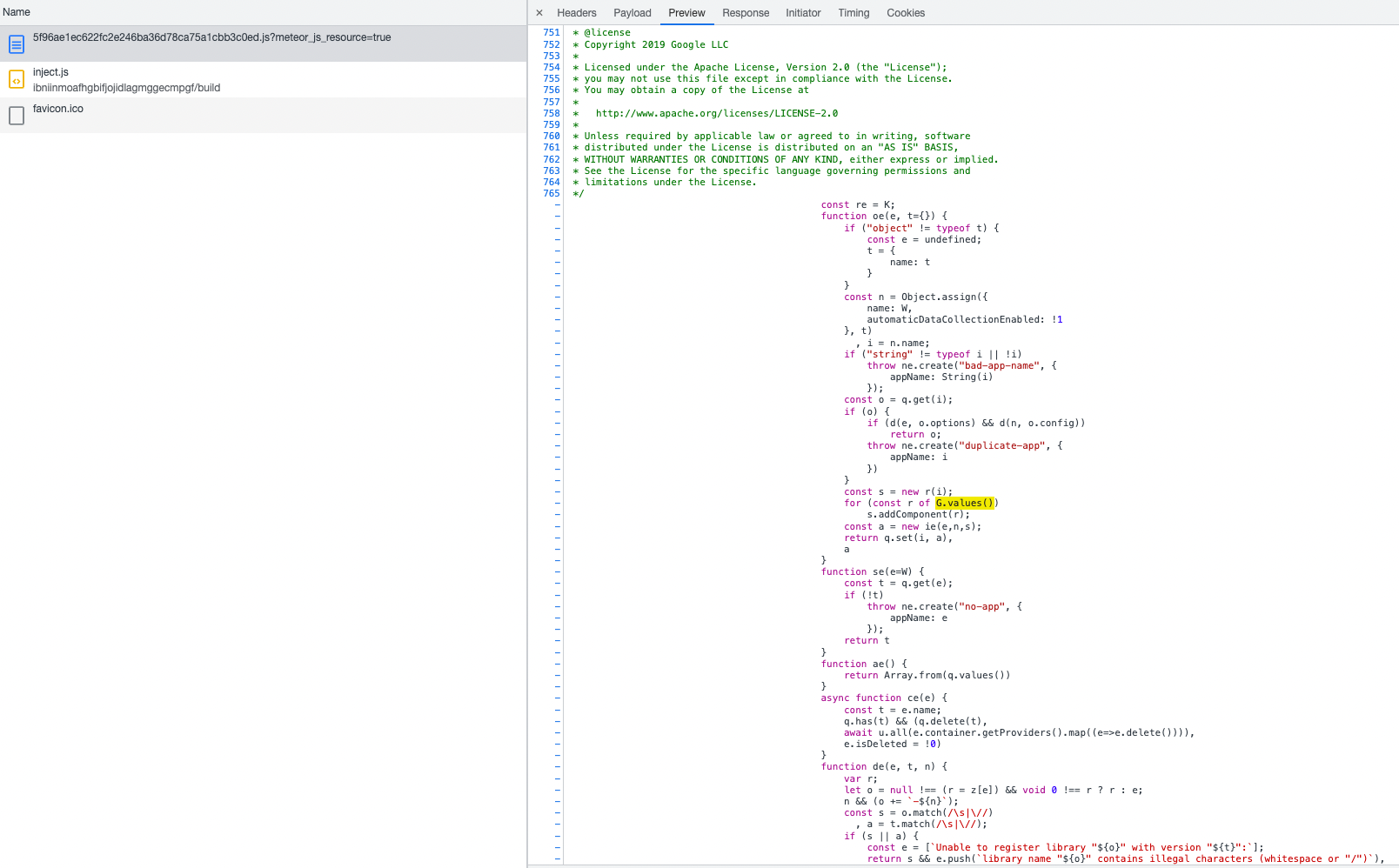
Thanks! Fortunately it looks like Meteor didn't minify addComponent so I think I've been able to trace it down to this line of code https://github.com/firebase/firebase-js-sdk/blob/9b9875c97f4cf3317b4c2e65e0bdd223017f3a46/packages/app/src/api.ts#L163
_components is a Map. In the compiled Meteor file you provided, it's minified to G. It's initialized in your Meteor bundle like this:
, G = new Map;
which is complied down from our Firebase source code where it looks like const _components = new Map();
and then later on it iterates on G.values(), which seems to cause an error.
I don't have a Chrome Android environment to test in but in my desktop browser console (where we expect it to work), it's fine, G = new Map is valid and initializes an empty Map, and G.values() returns a MapIterator {} which seems fine. I'm wondering if you can try out that Map syntax in a Chrome Android dev console and see if anything is weird with how it handles Map. Not using the parens in the initialization (new Map) is kind of unusual syntax to me but maybe that's a red herring.
In any case my guess would be that there's something about Chrome Android's handling of Map objects? Or the combination of Chrome Android + Meteor + Map?
The app loads in chromium and not exactly chrome on the Android device. Not sure if this piece of info helps.
Whatever the specific environment is, if anyone who has that environment can go into it (interactively with dev tools, or write a simple test file) and do some tests by initializing a new Map, with or without parens, and then trying to iterate on its .values property, if you get any errors or weird behavior there, that would identify the problem.
Hey @hgarcia101685. We need more information to resolve this issue but there hasn't been an update in 5 weekdays. I'm marking the issue as stale and if there are no new updates in the next 5 days I will close it automatically.
If you have more information that will help us get to the bottom of this, just add a comment!
Since there haven't been any recent updates here, I am going to close this issue.
@hgarcia101685 if you're still experiencing this problem and want to continue the discussion just leave a comment here and we are happy to re-open this.