

 firebase
type ChildUpdateFields within type UpdateData does not play nicely with nested interfaces
Describe your environment
- Operating System version: MacOS Monterey 12.6
- Firebase SDK version: 11.19.0
- Firebase Product: Firebase Admin
- Node.js version: 16.15.0
- NPM version: 8.5.5
Describe the problem
Steps to reproduce:
Create a simple environment to work with:
> npm init # go through the init steps
> npm install typescript # currently 4.9.4
> npm install firebase-admin # currently 11.4.0
Relevant Code:
Create a typescript file with the following:
interface UserSuccess {
    name: {
        first: string;
        last: string;
    };
}

interface UserFail {
    name: Name;
}

interface Name {
    first: string;
    last: string;
}
Note how both UserSuccess and UserFail are technically identical in structure.
When using the UpdateData type, you are able to traverse interface objects to update a specific field within Firebase. For example, something like this:
docRef.update({ "name.first": "John" });
However, when working with an interface that has a nested Interface object, UpdateData, or more specifically, ChildUpdateFields within UpdateData, fails to generate the new expected type whenever there are interfaces with other interfaces.
Success:
const user: FirebaseFirestore.UpdateData<UserSuccess> = {
    "name.first": "John",
};
The IDE even shows a list of helpful and expected suggestions:

Failure:
const user: FirebaseFirestore.UpdateData<UserFail> = {
    "name.first": "John", // ERROR
};
This produces the following error:
Type '{ "name.first": string; }' is not assignable to type '{ name?: FieldValue | { first?: string | FieldValue | undefined; last?: string | FieldValue | undefined; } | undefined; }'.
  Object literal may only specify known properties, and '"name.first"' does not exist in type '{ name?: FieldValue | { first?: string | FieldValue | undefined; last?: string | FieldValue | undefined; } | undefined; }'.
Secondly, the IDE does not show the intersected keys like above in the success state.

Possible Solution
Look at the ChildUpdateFields type.
 export type ChildUpdateFields<K extends string, V> =
    V extends Record<string, unknown>
      ? AddPrefixToKeys<K, UpdateData<V>>
      : never;
Change unknown to any:
 export type ChildUpdateFields<K extends string, V> =
    V extends Record<string, any>
        ? AddPrefixToKeys<K, UpdateData<V>>
        : never;
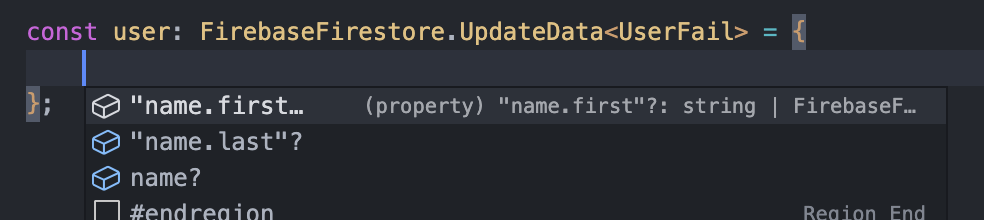
Suddenly, all problems described above are fixed. On top of that, the IDE also shows helpful and expected suggestions.
UserFail now behaves the same as UserSuccess:
const user: FirebaseFirestore.UpdateData<UserFail> = {
    "name.first": "John", // no more errors
};
Proper suggestions are listed in the IDE:

I found a few problems with this issue:
- I couldn't figure out how to label this issue, so I've labeled it for a human to triage. Hang tight.
- This issue does not seem to follow the issue template. Make sure you provide all the required information.

Hi @ianspryn,
Cloud Firestore support is provided by the @google-cloud/firestore library. Therefore the easiest and most efficient way to get Firestore issues resolved is by directly reporting them at the nodejs-firestore GitHub repo.
I think this will be better addressed on the nodejs-firestore repo, instead of here.
Thanks!

Bump into this issue too,with complex class definition its a problem unable to use dot notation with nested interface :/

Hi @LaysDragon , the issue is fully aware by the team and is working on fix.
