

 firebase
Extension 'firebase/storage-resize-images' emulator, not working well with Windows
[REQUIRED] Environment info
firebase-tools: 11.20.0
Platform: Windows 11
[REQUIRED] Test case
Firebase Extentions Emulator: firebase/storage-resize
extensions\storage-resize-images.env
DELETE_ORIGINAL_FILE=false
DO_BACKFILL=false
FUNCTION_MEMORY=512
IMAGE_TYPE=jpeg
IMG_BUCKET=demo
IMG_SIZES=500x500
IS_ANIMATED=true
LOCATION=europe-west1
MAKE_PUBLIC=false
RESIZED_IMAGES_PATH=thumbnails
firebase.json
{
  "functions": [
    {
      "source": "functions",
      "codebase": "default",
      "ignore": [
        "node_modules",
        ".git",
        "firebase-debug.log",
        "firebase-debug.*.log"
      ],
      "predeploy": [
        "npm --prefix \"$RESOURCE_DIR\" run lint",
        "npm --prefix \"$RESOURCE_DIR\" run build"
      ]
    }
  ],
  "database": {
    "rules": "database.rules.json"
  },
  "firestore": {
    "rules": "firestore.rules",
    "indexes": "firestore.indexes.json"
  },
  "storage": {
    "rules": "storage.rules"
  },
  "emulators": {
    "auth": {
      "port": 9099
    },
    "functions": {
      "port": 5001
    },
    "firestore": {
      "port": 8080
    },
    "database": {
      "port": 9000
    },
    "storage": {
      "port": 9199
    },
    "ui": {
      "enabled": true
    },
    "singleProjectMode": true
  },
  "extensions": {
    "storage-resize-images": "firebase/[email protected]"
  }
}
[REQUIRED] Steps to reproduce
Upload a JPEG to a {folder} in the Firebase Storage Emulator.
[REQUIRED] Expected behavior
Thumbnail gets generated/uploaded in a thumbnails/ folder next to the user uploaded file in {folder}.
[REQUIRED] Actual behavior
Thumbnail gets generated/uploaded to the root with {folder}\thumbnails\my_image.jpeg as the name``

Thanks for reporting this. Turns out that this is an issue with the source code of storage-resize-images. I've opened a PR to fix this there (https://github.com/firebase/extensions/pull/1416). It should go out in the next version of storage-resize-images (0.1.34).

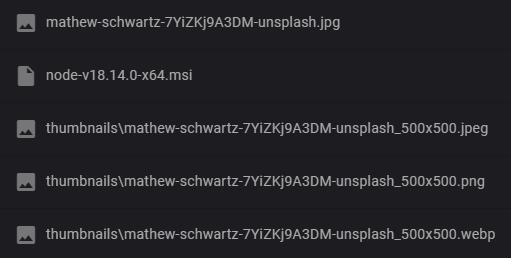

Hey :) What's the status on this bug? It says merged but I'm using version 0.1.39 and still facing the same issue. @joehan

I believe this was fixed- however, if youre still having issues, could you share some more details (function logs, etc). I'm also going to move this issue over to the extensions repo - they'll be better able to help you there.
extension[storage-resize-images] { "severity": "INFO", "message": "Image path 'C:\users\eYAlFqM4ckH6ds3yNmendFtzOuXd\profile-pic' is not supported, these are the supported absolute paths: /users//profile-pic, /users//wishlist" } on 0.1.39

I think I've figured out what's going on, I should have a PR in to fix this tomorrow. Here is a branch where i was investigating:
https://github.com/firebase/extensions/pull/1805

reopening as there is still an issue with certain windows paths, see: https://github.com/firebase/extensions/pull/1805#issuecomment-1826361858
Similarly, I had an issue with setting up the INCLUDE_PATH_LIST environment variable on the emulator (on Windows). Where it should have been /users/*/Profile/Pictures, I had to use C:\\users\\*\\Profile\\Pictures.
