

 finos
finos
Perspective styles do not work in a shadow root
Bug Report
Steps to Reproduce:
- Create a custom element and place a perspective-viewer in the shadow root. Stackblitz example.
- Notice that the perspective-viewer-datagrid and regular-table instances created in the shadow root have incorrect styling
Compare inside shadow root:
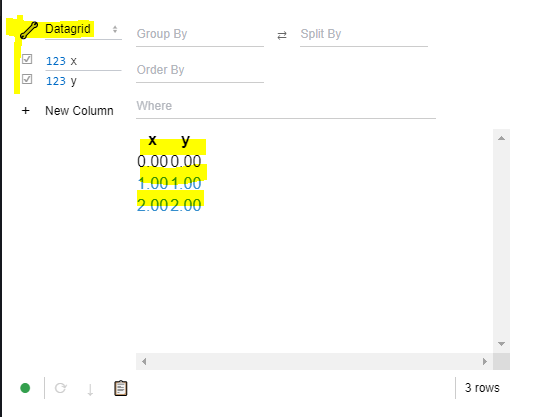 vs not in a custom element shadow root Stackblitz example (note: style seems to load inconsistently, not sure why, might need to refresh a couple times):
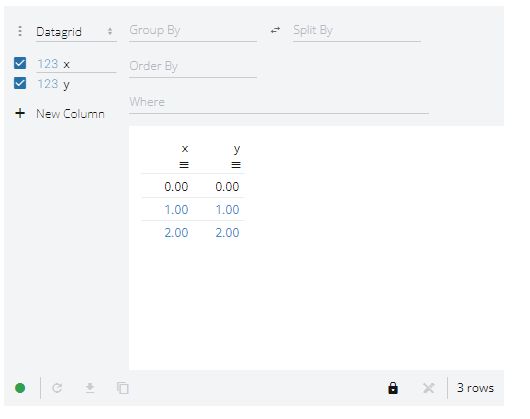
It looks like the module import has a side-effect of globally inserting a stylesheet. Due to the behavior of shadow roots, those styles don't apply to the perspective element.
Expected Result:
- I'd expect to be able to use perspective from within a shadow root, it does seem like most things would work, would just need a way to opt-in to the styling so I can apply it in my shadow root.
- Would prefer if a global
stylewas not inserted in the page. Or if the style just defined custom properties on:root {}that apply to the perspective shadow dom as custom properties can propagate through shadow roots. It would be helpful if those custom properties were prefixed in that case (--perspective-*) to prevent collisions. Even better if the prefix could be customized.
Actual Result:
Styles are inserted globally and fail to style perspective in a shadow root, see above.
Environment:
Windows, Chrome, Stackblitz (see links above), perspective 1.7.1
Additional Context:
This is a minimally reproducing example. My application is experimenting with using perspective with the FAST web components: https://explore.fast.design/components/

<perspective-viewer> works fine in the Shadow DOM. The linked example has two issues:
- The
<link>tag which loads the theme is embedded in the Shadow DOM as well, and thus not read by the document until the custom element is connected, well afterperspective-viewer.jsis loaded, causing theme auto-detection to fail. You need to manually tell<perspective-viewer>what theme CSS is available (from the docs) by calling (in your case):
viewer.resetThemes(["Material Light"])
- Perspective's themes have Google fonts, which won't be fetched when the CSS file is in the Shadow DOM. You'll need to separately download the necessary fonts in your document's
<head>:
<link rel="stylesheet" href="https://fonts.googleapis.com/css?display=block&family=Roboto+Mono:200,400%7CMaterial+Icons%7COpen+Sans:300,400,700">

Thanks for the help @texodus! It's a lot closer. Here is a stackblitz where I think I've captured the recommended changes: https://stackblitz.com/edit/perspective-inside-shadow-root-reset-theme
Looking at the example, I think that the perspective-viewer-datagrid global injected styles for the regular-table are still having issues applying in the shadow root of my custom element example:
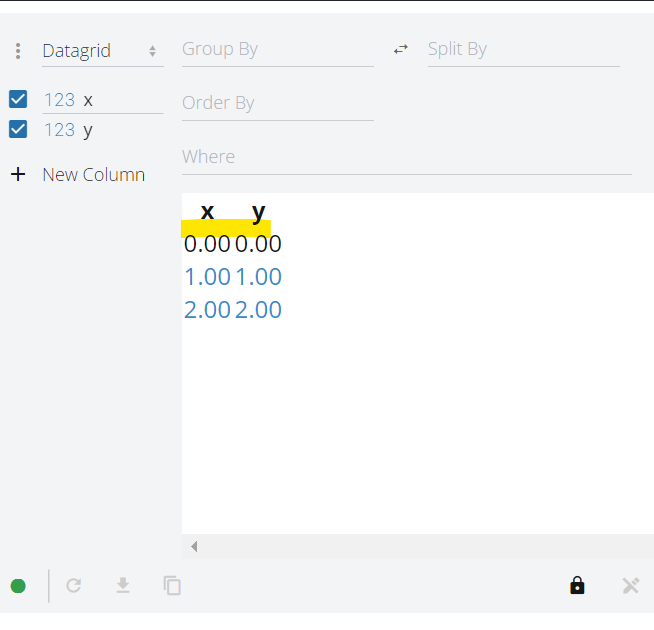 Can see the missing row line styles and sort button styling. Is there something else I may have missed?