
react-final-form
 react-final-form copied to clipboard
 final-form
Array field level validation still not working
Are you submitting a bug report or a feature request?
Bug report
What is the current behavior?
I've been trying to validate a form with an array field. It works for the most part, but when I need to show an error in array field level, it crashes with Cannot set a numeric property on an object. I'm using FieldArray component.
I've tried 2 approaches to validate the form:
- Using schema validation: The way I'm doing it in my project, by validating the whole form using schema validation (with ajv) which takes charge of generating the error object. Demo1: https://codesandbox.io/s/9yo1oz74yo
- Using form and field validation with validation functions. Demo2: https://codesandbox.io/s/4r9jmxwql4
The problem comes when you have validation for the FieldArray and, also, for the fields inside each item of the array. When this happen, the validation object goes form an array (with the errors for each array item) to an object/string (to show the FieldArray validation error) and that's why I thinks it's crashing:
Error object from the Demo1
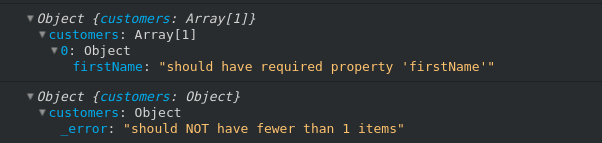
Steps to reproduce the bug (both demos)
- Add 1 customer
- Fill "lastName" input -> The validation triggers and it warns you about "firstName" being required
- Remove the customer -> The validation object contains the message of "min 1 customer"
- In this point, it crashes
What is the expected behavior?
What I hoped was that FinalForm could represent both FieldArray level validation message and the array item fields messages (not necessarily at the same time). For example: be able to show that 1 customer is the minimum required amount and, besides, show that the field "firstName" is required in the first element of the array.
What's your environment?
final-form: 4.11.0 final-form-arrays: 1.1.0 react-final-form: 4.0.2 react-final-form-arrays: 2.0.1 react: 16.6.3 Browser: Chrome 69.0.3497.100
Other information
I've seen these related issues but for me there's no clear solution in them
- https://github.com/final-form/final-form/issues/35 (I cannot treat the array as an Object as stated here, because of the schema validation)
- https://github.com/final-form/react-final-form/issues/160 (Not fully undestanding the ARRAY_ERROR use)

Facing the same issue. I want to say - add at least one user before you can submit the form. But cant.


It still seems to bug for me, if a field with contains an array returns a validation error, it will throw


Hi, we are running into the same problem. I tried a few of the workarounds I found in the linked issues but I can't get a result where it's possible to set an error for the whole array (for example not being long enough) and individual fields inside each array item.
This is something that works great with redux-form so I expected it to work with react-final-form too considering it's advertised as a replacement.
We are interested in implementing the feature ourselves and get it merged upstream, it would be easier if we could get some guidance on where to start.

My workaround
import { useFieldArray } from 'react-final-form-arrays';

...

const { fields: columnsFields } = useFieldArray(
    'fieldName',
    {
      validate: value => {
        return value.length < 2 ? 'Your error' : undefined;
      },
    },
  );
You can combine it with form level validation
Yup.object({
    fieldName: Yup.array().of(
      Yup.object({
        title: Yup.string().required(),
        states: Yup.array().min(1),
      }),
    ),
  });
