

 files-community
Feature: Add support for Windows 11 new context menu items
Description
I just noticed that if I right click on a folder to compress it, winrar doen't appear as option in the context menu. The only way to compress a folder is to create a winrar archive and that putt the folder.
Steps To Reproduce
- Install the latest version of WinRar
- Right click an item in Files and see that WinRar doesn't show up
Expected behavior
- Display WinRar and other options using the new shell apis
Files Version
3.1.7.0
Windows Version
Windows 11 Insider Preview 22543.1000 (rs_prerelease)
Relevant Assets/Logs


Thanks for the report. Could you also add:
- A screenshot of explorer's context menu for the same file
- A screenshot of explorer's "legacy" context menu (the one that appears e.g clicking Shift+F10)
- WinRar version
Please also verify if pressing shift while right clicking makes WinRar appear on Files.

Thanks for the report. Could you also add:
- A screenshot of explorer's context menu for the same file
- A screenshot of explorer's "legacy" context menu (the one that appears e.g clicking Shift+F10)
- WinRar version
Please also verify if pressing shift while right clicking makes WinRar appear on Files.
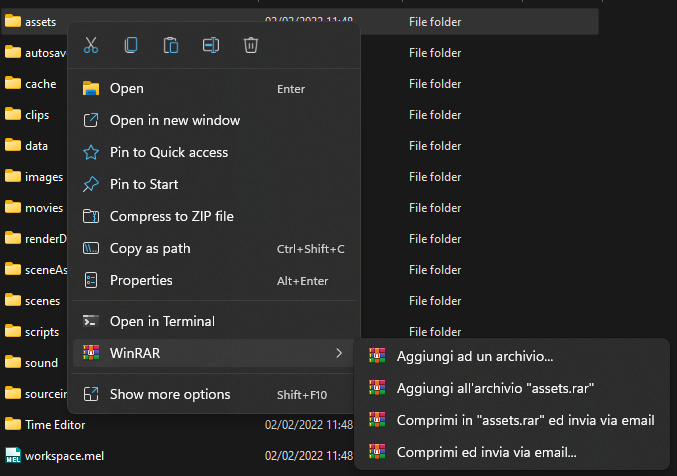
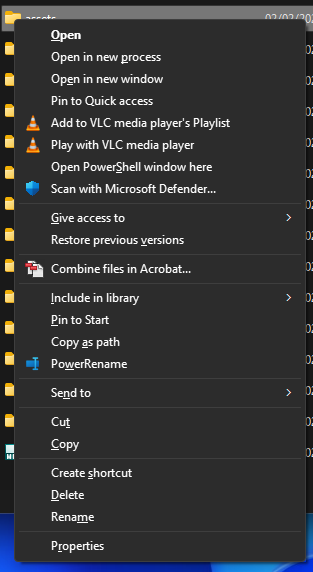
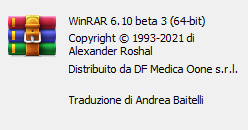
OK that's why. I see Winrar is missing from the legacy context menu and Files does not yet support pulling items from windows 11 menu. Installing Winrar 5 could be a workaround.
@dahall sorry to bother but in your infinite Win32 knowledge you may know this :)
Is there a way to query the new Windows 11 context menu and enumerate its items?
This is what we're using to get the context menu, but it returns only the "Windows 10" / legacy context menu items.
using var sf = new ShellFolder(@"SOME_FOLDER");
var menu = sf.GetViewObject<Shell32.IContextMenu>(null);
var hMenu = User32.CreatePopupMenu();
menu.QueryContextMenu(hMenu, ...)
...
I was led to believe that Windows 11 menu items implement IExplorerCommand so I was trying to use IExplorerCommandProvider to enumerate them, but I can't figure out how to get that interface.
using var sf = new ShellFolder(@"SOME_FOLDER");
var ecp = sf.GetViewObject<Shell32.IExplorerCommandProvider>(null); // This returns E_NOINTERFACE
I have seen the Windows sample project that successfully gets IExplorerCommandProvider by calling an IShellFolder::CreateViewObject method with it's GUID. Maybe the IShellFolder implementation for that shell item type doesn't support it. You've likely already read this documentation. Have you tried to cast your IContextMenu instance to IExplorerCommand? That's all I can think of.

Can I work on this? I guess I have proof of concept.
Items that implement IExplorerCommand and that are published by apps that have Package ID are shown in the Windows 11 context menu, while items that implement IContextMenu are show in its overflow. I guess we can get a provider instance with its object interface id and retrieve a sequence of IExplorerCommand instances.
Sample 1
#define WIN32_LEAN_AND_MEAN
#include <SDKDDKVer.h>
#include <windows.h>
#include <atlbase.h>
#include <atlcom.h>
#include <shobjidl_core.h>
#include <shlobj_core.h>

ATOM RegisterClass(HINSTANCE hInstance);
BOOL InitInstance(HINSTANCE, int);
LRESULT CALLBACK WndProc(HWND, UINT, WPARAM, LPARAM);

int APIENTRY wWinMain(_In_ HINSTANCE hInstance, _In_opt_ HINSTANCE, _In_ LPWSTR, _In_ int nCmdShow)
{
	HRESULT hr = CoInitializeEx(NULL, COINIT_APARTMENTTHREADED | COINIT_DISABLE_OLE1DDE);
	if (FAILED(hr))
		return FALSE;

	RegisterClass(hInstance);
	if (!InitInstance(hInstance, nCmdShow))
		return FALSE;

	MSG msg;
	while (GetMessage(&msg, nullptr, 0, 0))
	{
		TranslateMessage(&msg);
		DispatchMessage(&msg);
	}

	CoUninitialize();
	return (int)msg.wParam;
}

ATOM RegisterClass(HINSTANCE hInstance)
{
	WNDCLASSEXW wcex;
	wcex.cbSize = sizeof(WNDCLASSEX);
	wcex.style = CS_HREDRAW | CS_VREDRAW;
	wcex.lpfnWndProc = WndProc;
	wcex.cbClsExtra = 0;
	wcex.cbWndExtra = 0;
	wcex.hInstance = hInstance;
	wcex.hIcon = NULL;
	wcex.hCursor = LoadCursor(nullptr, IDC_ARROW);
	wcex.hbrBackground = (HBRUSH)(COLOR_WINDOW + 1);
	wcex.lpszMenuName = NULL;
	wcex.lpszClassName = L"DEBUG";
	wcex.hIconSm = NULL;
	return RegisterClassExW(&wcex);
}

BOOL InitInstance(HINSTANCE hInstance, int nCmdShow)
{
	HWND hWnd = CreateWindowW(L"DEBUG", L"Debug", WS_OVERLAPPEDWINDOW, CW_USEDEFAULT, 0, CW_USEDEFAULT, 0, nullptr, nullptr, hInstance, nullptr);
	if (!hWnd)
		return FALSE;

	ShowWindow(hWnd, nCmdShow);
	UpdateWindow(hWnd);
	return TRUE;
}

LRESULT CALLBACK WndProc(HWND hWnd, UINT message, WPARAM wParam, LPARAM lParam)
{
	switch (message)
	{
	case WM_CREATE:
	{
		SetWindowText(hWnd, L"Click somewhere");
	}
	break;

	case WM_LBUTTONDOWN:
	{
		CComPtr<IShellItem> item;
		// TODO: make sure this is a real file (of any type)
		SHCreateItemFromParsingName(L"C:\\Users\\onein\\Downloads\\Catppuccin_for_Visual_Studio.vsix", NULL, IID_PPV_ARGS(&item));

		DEFCONTEXTMENU cm = { 0 };
		cm.hwnd = hWnd;

		CComHeapPtr<ITEMIDLIST> pidl;
		CComPtr<IShellFolder> folder;
		CComQIPtr<IParentAndItem>(item)->GetParentAndItem(nullptr, &folder, &pidl);
		cm.psf = folder;

		LPCITEMIDLIST pidls[] = { pidl };
		cm.cidl = ARRAYSIZE(pidls);
		cm.apidl = pidls;

		CComPtr<IContextMenu> menu;
		SHCreateDefaultContextMenu(&cm, IID_PPV_ARGS(&menu));

		HMENU hMenu = CreatePopupMenu();

		// we can play with CMF verbs to vary what we'll get
		menu->QueryContextMenu(hMenu, 0, 0, SHRT_MAX, CMF_EXPLORE | CMF_CANRENAME);
		RECT Rect;
		GetWindowRect(hWnd, &Rect);
		MapWindowPoints(HWND_DESKTOP, GetParent(hWnd), (LPPOINT)&Rect, 2);
		USHORT id = TrackPopupMenu(hMenu, TPM_RETURNCMD, Rect.left + 50, Rect.top + 50, 0, hWnd, NULL);

		CMINVOKECOMMANDINFO info = { 0 };
		info.cbSize = sizeof(CMINVOKECOMMANDINFO);
		info.hwnd = hWnd;
		info.nShow = SW_SHOWNORMAL;
		info.lpVerb = MAKEINTRESOURCEA(id);
		menu->InvokeCommand(&info);

		DestroyMenu(hMenu);
	}
	break;

	case WM_DESTROY:
		PostQuitMessage(0);
		break;

	default:
		return DefWindowProc(hWnd, message, wParam, lParam);
	}
	return 0;
}

@0x5bfa please!!! For performance reasons, I think we should continue displaying all shell extensions in the sub menu (for the time being).

My idea didn’t work, it was not proof of concept.
- [x] ~~Instance IExplorerCommandProvider via CoCreateInstance~~
- I find that IExplorerCommandProvider cannot be obtained from COM activator or CoCreateInstance because it must be in-process activation, which mean’s IExplorerCommandProvider has to share the implementation with the menu.
- [ ] Use IFolderTypeDescription interface
- [x] ~~Cast IContextMenuItem to IExplorerCommand, or find dedicated info from old context menu.~~
- This requires to load shell context menu first.