

 files-community
trusted applications not showing in context menu
---> trusted applications not working (7zip, vsc, etc)
Explain the bug Write a clear description of what the bug is.
To reproduce
- Go to any folder that can be compressed by 7z, ect
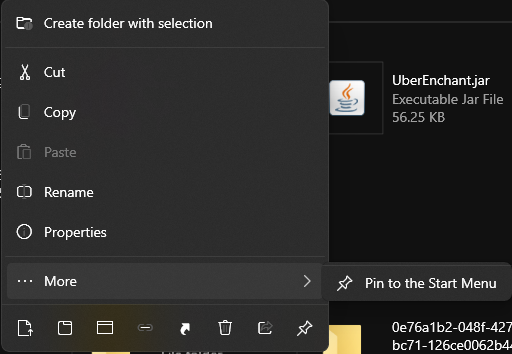
- it won't show an option to use 7z
Expected behavior
7zip or any other application should show up in context menu (as shown in crashmit's screenshot from the discord
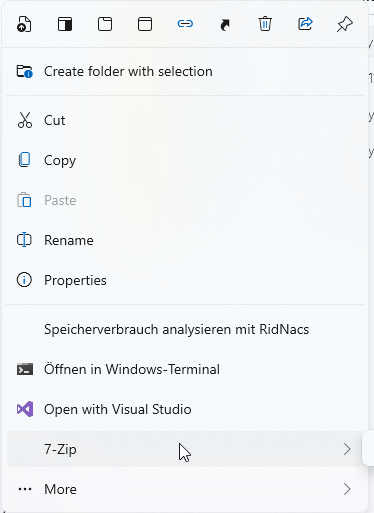 )
)
Logfile debug.log debug_fulltrust.log
Screenshots
What I see compared to what crashmit sees above:
System Information
-
OS Version: Edition Windows 10 Pro Version 20H2 Installed on 10/4/2020 OS build 19042.1110 Experience Windows Feature Experience Pack 120.2212.3530.0
-
App version: v1.1.9.14
Additional comment Continues after restart, Yair said it was trusted applications crash and to make a report

@RadNotRed if possible, could you try to delete the log files and post them again after triggering the issue with the latest Files version?

@RadNotRed if possible, could you try to delete the log files and post them again after triggering the issue with the latest Files version?
cleared them and remade debug_fulltrust.log
O.o I see no crash in the log this time. Could you check if you just need to scroll down the menu to see the shell menu items?
O.o I see no crash in the log this time. Could you check if you just need to scroll down the menu to see the shell menu items?
yeah it doesnt have it even i try to scroll
