

 ficonsulting
shortcut and menu item (.bat)
Hi all,
First of all, great job on the package ! Works great for me and has helped me deploy some shiny apps that help a lot of people in the company :) This is a great solution to not have to go through a whole production process.
I had a very simple (maybe dumb) question that I couldn't find an answer for. The question came from user trial and use :
- If someone wants to pin the shiny app to the taskbar it seems it pins the .exe of the file, but to cleanly run (if my understanding is correct) you need to run the .bat that launches the js scripts. Thus this creates a "dead" link for the app in the taskbar. -The other related "issue" is that when the shortcut is created on the desktop and menu, since it links to the .bat (which launches correctly the app) it loses it's icon. This leads to a blank shortcut icon.
Nothing major or critical but might be helpful if "fixed" for end users that are not versed in code :) Any ideas to "fix" this ? If I'm just a idiot and there is actually a simple way to change this, I would be very thankful to be pointed in the right direction !
Thanks again for the amazing work and I'll be looking forward to the futur developments of RInno ! Cheers, Wiwerod

Thanks! I'm glad to hear it is working for your use case. It is often much easier to keep everything local.
We currently support desktop icons and program menu icons - it looks like we just need to update icons_section and tasks_section to include an option for creating a taskbar icon.
In the short term, you can add it to your .iss in the tasks and icons sections (Inno docs). We can add this feature in a future release.

Hi Dripdrop,
Thanks for the swift answer ! :) I'm not sure I wrote in a very good manner the issue, the taskbar has an icon and the icon I managed to change. The problem seems to come from the shortcut that references the .bat file (.bat not having icons, so the shortcut is blank) Here are some screenshots to try and explain things better :
Let's start with the desktop shortcut :
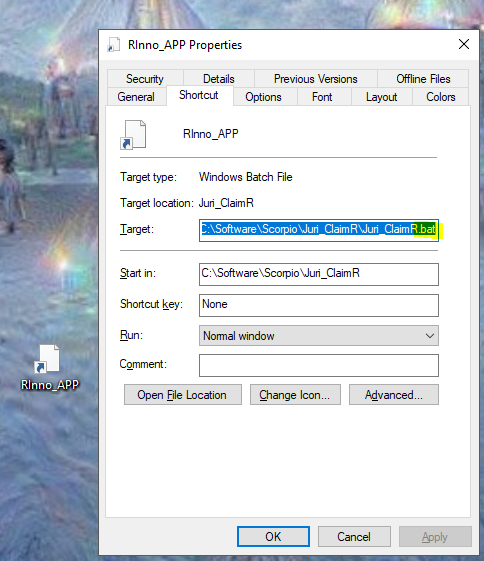 As you can see here the desktop shortcut references the .bat file and so can't have an icon if my understanding is correct (.bat just being text files).
This shortcut will launch the app nicely and easily (executes run.wsf and then loads the app):
As you can see here the desktop shortcut references the .bat file and so can't have an icon if my understanding is correct (.bat just being text files).
This shortcut will launch the app nicely and easily (executes run.wsf and then loads the app):

But then let's say the user pins the program to his taskbar while the app is running :
 This time the icon appears ! I believe this is because we are now referencing the .exe that has the icon saved as one of it's properties.
The only problem is that if we launch the app from the taskbar (so basically just running the .exe):
This time the icon appears ! I believe this is because we are now referencing the .exe that has the icon saved as one of it's properties.
The only problem is that if we launch the app from the taskbar (so basically just running the .exe):
 The app just stays blank (doesn't seem to load the libraries neither).
Not sure if this explains my issue better, as the iss part of things seems to be working just fine :) It might just be me who is an idiot hahaha (never worked with .exes before) Tell if I can help in any manner from this side ! Thank you for your time, it's very appreciated !! Wiwerod
Interesting bug... Thank you for that detail. I was able to replicate it on my end, and I'll see if I can figure out what is going on here. Pinning to start works but pinning to the taskbar does not.