

 ffmpegwasm
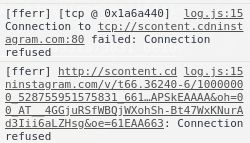
Connection refused
In my code: await ffmpeg.run("-i","http://someurl","output.mp4"), I got error in this image. But when running manually in terminal: ffmpeg -i "http://someurl" output.mp4, I run successfully. I use ffmpeg.run() instead of fetchFile() method because ffmpeg.run() method can pass command to download the segment of video, for example last 10 seconds of video, but fetchFile() method downloads full video. How to fix Connection refused error.

I might be wrong, but I guess the feature you want is not available in ffmpeg.wasm. There is no reference in the documentation for such a feature and there are a few limitations on what you can do within WASM.

Hi @brunoluiz, Actually I want to merge video segment and audio segment into output.mp4 file. I tried to merge with input is local file, for example await ffmpeg.run("-ss", "5", "-i", "video.mp4", "-ss", "5", "-i", "audio.mp3", "-c", "copy", "-map", "0:0", "-map", "1:0", "-to", "10", "output.mp4") (merge from 5th to 15th second of video and audio), and it ran successfully. But when I tried to merge with input is url, for example await ffmpeg.run("-ss", "5", "-i", "http://videourl", "-ss", "5", "-i", "http://audiourl", "-c", "copy", "-map", "0:0", "-map", "1:0", "-to", "10", "output.mp4"), I got Connection refused error. I also tried to replace http with https and I got https protocol not found, recompile FFmpeg with openssl, gnutls or securetransport enabled error. I think merge feature is available in ffmpeg.wasm because I ran successfully with input is local file.
I mean, the remote fetch feature. I guess it only works with files loaded to Emscripten file system. Another thing that doesn't work as well is streaming data in the input as well, if I recall correctly.
Hi @brunoluiz I tried to use fetchFile function with remote url: const data = await fetchFile('https://someurl') and it ran successfully. Is there any efficient way to use fetchFile function? For example, that url contains 1 hour long video, how to fetch and play video at the same time? Because I see current fetchFile function fetches the entire video first and then plays it, so performance will decrease.
I have referenced this link: https://github.com/ffmpegwasm/ffmpeg.wasm/blob/master/docs/api.md#fetch-file, but there is no way to pass start time, end time of video need to be loaded