
ffmpeg.wasm
 ffmpeg.wasm copied to clipboard
 ffmpegwasm
Support For IOS Mobile
Describe the bug Unhandled Promise Rejection: RangeError: Out of Memory. And then the line of code that the error points to is "await ffmpeg.load();".
To Reproduce Steps to reproduce the behavior:
- Try to use FFmpeg on Safari 15.2 or a Chrome browser on an IOS mobile device.
Expected behavior There will not be memory crashes.
Screenshots N/A
Smartphone (please complete the following information):
- Device: Iphone 12
- OS: IOS 15.2
- Browser: Safari and Chrome App
- Version: 15.2 for Safari and latest Chrome version.
Additional context Add any other context about the problem here.

As has been already noted here - a couple of more findings from my side:
- It is actually
await this.ffmpeg.load();that is causing the exception. So it's not about the audio file size or exceeding the memory withawait this.ffmpeg.run();call. - Likely, this happens because of the ffmpeg wasm size (currently 23.7 MB), which is apparently too big for a mobile browser. This is only my speculation, though. Please, correct me if I am wrong.
- Other WASM libs (coincidentally much smaller, under 1 MB) cause me no troubles in mobile browsers.
- Again, only my speculation, but perhaps streaming the WASM would make things more efficient? https://developers.google.com/web/updates/2018/04/loading-wasm

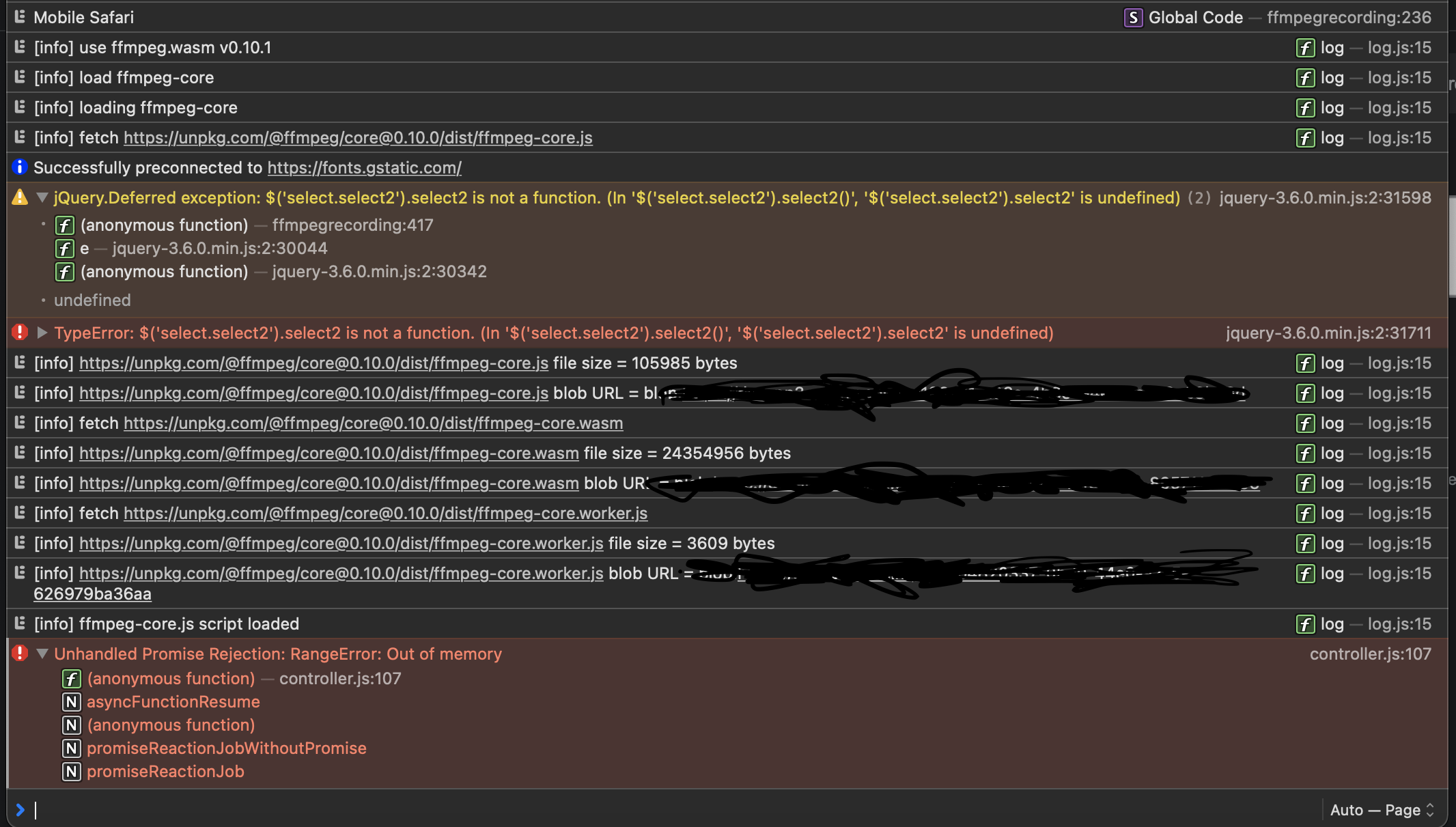 This is the error log that I get on my iPhone. Usually after "ffmpeg-core.js script loaded" I will get "ffmpeg-core loaded" which I think is referring to the ffmpeg-core.wasm file. So I think it is the ffmpeg wasm size that may be causing the issue.
I'm seeing this same issue on iPad on both iPad OS 15.0 and 15.3 (which is the most recent). I'd love to see this resolved.





Same here. xcode ios Simulator 15.4 iPhone 13
new WebAssembly.Memory() makes Out of Memory error.
INITIAL_MEMORY is 2GB, right?
in case of ammo.js, INITIAL_MEMORY seems to be 64MB.

I built custom core files with Docker CE on wsl2 Ubuntu 20.04. And, It works fine with ios Safari.
see also https://github.com/ffmpegwasm/ffmpeg.wasm/issues/267
setup
$ git clone https://github.com/ffmpegwasm/ffmpeg.wasm-core
$ cd ffmpeg.wasm-core
$ git checkout b59fb55619
$ git submodule update --init --recursive
edit wasm/build-scripts/build-ffmpeg.sh
-  -s INITIAL_MEMORY=2146435072                  # 64 KB * 1024 * 16 * 2047 = 2146435072 bytes ~= 2 GB
+  -s INITIAL_MEMORY=1073741824                  # 1GB
or
-  -s INITIAL_MEMORY=2146435072                  # 64 KB * 1024 * 16 * 2047 = 2146435072 bytes ~= 2 GB
+  -s INITIAL_MEMORY=33554432                    # 32MB
+  -s MAXIMUM_MEMORY=1073741824                  # 1GB
+  -s ALLOW_MEMORY_GROWTH=1
edit wasm/build-scripts/install-deps.sh
-for cmd in autoconf automake libtool pkg-config
+for cmd in autoconf automake libtool pkg-config ragel
and run
$ bash build-with-docker.sh
I wrote simple WebAssembly.Memory test for test memory allocation.
https://gist.github.com/novogrammer/cf4752f447c54e4b76fffe5e737a3064
ios Simulator screenshot below.
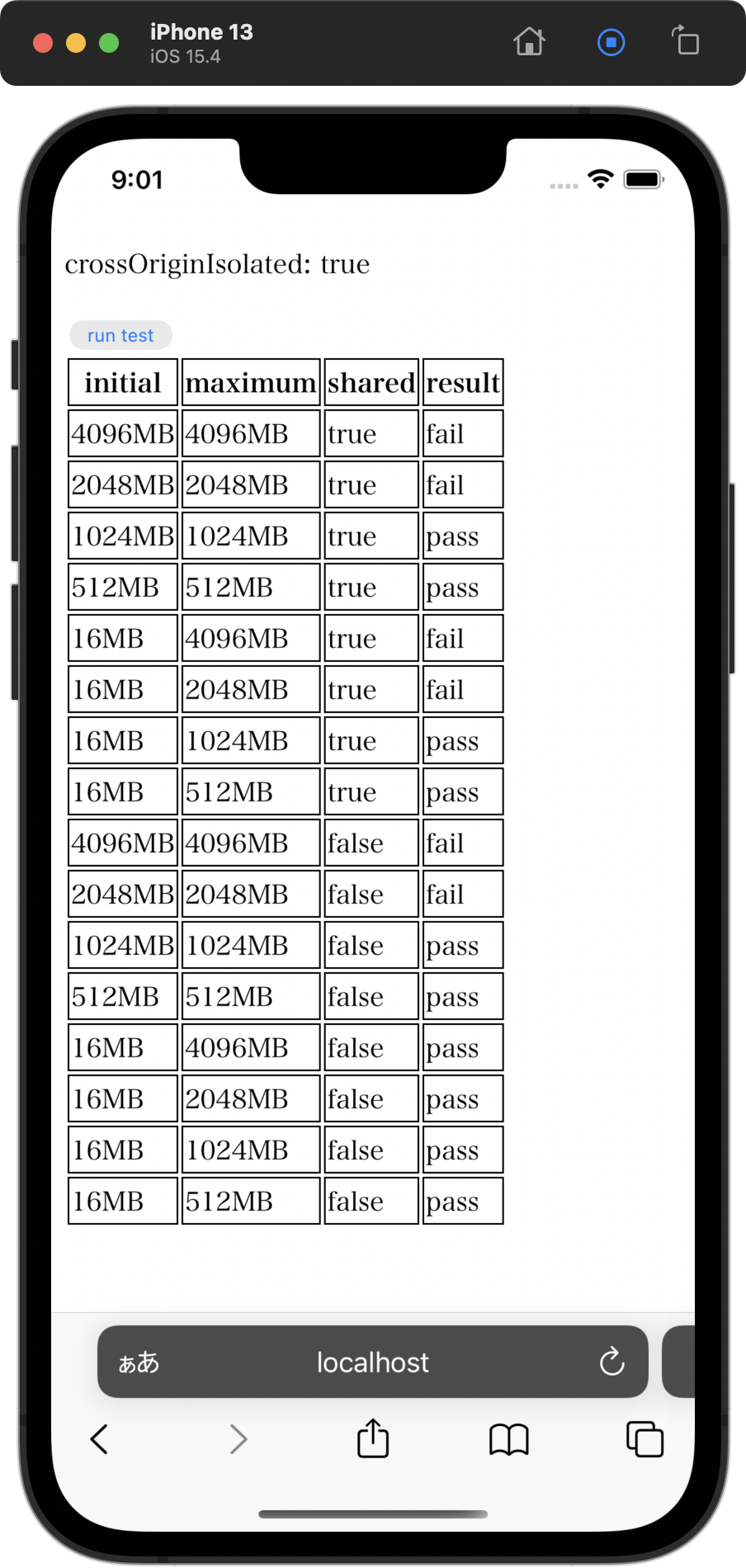
I built custom core files with Docker CE on wsl2 Ubuntu 20.04.
And, It works fine with ios Safari.
see also https://github.com/ffmpegwasm/ffmpeg.wasm/issues/267
setup
$ git clone https://github.com/ffmpegwasm/ffmpeg.wasm-core

$ cd ffmpeg.wasm-core

$ git checkout b59fb55619

$ git submodule update --init --recursive
edit wasm/build-scripts/build-ffmpeg.sh
-  -s INITIAL_MEMORY=2146435072                  # 64 KB * 1024 * 16 * 2047 = 2146435072 bytes ~= 2 GB

+  -s INITIAL_MEMORY=1073741824                  # 1GB
or
-  -s INITIAL_MEMORY=2146435072                  # 64 KB * 1024 * 16 * 2047 = 2146435072 bytes ~= 2 GB

+  -s INITIAL_MEMORY=33554432                    # 32MB

+  -s MAXIMUM_MEMORY=1073741824                  # 1GB

+  -s ALLOW_MEMORY_GROWTH=1
edit wasm/build-scripts/install-deps.sh
-for cmd in autoconf automake libtool pkg-config

+for cmd in autoconf automake libtool pkg-config ragel
and run
$ bash build-with-docker.shI wrote simple
WebAssembly.Memory testfor test memory allocation.https://gist.github.com/novogrammer/cf4752f447c54e4b76fffe5e737a3064
ios Simulator screenshot below.
You're a godsend
I built custom core files with Docker CE on wsl2 Ubuntu 20.04.
And, It works fine with ios Safari.
see also https://github.com/ffmpegwasm/ffmpeg.wasm/issues/267
setup
$ git clone https://github.com/ffmpegwasm/ffmpeg.wasm-core

$ cd ffmpeg.wasm-core

$ git checkout b59fb55619

$ git submodule update --init --recursive
edit wasm/build-scripts/build-ffmpeg.sh
-  -s INITIAL_MEMORY=2146435072                  # 64 KB * 1024 * 16 * 2047 = 2146435072 bytes ~= 2 GB

+  -s INITIAL_MEMORY=1073741824                  # 1GB
or
-  -s INITIAL_MEMORY=2146435072                  # 64 KB * 1024 * 16 * 2047 = 2146435072 bytes ~= 2 GB

+  -s INITIAL_MEMORY=33554432                    # 32MB

+  -s MAXIMUM_MEMORY=1073741824                  # 1GB

+  -s ALLOW_MEMORY_GROWTH=1
edit wasm/build-scripts/install-deps.sh
-for cmd in autoconf automake libtool pkg-config

+for cmd in autoconf automake libtool pkg-config ragel
and run
$ bash build-with-docker.shI wrote simple
WebAssembly.Memory testfor test memory allocation.https://gist.github.com/novogrammer/cf4752f447c54e4b76fffe5e737a3064
ios Simulator screenshot below.
Is there any option where we can split the resulting binary by its component libraries? So only the libraries that will be used for an operation get lazy loaded.
@nxtexe Add a script tag like this, if you want. https://gist.github.com/james2doyle/28a59f8692cec6f334773007b31a1523
@nxtexe
Add a script tag like this, if you want.
https://gist.github.com/james2doyle/28a59f8692cec6f334773007b31a1523
This wouldn't work much for me since I use ffmpeg in a web worker. But what I mean more specifically is lazy loading the libraries ffmpeg relies on to do certain conversions for example libx264. This way only when this library is specified only its binary would be loaded instead of the entire wasm binary containing all the libraries. Since as we know the full binary is around 25MB this would be very beneficial for lower end devices.
@nxtexe
This wouldn't work much for me since I use ffmpeg in a web worker. But what I mean more specifically is lazy loading the libraries ffmpeg relies on to do certain conversions for example libx264. This way only when this library is specified only its binary would be loaded instead of the entire wasm binary containing all the libraries. Since as we know the full binary is around 25MB this would be very beneficial for lower end devices.
I feel you. I want to reduce the binary size.
I am not familiar to Emscripten and FFmpeg. But, I think dynamic linking is generally a difficult technique.
Based on this static linked program, I think you need to create some custom binaries and switch between them as needed.
I think it's around here. wasm/build-scripts/configure-ffmpeg.sh wasm/build-scripts/build-ffmpeg.sh
Hello @novogrammer! Thanks for taking the time to create this! I'm currently using FFMPEG WASM to convert files to MP4 using Node.js. I was wondering if you have an endpoint where your custom build is live and where it can be used from. Thanks!
Hello @bilinkis !
My study project is here. https://github.com/ningen-inc/hello-ffmpeg-wasm
$ npm install
$ npm start
and open http://localhost:3000/ to try this.
Looks like it's working on iOS! Marvellous work, thank you so much for taking the time!
I was able to get my converter to work on my iPad using the new ffmpeg-core.js Thanks for doing that! I would be great to get the changes into a new stable release but I'm happy nonetheless.