ffmpegwasm
Can't be used within browser manifest v3 service workers
Describe the bug
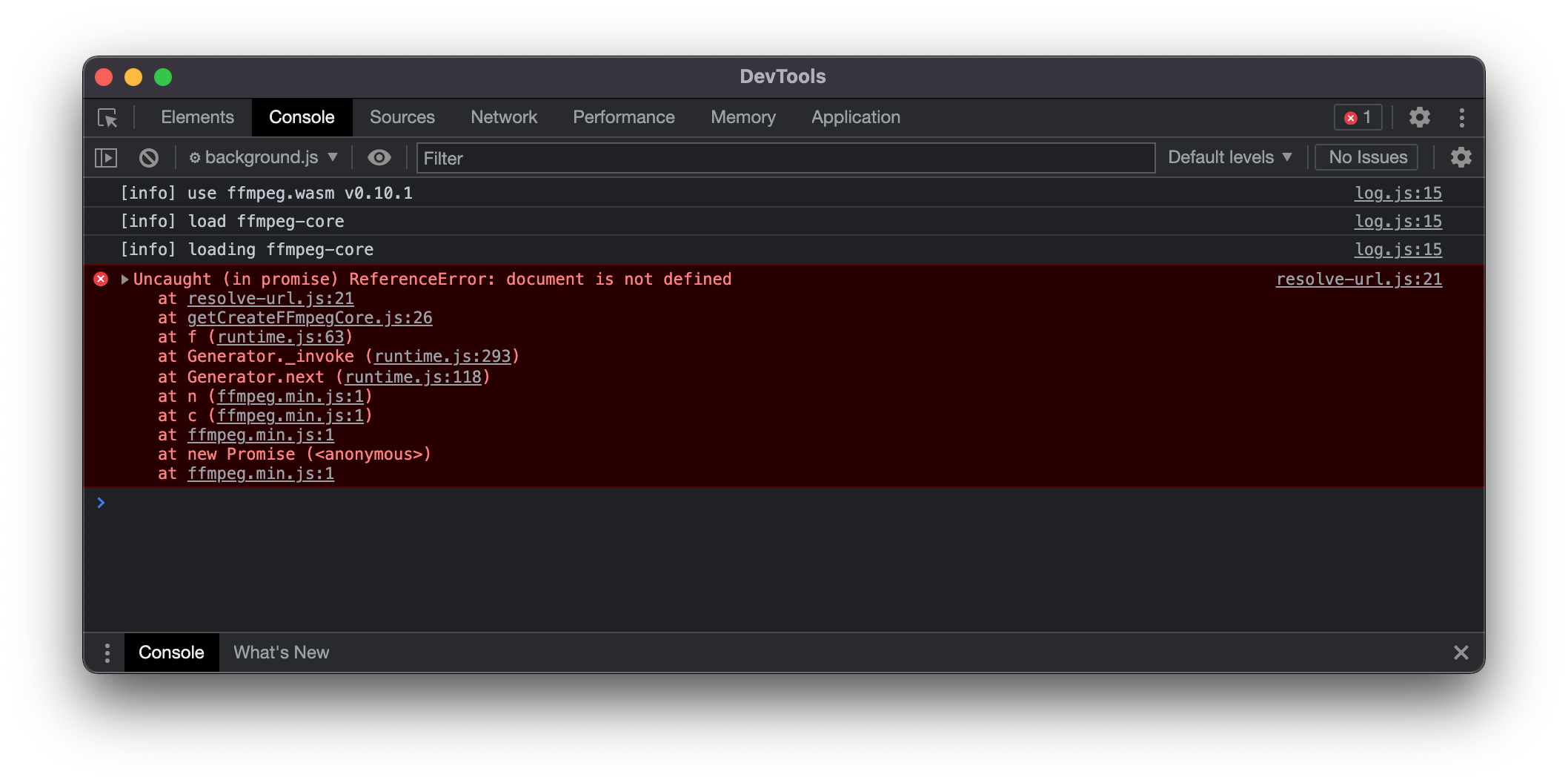
If a developer wants to use this library within a service worker (enforced in Manifest V3 extension spec sadly), it will not work due to the dependencies around document in resolve-url library. Neither window nor document is available inside a service worker.
I tried to remove the resolve-url dependency, but then I discovered that URL.createObjectURL is not available within service workers and it is required in getCreateFFmpegCore. Perhaps there is a way to remove its dependency?
If you are debugging, you might need to change browser/fetchFile.js to something similar to the node/fetchFile.js, but without the fs and util imports.
const isURL = require('is-url');

module.exports = async (_data) => {
  let data = _data;
  if (typeof _data === 'undefined') {
    return new Uint8Array();
  }

  if (typeof _data === 'string') {
    /* From remote URL/server */
    if (isURL(_data)
      || _data.startsWith('moz-extension://')
      || _data.startsWith('chrome-extension://')
      || _data.startsWith('file://')) {
      const res = await fetch(_data);
      data = await res.arrayBuffer();
    /* From base64 format */
    } else if (/data:_data\/([a-zA-Z]*);base64,([^"]*)/.test(_data)) {
      data = Buffer.from(_data.split(',')[1], 'base64');
    /* From local file path */
    }
    /* From Buffer */
  } else if (Buffer.isBuffer(_data)) {
    data = _data;
  }

  return new Uint8Array(data);
};
To Reproduce Steps to reproduce the behavior:
- Create a basic chrome extension with
{
  "manifest_version": 3,
  "version": "1.0.0",
  "name": "Test Extension",
  "author": "Bruno Luiz Silva <[email protected]>",
  "web_accessible_resources": [
    {
      "resources": [ "src/vendor/*" ],
      "matches": ["*://*/*"]
    }
  ],
  "background": {
    "service_worker": "src/js/background.js"
  },
  "host_permissions": [
    "*://*/*"
  ],
  "content_security_policy": {
    "extension_pages": "default-src 'self'; media-src * blob:"
  },
  "cross_origin_embedder_policy": {
    "value": "require-corp"
  },
  "cross_origin_opener_policy": {
    "value": "same-origin"
  }
}
- Place ffmpeg and ffmpeg-core dist files within
src/vendor - Create a
src/js/background.jsfile
(async () => {
  try {
    importScripts("/src/vendor/ffmpeg-core.js", "/src/vendor/ffmpeg.min.js");
  } catch (e) {
    console.error(e);
  }

  const corePath = chrome.runtime.getURL("src/vendor/ffmpeg-core.js");
  const settings = { corePath, log: true };

  ffmpeg = await FFmpeg.createFFmpeg(settings);
  await ffmpeg.load();
})();
- Load unpacked extension in Chrome
- Get an error message in the service worker console (click on
Inspect Viewsin the loaded extension)
Expected behavior
Work within browser service workers, albeit it was only tested within manifest v3 service workers.
Screenshots
Desktop (please complete the following information):
- OS: MacOS 12.1
- Browser Chrome
- Version Version 96.0.4664.110 (Official Build) (x86_64)