

 ferion11
LogosSetup.exe program error during installation
Hello,
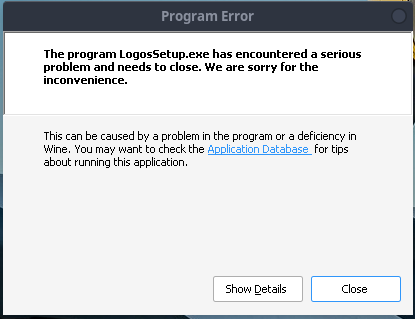
When I first attempted to update from Logos 9 to 10, I broke things so I decided it's probably best that I just start over with a fresh 10 install. I removed the L9 folder and received the same error twice now (error image in comment below).
When I close out the error, I see a notice showing Logos Bible Installed, but when I launch Logos.sh, I only receive an open Wine Control Panel.
I cannot find where I have gone wrong, and starting the process a second time didn't help. Any advice will be greatly appreciated!
Here's the program error details:
Unhandled exception: page fault on read access to 0xd95c021a in 32-bit code (0x6f4d1849). Register dump: CS:0023 SS:002b DS:002b ES:002b FS:0063 GS:006b EIP:6f4d1849 ESP:0069f120 EBP:0069f228 EFLAGS:00010286( R- -- I S - -P- ) EAX:d95c0212 EBX:00000001 ECX:0069f120 EDX:00000000 ESI:01959b9c EDI:007e2388 Stack dump: 0x0069f120: 007e2388 6f4dc163 00000000 007e2388 0x0069f130: 0069f1c0 007d9fd8 007d9ce0 00000000 0x0069f140: 6f4dc074 00000000 0069f168 6f4d743c 0x0069f150: 00000000 6f4d8420 007db240 007d9ce0 0x0069f160: 01959ae8 007d9ce0 00000001 007e2388 0x0069f170: 6f4dc074 0069f1a0 6f4dc3ec 00000000 Backtrace: =>0 0x6f4d1849 in wintrust (+0x11849) (0x0069f228) 1 0x6f4d2da3 in wintrust (+0x12da3) (0x0069f278) 2 0x6f4d48b2 in wintrust (+0x148b2) (0x0069f308) 3 0x6f4d543c in wintrust (+0x1543c) (0x0069f3a8) 4 0x6f4d5f49 in wintrust (+0x15f49) (0x0069f3c8) 5 0x650dbfce in msi (+0x5bfce) (0x0069f488) 6 0x00420060 in logossetup (+0x2 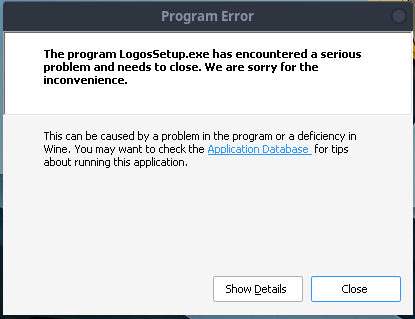 0060) (0x0069f638) 7 0x0041c304 in logossetup (+0x1c304) (0x0069fafc) 8 0x00426092 in logossetup (+0x26092) (0x0069fee4) 9 0x00433032 in logossetup (+0x33032) (0x0069ff30) 10 0x7b629270 in kernel32 (+0x29270) (0x0069ff48) 11 0x7bc5ceb7 in ntdll (+0x5ceb7) (0x0069ff5c) 12 0x7bc5d588 in ntdll (+0x5d588) (0x0069ffec) 0x6f4d1849 wintrust+0x11849: testb $0x2,0x8(%eax) Modules: Module Address Debug info Name (94 modules) PE 00400000-00492000 Export logossetup PE 009f0000-0134c000 Deferred shell32 PE 01350000-0135d000 Deferred userenv PE 61740000-61783000 Deferred advapi32 PE 61940000-619cc000 Deferred wininet PE 61d00000-61e44000 Deferred actxprxy PE 62e00000-62e13000 Deferred odbccp32 PE 62fc0000-6304e000 Deferred rpcrt4 PE 63480000-6348d000 Deferred version PE 637c0000-63869000 Deferred urlmon PE 63bc0000-63bda000 Deferred shcore PE 64a40000-64a94000 Deferred shlwapiclick yes to run it now PE 64ec0000-64feb000 Deferred oleaut32 PE 65080000-651d5000 Dwarf msi PE 658c0000-658d0000 Deferred sxs PE 65d40000-65d4b000 Deferred msisip PE 66240000-66256000 Deferred bcrypt PE 66540000-6654a000 Deferred atlthunk PE 66b00000-66b3c000 Deferred win32u PE 673c0000-673ef000 Deferred qmgrprxy PE 68500000-6855a000 Deferred combase PE 68700000-68736000 Deferred uxtheme PE 68e00000-68e11000 Deferred aclui PE 6a280000-6a32e000 Deferred msvcrt PE 6a400000-6a536000 Deferred ole32 PE 6bc00000-6bc2c000 Deferred sechost PE 6c9c0000-6ca49000 Deferred gdi32 PE 6cc40000-6cd9a000 Deferred comctl32 PE 6d580000-6d59e000 Deferred cabinet PE 6d780000-6d7a9000 Deferred ws2_32 PE 6db40000-6db4f000 Deferred imagehlp PE 6e8c0000-6e994000 Deferred crypt32 PE 6ed00000-6eec4000 Deferred user32 PE 6f4c0000-6f4e9000 Dwarf wintrust PE 6fa80000-6faf9000 Deferred dbghelp PE 6fe40000-6fe73000 Deferred rsaenh PE 70940000-70960000 Deferred mpr PE 70b40000-70c18000 Deferred ucrtbase PE 70cc0000-70d3b000 Deferred winex11 PE 70e80000-70e8a000 Deferred msimg32 PE 710c0000-710d0000 Deferred mspatcha PE 71200000-7121b000 Deferred imm32 PE 7b000000-7b29e000 Deferred kernelbase PE 7b600000-7b661000 Dwarf kernel32 PE 7bc00000-7bcae000 Dwarf ntdll ELF 7d000000-7d005000 Deferred <wine-loader> ELF 7d643000-7d7ef000 Deferred libunistring.so.2 ELF 7d7ef000-7d87b000 Deferred libgmp.so.10 ELF 7d87b000-7d8c6000 Deferred libhogweed.so.6 ELF 7da0b000-7da10000 Deferred libpthread.so.0 ELF 7da10000-7da60000 Deferred libnettle.so.8 ELF 7da60000-7da78000 Deferred libtasn1.so.6 ELF 7da78000-7db1a000 Deferred libzstd.so.1 ELF 7db1a000-7dbba000 Deferred libbrotlienc.so.1 ELF 7dbba000-7dcff000 Deferred libp11-kit.so.0 ELF 7dcff000-7df3f000 Deferred libgnutls.so.30 ELF 7dfef000-7dff7000 Deferred libxfixes.so.3 ELF 7dff7000-7e004000 Deferred libxcursor.so.1 ELF 7e039000-7e04e000 Deferred libxi.so.6 ELF 7e04e000-7e053000 Deferred libxcomposite.so.1 ELF 7e053000-7e063000 Deferred libxrandr.so.2 ELF 7e063000-7e071000 Deferred libxrender.so.1 ELF 7e071000-7e079000 Deferred libxxf86vm.so.1 ELF 7e079000-7e07e000 Deferred libxinerama.so.1 ELF 7e07e000-7e086000 Deferred libxdmcp.so.6 ELF 7e086000-7e0b1000 Deferred libxcb.so.1 ELF 7e0b1000-7e203000 Deferred libx11.so.6 ELF 7e203000-7e219000 Deferred libxext.so.6 ELF 7e219000-7e21e000 Deferred libdl.so.2 ELF 7e21e000-7e229000 Deferred libffi.so.8 ELF 7e229000-7e24a000 Deferred libidn2.so.0 ELF 7e24c000-7e2cb000 Deferred winex11.so ELF 7e39a000-7e3c5000 Deferred libexpat.so.1 ELF 7e3c5000-7e417000 Deferred libfontconfig.so.1 ELF 7e417000-7e4b8000 Deferred libpcre2-8.so.0 ELF 7e4b8000-7e4db000 Deferred libbrotlicommon.so.1 ELF 7e4db000-7e631000 Deferred libglib-2.0.so.0 ELF 7e631000-7e63f000 Deferred libbrotlidec.so.1 ELF 7e63f000-7e737000 Deferred libharfbuzz.so.0 ELF 7e737000-7e774000 Deferred libpng16.so.16 ELF 7e774000-7e786000 Deferred libbz2.so.1.0 ELF 7e786000-7e79f000 Deferred libz.so.1 ELF 7e79f000-7e86c000 Deferred libfreetype.so.6 ELF 7e86c000-7e871000 Deferred libxau.so.6 ELF 7e89f000-7e8a9000 Deferred bcrypt.so ELF 7e8a9000-7e9ff000 Deferred win32u.so ELF 7e9ff000-7eb86000 Dwarf libwine.so.1 ELF f7ab1000-f7ab7000 Deferred ws2_32.so ELF f7ab7000-f7abd000 Deferred crypt32.so ELF f7abd000-f7ae2000 Deferred libgcc_s.so.1 ELF f7ae2000-f7bb3000 Deferred libm.so.6 ELF f7bb3000-f7c73000 Deferred ntdll.so ELF f7c73000-f7e9e000 Deferred libc.so.6 ELF f7ed3000-f7f09000 Deferred ld-linux.so.2 Threads: process tid prio name (all IDs are in hex) 00000020 start.exe 00000024 0 00000038 services.exe 0000003c 0 00000040 0 wine_rpcrt4_server 0000004c 0 wine_rpcrt4_io 00000070 0 wine_rpcrt4_io 0000009c 0 wine_rpcrt4_io 000000b4 0 wine_rpcrt4_io 000000e0 0 wine_rpcrt4_io 00000128 0 wine_rpcrt4_io 00000044 winedevice.exe 00000048 0 00000054 0 00000058 0 0000005c 0 00000060 0 00000064 0 000000c0 0 00000068 winedevice.exe 0000006c 0 00000074 0 00000078 0 0000007c 0 00000080 0 00000084 0 00000088 0 0000008c 0 00000090 0 00000094 plugplay.exe 00000098 0 000000a0 0 000000a4 0 000000a8 0 wine_rpcrt4_server 000000ac svchost.exe 000000b0 0 000000b8 0 000000bc 0 000000c4 explorer.exe 000000c8 0 000000cc 0 000000d0 0 wine_rpcrt4_server 000000d8 rpcss.exe 000000dc 0 000000e8 0 000000ec 0 000000f0 0 wine_rpcrt4_server 000000f4 0 wine_rpcrt4_server 000000f8 0 wine_rpcrt4_io 00000110 0 wine_rpcrt4_io 0000013c 0 wine_rpcrt4_io 000001b0 0 wine_rpcrt4_io 00000100 conhost.exe 00000104 0 00000108 (D) Z:\home\irish\LogosBible10\LogosSetup.exe ["Z:\home\irish\LogosBible10\LogosSetup.exe" ] 0000010c 0 <== 00000160 0 wine_rpcrt4_server 00000164 0 wine_rpcrt4_io 00000174 0 wine_rpcrt4_io 0000019c 0 00000120 svchost.exe 00000124 0 00000130 0 00000134 0 00000138 0 wine_rpcrt4_server 00000140 0 00000144 0 wine_rpcrt4_io 00000150 0 wine_rpcrt4_io 00000154 0 wine_rpcrt4_io 00000158 0 wine_rpcrt4_io 0000015c 0 wine_rpcrt4_io 000001a0 explorer.exe 000001a4 0 000001a8 0 000001ac 0 wine_rpcrt4_server System information: Wine build: wine-7.19 (Staging) Platform: i386 (WOW64) Version: Windows 10 Host system: Linux Host version: 5.15.74-1-lts
Here's the output from the terminal showing Wine Debugger:
Installing LogosBible 64bits... LogosSetup.exe exist. Using it... wine64 LogosSetup.exe 002c:fixme:winediag:LdrInitializeThunk wine-staging 7.19 is a testing version containing experimental patches. 002c:fixme:winediag:LdrInitializeThunk Please mention your exact version when filing bug reports on winehq.org. 002c:err:wineboot:process_run_key Error running cmd L"C:\\windows\\system32\\winemenubuilder.exe -a -r" (126). 007c:fixme:hid:handle_IRP_MN_QUERY_ID Unhandled type 00000005 007c:fixme:hid:handle_IRP_MN_QUERY_ID Unhandled type 00000005 007c:fixme:hid:handle_IRP_MN_QUERY_ID Unhandled type 00000005 007c:fixme:hid:handle_IRP_MN_QUERY_ID Unhandled type 00000005 00c8:fixme:imm:ImeSetActiveContext (0000000000010026, 0): stub 00c8:fixme:imm:ImmReleaseContext (0000000000010020, 0000000000010026): stub 010c:fixme:imm:ImeSetActiveContext (00010060, 1): stub 010c:fixme:imm:ImmReleaseContext (00010062, 00010060): stub 0134:fixme:ole:CoInitializeSecurity 0000000000000000, -1, 0000000000000000, 0000000000000000, 1, 3, 0000000000000000, 0, 0000000000000000 stub 014c:fixme:qmgr:BackgroundCopyJob_AddFileSet Check for valid filenames and supported protocols 014c:fixme:qmgr:BackgroundCopyJob_SetPriority 00000000010A2D60, 0: stub 010c:err:ole:marshal_object Failed to create an IRpcStubBuffer from IPSFactory for {659cdeac-489e-11d9-a9cd-000d56965251} with error 0x80004002 0178:fixme:qmgr:BackgroundCopyJob_AddFileSet Check for valid filenames and supported protocols 0168:fixme:qmgr:BackgroundCopyJob_SetMinimumRetryDelay 00000000010AF150, 60. 0178:fixme:qmgr:BackgroundCopyJob_SetPriority 00000000010AF150, 2: stub 0178:fixme:qmgr:BackgroundCopyJob_SetPriority 00000000010AF150, 0: stub 010c:err:ole:marshal_object Failed to create an IRpcStubBuffer from IPSFactory for {659cdeac-489e-11d9-a9cd-000d56965251} with error 0x80004002 010c:fixme:file:NtLockFile I/O completion on lock not implemented yet 010c:fixme:cryptasn:CRYPT_GetBuiltinDecoder Unsupported decoder for lpszStructType 1.3.6.1.4.1.311.2.1.4 010c:fixme:cryptasn:CRYPT_GetBuiltinDecoder Unsupported decoder for lpszStructType 1.3.6.1.4.1.311.2.1.4 010c:fixme:wintrust:SOFTPUB_VerifyImageHash Cannot verify hash for pszObjId="1.3.6.1.4.1.311.2.1.30" wine: Unhandled page fault on read access to D95C021A at address 6F4D1849 (thread 010c), starting debugger... 0198:fixme:imm:ImeSetActiveContext (000100B0, 1): stub 0198:fixme:imm:ImmReleaseContext (000100BA, 000100B0): stub 01a4:fixme:imm:ImeSetActiveContext (0000000000040068, 0): stub 01a4:fixme:imm:ImmReleaseContext (0000000000040062, 0000000000040068): stub

The fresh install was a good move.
You are using the latest version of the script in your install?
This looks like a memory issue; while we have had these, they have been incredibly hard to reproduce in order to debug. More often than not, we have found these to be either library issues or temporary.
There is an included command in the Logos.sh script that can sometimes resolve these "I just installed Logos but am having problems booting" problems. Try running:
./Logo.sh removeLibraryCatalog
Then try running Logos again.

I am using the 10.0-1 version, and tried the removeLibraryCatalog but still getting the Wine Control Panel at launch. I also tried using the .msi instead of the .exe but the installation self-aborted saying .exe required.
I'm gong to try the LibraryCatalog again, delete everything, reboot and go for another fresh install. Doubtful, but worth trying I suppose!
Ok, cleaned everything again and installed using wine-staging_7.18-x86_64.AppImage rather than Logos10_Setup.sh and was crashing as soon as the launch sound began. It appears it may still be some memory related issue because when I used ./Logo.sh removeLibraryCatalog this time, Logos 10 did successfully launch and is currently indexing.
Anything deeper than that is really difficult for me to determine with my limited knowledge, so I'll include this here in case it helps someone down the road.
(Terminal output from launch to crash attached) L10 terminal output on crash.docx
A short-lived success, and unfortunately I cannot get either 9 or 10 working now.
10 Crashed during updating:
010c:err:eventlog:ReportEventW L"Application: Logos.exe\nCoreCLR Version: 6.0.722.32202\n.NET Version: 6.0.7\nDescription: The process was terminated due to an internal error in the .NET Runtime at IP 0000000003561FDD (0000000003390000) with exit code c0000005.\n"
And again immediately after re-launching:
010c:err:eventlog:ReportEventW L"Application: Logos.exe\nCoreCLR Version: 6.0.722.32202\n.NET Version: 6.0.7\nDescription: The process was terminated due to an internal error in the .NET Runtime at IP 0000000003561FDD (0000000003390000) with exit code c0000005.\n" 0274:err:winediag:wined3d_dll_init Disabling 3D support. 027c:err:winediag:wined3d_dll_init Disabling 3D support. [1029/193825.134:ERROR:dxva_video_decode_accelerator_win.cc(1458)] DXVAVDA fatal error: could not LoadLibrary: msmpeg2vdec.dll: Module not found. (0 x7E) [1029/193825.137:ERROR:dxva_video_decode_accelerator_win.cc(1466)] DXVAVDA fatal error: could not LoadLibrary: msvproc.dll: Module not found. (0x7E) 0290:err:winediag:wined3d_dll_init Disabling 3D support. [1029/193840.411:INFO:child_thread_impl.cc(897)] ChildThreadImpl::EnsureCo nnected()
Wine is 7.19 Staging and here's inxi -b
System: Host: irish-sager Kernel: 5.15.75-1-lts arch: x86_64 bits: 64 Desktop: GNOME v: 42.5 Distro: EndeavourOS Machine: Type: Laptop System: Notebook product: N85_N87,HJ,HJ1,HK1 v: N/A serial: <superuser required> Mobo: Notebook model: N85_N87,HJ,HJ1,HK1 serial: <superuser required> UEFI: American Megatrends v: 1.05.22RLS1 date: 03/27/2018 Battery: ID-1: BAT0 charge: 31.2 Wh (100.0%) condition: 31.2/59.9 Wh (52.0%) CPU: Info: quad core Intel Core i7-7700HQ [MT MCP] speed (MHz): avg: 1058 min/max: 800/3800 Graphics: Device-1: Intel HD Graphics 630 driver: i915 v: kernel Device-2: NVIDIA GP107M [GeForce GTX 1050 Ti Mobile] driver: nvidia v: 520.56.06 Device-3: Chicony USB 2.0 Camera type: USB driver: uvcvideo Display: x11 server: X.Org v: 21.1.4 with: Xwayland v: 22.1.4 driver: X: loaded: modesetting,nvidia dri: iris gpu: i915 resolution: 1920x1080~60Hz OpenGL: renderer: NVIDIA GeForce GTX 1050 Ti/PCIe/SSE2 v: 4.6.0 NVIDIA 520.56.06 Network: Device-1: Realtek RTL8111/8168/8411 PCI Express Gigabit Ethernet driver: r8169 Device-2: Intel Wireless 8265 / 8275 driver: iwlwifi Device-3: Intel Bluetooth wireless interface type: USB driver: btusb Drives: Local Storage: total: 1.14 TiB used: 697.47 GiB (59.6%) Info: Processes: 272 Uptime: 15h 27m Memory: 15.52 GiB used: 2.57 GiB (16.5%) Shell: Bash inxi: 3.3.22
Another quick thought (sorry not enough time at the moment), but you can try running indexing in the background rather than booting all of Logos.
./Logos.sh indexing
That's been known to help some folks.
Another quick thought (sorry not enough time at the moment), but you can try running indexing in the background rather than booting all of Logos.
./Logos.sh indexingThat's been known to help some folks.
The good news is, indexing did complete! The challenging news is that it's still crashing at launch. :)
Another quick thought (sorry not enough time at the moment), but you can try running indexing in the background rather than booting all of Logos.
./Logos.sh indexingThat's been known to help some folks.The good news is, indexing did complete! The challenging news is that it's still crashing at launch. :)
Not to sound like a broken record, but try removing the library catalog again; the library catalog's removal does not trigger a re-indexing.
Broken records are ok, I just appreciate the help! Removed the library catalog again and L10 started and running for about 5 minutes at this point. I'll get to work and share the results. Thanks again for your help!
Update: After about 15 minutes, crashed and below is the terminal from start to crash.
Second update: I restarted Logos and kept it running on a second monitor all day long with no crashes. I didn't have a chance to use it much at all, but let it sit open for about 4 hours, closed and restarted it again and left it another 3 hours and it's still functioning. Maybe the current round of library catalog did something, maybe an EndeavourOS update that happened today, I don't know, but it's working at the moment!
[irish@irish-sager LogosBible10]$ ./Logos.sh No arguments parsed. grep: warning: stray \ before / 0134:err:winediag:wined3d_dll_init Disabling 3D support. [1102/104018.660:ERROR:network_change_notifier_win.cc(228)] WSALookupServiceBegi n failed with: 0 020c:err:combase:RoGetActivationFactory Failed to find library for L"Windows.UI.ViewManagement.UISettings" 0264:err:winediag:wined3d_dll_init Disabling 3D support. 0270:err:winediag:wined3d_dll_init Disabling 3D support. 0278:err:winediag:wined3d_dll_init Disabling 3D support. [1102/104020.248:ERROR:dxva_video_decode_accelerator_win.cc(1458)] DXVAVDA fatal error: could not LoadLibrary: msmpeg2vdec.dll: Module not found. (0x7E) [1102/104020.250:ERROR:dxva_video_decode_accelerator_win.cc(1466)] DXVAVDA fatal error: could not LoadLibrary: msvproc.dll: Module not found. (0x7E) [1102/104020.505:ERROR:network_change_notifier_win.cc(228)] WSALookupServiceBegi n failed with: 0 0284:err:winediag:wined3d_dll_init Disabling 3D support. 021c:err:wininet:HTTP_ParseRfc1123Date unexpected time zone L"UTC" 021c:err:wininet:HTTP_ParseRfc850Date unexpected month format L" Nov 2022 10:00:00 UTC" 021c:err:wininet:HTTP_ParseDate unexpected date format L"Tue, 01 Nov 2022 10:00:00 UTC" [1102/104027.553:WARNING:cert_verify_proc_win.cc(83)] Unknown error -2146762482 mapped to net::ERR_FAILED 0214:err:wininet:HTTP_ParseRfc1123Date unexpected time zone L"UTC" 0214:err:wininet:HTTP_ParseRfc850Date unexpected month format L" Nov 2022 09:00:00 UTC" 0214:err:wininet:HTTP_ParseDate unexpected date format L"Tue, 01 Nov 2022 09:00:00 UTC" [1102/104027.603:WARNING:cert_verify_proc_win.cc(83)] Unknown error -2146762482 mapped to net::ERR_FAILED [1102/104119.678:WARNING:cert_verify_proc_win.cc(83)] Unknown error -2146762482 mapped to net::ERR_FAILED 03e8:err:ole:get_stub_manager_from_ipid not found for ipid {00000001-0000-03fc-a58e-64d9a5463f07} 03e8:err:ole:get_stub_manager_from_ipid not found for ipid {00000002-0000-03fc-a3bd-ad9b16abef0e} 03e8:err:ole:get_stub_manager_from_ipid not found for ipid {00000003-0000-03fc-87bb-7e680e7480a3} 03e8:err:ole:get_stub_manager_from_ipid not found for ipid {00000004-0000-03fc-a517-f8abca25fcc9} 03e8:err:ole:get_stub_manager_from_ipid not found for ipid {00000003-0000-03fc-87bb-7e680e7480a3} 03e8:err:ole:get_stub_manager_from_ipid not found for ipid {00000005-0000-03fc-a286-106a7af128dc} 03e8:err:ole:get_stub_manager_from_ipid not found for ipid {00000003-0000-03fc-87bb-7e680e7480a3} 03e8:err:ole:get_stub_manager_from_ipid not found for ipid {00000006-0000-03fc-8210-aa822b0f39bf} 03e8:err:ole:get_stub_manager_from_ipid not found for ipid {00000003-0000-03fc-87bb-7e680e7480a3} 03e8:err:ole:get_stub_manager_from_ipid not found for ipid {00000007-0000-03fc-b0ea-36c184ff8326} 03e8:err:ole:get_stub_manager_from_ipid not found for ipid {00000007-0000-03fc-b0ea-36c184ff8326} 03e8:err:ole:get_stub_manager_from_ipid not found for ipid {00000007-0000-03fc-b0ea-36c184ff8326} 03e8:err:ole:get_stub_manager_from_ipid not found for ipid {00000007-0000-03fc-b0ea-36c184ff8326} 03e8:err:ole:get_stub_manager_from_ipid not found for ipid {00000007-0000-03fc-b0ea-36c184ff8326} 03e8:err:ole:get_stub_manager_from_ipid not found for ipid {00000007-0000-03fc-b0ea-36c184ff8326} 03e8:err:ole:get_stub_manager_from_ipid not found for ipid {00000007-0000-03fc-b0ea-36c184ff8326} 03e8:err:ole:get_stub_manager_from_ipid not found for ipid {00000007-0000-03fc-b0ea-36c184ff8326} 03e8:err:ole:get_stub_manager_from_ipid not found for ipid {00000007-0000-03fc-b0ea-36c184ff8326} 03e8:err:ole:get_stub_manager_from_ipid not found for ipid {00000008-0000-03fc-bef9-05d0da342542} 03e8:err:ole:get_stub_manager_from_ipid not found for ipid {00000008-0000-03fc-bef9-05d0da342542} 03e8:err:ole:get_stub_manager_from_ipid not found for ipid {00000009-0000-03fc-9212-b283233f2138} 03e8:err:ole:get_stub_manager_from_ipid not found for ipid {00000009-0000-03fc-9212-b283233f2138} 03e8:err:ole:get_stub_manager_from_ipid not found for ipid {00000007-0000-03fc-b0ea-36c184ff8326} 03e8:err:ole:CoReleaseMarshalData StdMarshal ReleaseMarshalData failed with error 0x8001011d 03e8:err:ole:CoReleaseMarshalData StdMarshal ReleaseMarshalData failed with error 0x8001011d 0458:err:winediag:wined3d_dll_init Disabling 3D support. 0478:err:winediag:wined3d_dll_init Disabling 3D support. 049c:err:winediag:wined3d_dll_init Disabling 3D support. 04c4:err:winediag:wined3d_dll_init Disabling 3D support. GnuTLS error: GnuTLS internal error. 0198:err:secur32:schan_free_handle Handle 23(0000000041890590) is not of type 0x1 Process terminated. Unhandled exception in async work at System.Environment.FailFast(System.String, System.Exception) at Libronix.Utility.ApplicationUtility.FailFast(System.String, System.Excepti on) at Libronix.Utility.Threading.AsyncWorkerTask1[[System.__Canon, System.Priva
te.CoreLib, Version=6.0.0.0, Culture=neutral, PublicKeyToken=7cec85d7bea7798e]].
EnumMoveNext()
at Libronix.Utility.Threading.AsyncWorkerTask1[[System.__Canon, System.Priva te.CoreLib, Version=6.0.0.0, Culture=neutral, PublicKeyToken=7cec85d7bea7798e]]. ContinueExecution(System.Object) at Libronix.Utility.Threading.GroupedThreadPool.ExecuteNextCallback(System.Ob ject) at System.Threading.QueueUserWorkItemCallback.Execute() at System.Threading.ThreadPoolWorkQueue.Dispatch() at System.Threading.PortableThreadPool+WorkerThread.WorkerThreadStart() System.IO.FileNotFoundException: Could not find file 'C:\users\irish\AppData\Loc al\Logos\Data\4sjtk5f2.x0y\UpdateManager\Resources\83\131CHRSTNSKNW.logos4'. File name: 'C:\users\irish\AppData\Local\Logos\Data\4sjtk5f2.x0y\UpdateManager\R esources\83\131CHRSTNSKNW.logos4' at System.IO.File.Move(String sourceFileName, String destFileName, Boolean ov erwrite) at Libronix.Utility.FileUtility.DoRetryOnSharingViolation(String name, Action action, TimeSpan timeout, String[] paths) at LDLS4.Update.InstallResourceUpdateStage.ProcessFinishedResource(Downloadab leUpdateJob updateJob, DownloadJob downloadJob, String resourceInstallPath) at LDLS4.Update.InstallResourceUpdateStage.ProcessDownloadableUpdateJob(Downl oadableUpdateJob updateJob, DownloadJob downloadJob, IWorkState workState) at LDLS4.Update.InstallResourceUpdateStage.DoWorkCore(IWorkState workState) at LDLS4.Update.UpdateStageBase.DoWork(UpdateStageBase self)+MoveNext() at Libronix.Utility.Threading.AsyncWorkerTask1.EnumMoveNext()0700:err:eventlog:ReportEventW L"Application: Logos.exe\nCoreCLR Version: 6.0.722.32202\n.NET Version: 6.0.7\nDescription: The application requested process termination through System.Environment.FailFast(string message).\nMessage: Unhandled exception in async work\nDescription: The process was terminated due to an unhan"...`
Bummed about same issue here. Using Arch Linux, xanmod kernel. Attempting to install Logos 10 and get the LogosSetup.exe crashing. For my case, nothing is installed when the setup app crashes. Script moves on and acts like the app was installed correctly. Running Logos.sh just brings up the wine control panel. I looked inside the bottle that is created and no Logos app or data are there, of course.
The Wine crash log:
Unhandled exception: page fault on read access to 0x168feb1b in 32-bit code (0x63891849). Register dump: CS:0023 SS:002b DS:002b ES:002b FS:0063 GS:006b EIP:63891849 ESP:0069f120 EBP:0069f228 EFLAGS:00010202( R- -- I - - - ) EAX:168feb13 EBX:00000001 ECX:0069f120 EDX:00000000 ESI:01129b9c EDI:007ea700 Stack dump: 0x0069f120: 007ea700 6389c163 00000000 007ea700 0x0069f130: 0069f1c0 007e5dd8 007e6780 00000000 0x0069f140: 6389c074 00000000 0069f168 6389743c 0x0069f150: 00000000 63898420 007e3a60 007e6780 0x0069f160: 01129ae8 007e6780 00000001 007ea700 0x0069f170: 6389c074 0069f1a0 6389c3e4 00000000 Backtrace: =>0 0x63891849 in wintrust (+0x11849) (0x0069f228) 1 0x63892da3 in wintrust (+0x12da3) (0x0069f278) 2 0x638948b2 in wintrust (+0x148b2) (0x0069f308) 3 0x6389543c in wintrust (+0x1543c) (0x0069f3a8) 4 0x63895f49 in wintrust (+0x15f49) (0x0069f3c8) 5 0x6e41bfce in msi (+0x5bfce) (0x0069f488) 6 0x00420060 in logossetup (+0x20060) (0x0069f638) 7 0x0041c304 in logossetup (+0x1c304) (0x0069fafc) 8 0x00426092 in logossetup (+0x26092) (0x0069fee4) 9 0x00433032 in logossetup (+0x33032) (0x0069ff30) 10 0x7b6292e0 in kernel32 (+0x292e0) (0x0069ff48) 11 0x7bc5d1f7 in ntdll (+0x5d1f7) (0x0069ff5c) 12 0x7bc5d8c8 in ntdll (+0x5d8c8) (0x0069ffec) 0x63891849 wintrust+0x11849: testb $0x2,0x8(%eax) Modules: Module Address Debug info Name (94 modules) PE 00400000-00492000 Export logossetup PE 009f0000-00b28000 Deferred ole32 PE 61600000-61610000 Deferred mspatcha PE 61c40000-61c4d000 Deferred userenv PE 622c0000-622f3000 Deferred rsaenh PE 62500000-6262d000 Deferred oleaut32 PE 63880000-638a9000 Dwarf wintrust PE 643c0000-643e9000 Deferred ws2_32 PE 64a80000-64abc000 Deferred win32u PE 65340000-6534a000 Deferred msimg32 PE 65480000-65510000 Deferred rpcrt4 PE 65680000-6572f000 Deferred msvcrt PE 66080000-660d6000 Deferred shlwapi PE 66300000-6630b000 Deferred msisip PE 663c0000-663ca000 Deferred atlthunk PE 66480000-6648f000 Deferred imagehlp PE 66640000-6664d000 Deferred version PE 667c0000-667da000 Deferred shcore PE 67500000-6751b000 Deferred imm32 PE 67bc0000-67d1c000 Deferred comctl32 PE 68100000-68110000 Deferred sxs PE 684c0000-6851b000 Deferred combase PE 68880000-68a44000 Deferred user32 PE 68cc0000-68d94000 Deferred crypt32 PE 69840000-69883000 Deferred advapi32 PE 6aac0000-6ab9a000 Deferred ucrtbase PE 6afc0000-6afd1000 Deferred aclui PE 6ba40000-6ba53000 Deferred odbccp32 PE 6bb40000-6bbbd000 Deferred winex11 PE 6bbc0000-6bbec000 Deferred sechost PE 6c100000-6c18c000 Deferred wininet PE 6da80000-6db09000 Deferred gdi32 PE 6db80000-6dcc5000 Deferred actxprxy PE 6e000000-6e01e000 Deferred cabinet PE 6e200000-6e216000 Deferred bcrypt PE 6e3c0000-6e516000 Dwarf msi PE 70000000-70079000 Deferred dbghelp PE 70380000-7042b000 Deferred urlmon PE 70d80000-70db6000 Deferred uxtheme PE 71140000-7116f000 Deferred qmgrprxy PE 712c0000-712e0000 Deferred mpr PE 71400000-71d5c000 Deferred shell32 PE 7b000000-7b2a0000 Deferred kernelbase PE 7b600000-7b661000 Dwarf kernel32 PE 7bc00000-7bcaf000 Dwarf ntdll ELF 7cc00000-7ce40000 Deferred libgnutls.so.30 ELF 7d000000-7d005000 Deferred <wine-loader> ELF 7d17e000-7d32a000 Deferred libunistring.so.2 ELF 7d32a000-7d3b6000 Deferred libgmp.so.10 ELF 7d3b6000-7d400000 Deferred libhogweed.so.6 ELF 7d415000-7d41a000 Deferred libpthread.so.0 ELF 7d41a000-7d424000 Deferred libffi.so.8 ELF 7d424000-7d473000 Deferred libnettle.so.8 ELF 7d473000-7d48b000 Deferred libtasn1.so.6 ELF 7d48b000-7d4d6000 Deferred libidn2.so.0 ELF 7d4d6000-7d578000 Deferred libzstd.so.1 ELF 7d578000-7d618000 Deferred libbrotlienc.so.1 ELF 7d618000-7d75d000 Deferred libp11-kit.so.0 ELF 7d917000-7d91f000 Deferred libxfixes.so.3 ELF 7d91f000-7d92c000 Deferred libxcursor.so.1 ELF 7d953000-7d968000 Deferred libxi.so.6 ELF 7d968000-7d96d000 Deferred libxcomposite.so.1 ELF 7d96d000-7d97d000 Deferred libxrandr.so.2 ELF 7d97d000-7d98b000 Deferred libxrender.so.1 ELF 7d98b000-7d993000 Deferred libxxf86vm.so.1 ELF 7d993000-7d998000 Deferred libxinerama.so.1 ELF 7d998000-7d99d000 Deferred libdl.so.2 ELF 7d9bf000-7d9c7000 Deferred libxdmcp.so.6 ELF 7d9c7000-7d9f2000 Deferred libxcb.so.1 ELF 7d9f2000-7db44000 Deferred libx11.so.6 ELF 7db44000-7db5a000 Deferred libxext.so.6 ELF 7db81000-7dc00000 Deferred winex11.so ELF 7e365000-7e390000 Deferred libexpat.so.1 ELF 7e390000-7e3e2000 Deferred libfontconfig.so.1 ELF 7e3e2000-7e483000 Deferred libpcre2-8.so.0 ELF 7e483000-7e4a6000 Deferred libbrotlicommon.so.1 ELF 7e4a6000-7e5fd000 Deferred libglib-2.0.so.0 ELF 7e5fd000-7e6f5000 Deferred libharfbuzz.so.0 ELF 7e6f5000-7e732000 Deferred libpng16.so.16 ELF 7e732000-7e7ff000 Deferred libfreetype.so.6 ELF 7e7ff000-7e986000 Dwarf libwine.so.1 ELF 7ee0a000-7ef62000 Deferred win32u.so ELF 7ef9a000-7efa8000 Deferred libbrotlidec.so.1 ELF 7efa8000-7efba000 Deferred libbz2.so.1.0 ELF 7efba000-7efd3000 Deferred libz.so.1 ELF 7effa000-7f000000 Deferred ws2_32.so ELF f7b20000-f7b25000 Deferred libxau.so.6 ELF f7b25000-f7b2f000 Deferred bcrypt.so ELF f7b2f000-f7c00000 Deferred libm.so.6 ELF f7c00000-f7e2b000 Deferred libc.so.6 ELF f7e71000-f7e77000 Deferred crypt32.so ELF f7e77000-f7e9c000 Deferred libgcc_s.so.1 ELF f7ec3000-f7f83000 Deferred ntdll.so ELF f7f85000-f7fbb000 Deferred ld-linux.so.2 Threads: process tid prio name (all IDs are in hex) 00000020 start.exe 00000024 0 00000038 services.exe 0000003c 0 00000040 0 wine_rpcrt4_server 0000004c 0 wine_rpcrt4_io 00000070 0 wine_rpcrt4_io 0000009c 0 wine_rpcrt4_io 000000b4 0 wine_rpcrt4_io 000000e0 0 wine_rpcrt4_io 00000128 0 wine_rpcrt4_io 00000044 winedevice.exe 00000048 0 00000054 0 00000058 0 wine_sechost_service 0000005c 0 00000060 0 00000064 0 000000c0 0 00000068 winedevice.exe 0000006c 0 00000074 0 00000078 0 wine_sechost_service 0000007c 0 00000080 0 00000084 0 00000088 0 0000008c 0 00000090 0 00000094 plugplay.exe 00000098 0 000000a0 0 000000a4 0 wine_sechost_service 000000a8 0 wine_rpcrt4_server 000000ac svchost.exe 000000b0 0 000000b8 0 000000bc 0 wine_sechost_service 000000c4 explorer.exe 000000c8 0 000000cc 0 000000d0 0 wine_rpcrt4_server 000000d8 rpcss.exe 000000dc 0 000000e8 0 000000ec 0 wine_sechost_service 000000f0 0 wine_rpcrt4_server 000000f4 0 wine_rpcrt4_server 000000f8 0 wine_rpcrt4_io 00000110 0 wine_rpcrt4_io 0000013c 0 wine_rpcrt4_io 000001b0 0 wine_rpcrt4_io 00000100 conhost.exe 00000104 0 00000108 (D) Z:\home\jeremy\LogosBible10\LogosSetup.exe ["Z:\home\jeremy\LogosBible10\LogosSetup.exe" ] 0000010c 0 <== 00000160 0 wine_rpcrt4_server 00000164 0 wine_rpcrt4_io 00000174 0 wine_rpcrt4_io 0000019c 0 00000120 svchost.exe 00000124 0 00000130 0 00000134 0 wine_sechost_service 00000138 0 wine_rpcrt4_server 00000140 0 00000144 0 wine_rpcrt4_io 00000150 0 wine_rpcrt4_io 00000154 0 wine_rpcrt4_io 00000158 0 wine_rpcrt4_io 0000015c 0 wine_rpcrt4_io 00000170 0 wine_wininet_collect_connections 00000180 0 wine_threadpool_worker 000001a0 explorer.exe 000001a4 0 000001a8 0 000001ac 0 wine_rpcrt4_server System information: Wine build: wine-7.20 (Staging) Platform: i386 (WOW64) Version: Windows 10 Host system: Linux Host version: 6.0.7-zen3-xanmod1-1
I do realize v10 is still pretty new, but it appears others are able to install and use it. Any help would be appreciated.
Adding that I have tried the route of using the AppImage for wine and downloading winetricks which don't change the outcome.

Do you have any errors from the install process?
If not, the best I have at the moment is to say clear out the garbage installation and run the install again and see if it succeeds. Otherwise, join us in the Telegram/Matrix channel and we can try to diagnose there.
Thanks. It's likely not the script but an issue with wine. I will just wait for an update for wine or try another version of wine if I find some time. This worked beautifully with v8 and v9 of Logos, so I could downgrade as well.
@dedeaux dedeaux I'm having the same issue as you are on arch linux with logos 10. Thanks for the thought about trying a different version of wine. I used the instructions here https://forum.winehq.org/viewtopic.php?f=8&t=3423 to download wine 7.18 staging from here https://archive.archlinux.org/packages/w/wine-staging/ I did choose to use the online version of winetricks but the native version of wine (not sure why I did that--I guess I was worried that my winetricks version was newer than the native version but I'm not even sure if that matters). It is installing now and I was never before able to get to the actual install process. I'm assuming this will work--will edit this comment or post again if it does or doesn't.
UPDATE: yes it seems to work really well, this is awesome thanks!
UPDATE: although I am now getting a lot of crashes while indexing and downloading. I think that I just need to do what I did with logos 9 and download and index things gradually. I actually had to reinstall it (like I did last time) because I tried to download and index things for too long. If it indexes or maybe downloads stuff for too long it gets into a loop of crashes. So I would advise starting with the smallest installation possible and then as you use logos download like maybe 50 or so resources at once and let those index before you move on.

@dedeaux dedeaux I'm having the same issue as you are on arch linux with logos 10. Thanks for the thought about trying a different version of wine. I used the instructions here https://forum.winehq.org/viewtopic.php?f=8&t=3423 to download wine 7.18 staging from here https://archive.archlinux.org/packages/w/wine-staging/ I did choose to use the online version of winetricks but the native version of wine (not sure why I did that--I guess I was worried that my winetricks version was newer than the native version but I'm not even sure if that matters). It is installing now and I was never before able to get to the actual install process. I'm assuming this will work--will edit this comment or post again if it does or doesn't.
UPDATE: yes it seems to work really well, this is awesome thanks!
UPDATE: although I am now getting a lot of crashes while indexing and downloading. I think that I just need to do what I did with logos 9 and download and index things gradually. I actually had to reinstall it (like I did last time) because I tried to download and index things for too long. If it indexes or maybe downloads stuff for too long it gets into a loop of crashes. So I would advise starting with the smallest installation possible and then as you use logos download like maybe 50 or so resources at once and let those index before you move on.
Hey, thanks for the update. I too am experiencing the same that you note after downgrading Wine... I can get the installer to complete but it is crashing now on resource downloading. Due to work, I've sidelined this until next week when I have more time to devote to this.
So I got to the point where I only had about 1200 resources left to download (I have like 5600 total) and I got too greedy and downloaded like a third of what was left and it crashed when indexing and now it won't start again. Man . . . it looks like I'll have to reinstall and try downloading all the resources again.
Here's the output of terminal:
0x00000184304faf libcef+0x4304faf: int $3
Modules:
Module Address Debug info Name (142 module
s)
PE 0000000000730000-000000000085d000 Deferred chrome_elf
PE 0000000010000000-0000000010002000 Deferred usp10
ELF 000000007a800000-000000007aa16000 Deferred opengl32
And here's the backtrace: backtrace.txt
So for me what worked in setting it up was I actually downloaded everything from the library after I did minimal install. I just went to the library selected all resources https://www.logos.com/grow/how-to-download-all-resources-at-once/ and I paused indexing https://support.logos.com/hc/en-us/articles/360007914192-About-Indexing It did crash a few times during the download but I just ctrl-c to end the process completely in the terminal and restarted the program (sometimes a few times) before it worked. After the downloading was done I had to deal with some stuck downloads which I could do by going into the logos data folder in the install directory with the linux terminal and finding the windows folders they are talking about here with the find command and just deleting them from the linux terminal https://support.logos.com/hc/en-us/articles/5644382844941-Resources-stuck-downloading- after all that was done I resumed indexing and let it run over night. I did stop and start it a few times originally because I was afraid of running it all at ounce but after it got to 2 percent in like 20 minutes I decided to just let it run over night. I woke up to a working version of logos that was fully indexed, hooray!
Poking around the script for #93, I was able to find this issue occurring on the AppImage. My latest changes have that resolved; I am working on trying to resolve this error:
Unhandled exception: page fault on read access to 0x16a0d1ce in 32-bit code (0x63891849).
This issue, if it is the same as the appimage issue, appears to be an improperly referenced binary. I just have to find out where.
EDIT: Rereading this thread's history, it may not be a binary issue but a wine version issue. If so, then the solution for us bleeding edge people is to use the appimage. (I'm on Manjaro, wine 7.20.) See rationale: https://github.com/ferion11/LogosLinuxInstaller/pull/95#issuecomment-1322857696
We'll probably need some git bisects in wine to figure out what happened between 7.18 and 7.19 or 7.20 to cause our installs to fail.
I had to reinstall logos again shortly after updating to logos 10.1 I tried several things including wine staging 7-20.1. I kept getting the same error with it, this is the backtrace for wine staging 7-20.1 backtrace.txt this is the error in the terminal for the wine 7.18 staging which I had to downgrade to again and reinstall to get it to work. I think I will use some of the options in the Logos.sh script next time (maybe try removeIndex) to deal with the error instead of reinstalling) it's unfortunate that it doesn't let you repair the install and you need to download your whole library again.
Fatal error. System.AccessViolationException: Attempted to read or write protected memory. This is often an indication that other memory is corrupt. Repeat 2 times:
at MS.Win32.PresentationCore.UnsafeNativeMethods+MILUnknown.Release(IntPtr)
at MS.Win32.PresentationCore.UnsafeNativeMethods+MILUnknown.ReleaseInterface(IntPtr ByRef)
at System.Windows.Media.Imaging.BitmapDecoder.SetupDecoderFromUriOrStream(System.Uri, System.IO.Stream, System.Windows.Media.Imaging.BitmapCacheOption, System.Guid ByRef, Boolean ByRef, System.IO.Stream B
yRef, System.IO.UnmanagedMemoryStream ByRef, Microsoft.Win32.SafeHandles.SafeFileHandle ByRef)
at System.Windows.Media.Imaging.BitmapDecoder.CreateFromUriOrStream(System.Uri, System.Uri, System.IO.Stream, System.Windows.Media.Imaging.BitmapCreateOptions, System.Windows.Media.Imaging.BitmapCacheOpti
on, System.Net.Cache.RequestCachePolicy, Boolean)
at System.Windows.Media.Imaging.BitmapImage.FinalizeCreation()
at System.Windows.Media.Imaging.BitmapImage.EndInit()
at Libronix.Utility.Windows.BitmapSourceUtility.EndInitHandlingDecodeFailure[System.__Canon, System.Private.CoreLib, Version=6.0.0.0, Culture=neutral, PublicKeyToken=7cec85d7bea7798e]
at Libronix.Utility.Windows.BitmapSourceUtility+<>c__DisplayClass7_0.<CreateFromStream>b__0()
at Libronix.Utility.Windows.BitmapSourceUtility.NullIfFailedCreation[[System.__Canon, System.Private.CoreLib, Version=6.0.0.0, Culture=neutral, PublicKeyToken=7cec85d7bea7798e]](System.Func1<System.__Can on>, System.Exception ByRef) at Libronix.Utility.Windows.BitmapSourceUtility.NullIfFailedCreation[[System.__Canon, System.Private.CoreLib, Version=6.0.0.0, Culture=neutral, PublicKeyToken=7cec85d7bea7798e]](System.Func1<System.__Can
on>)
at Libronix.Utility.Windows.BitmapSourceUtility.CreateFromStream(System.IO.Stream, Int32, Int32)
at Libronix.Utility.Windows.BitmapSourceUtility.CreateFromStream(System.IO.Stream)
at Libronix.Utility.Windows.BitmapSourceUtility.CreateFromByteArray(Byte[])
at LDLS4.NotificationsViewModel.CreateResourceUpdatePopupMessage(Libronix.DigitalLibrary.ResourceInfo, Boolean, System.Threading.CancellationToken)
at LDLS4.NotificationsViewModel+<>c__DisplayClass48_0.<RefreshResourceUpdatesNotification>b__3(Libronix.DigitalLibrary.ResourceInfo)
at System.Linq.Enumerable+SelectListIterator2[[Libronix.DigitalLibrary.ResourceInfo, Libronix.DigitalLibrary, Version=45.15.10.0, Culture=neutral, PublicKeyToken=null],[System.__Canon, System.Private.Cor eLib, Version=6.0.0.0, Culture=neutral, PublicKeyToken=7cec85d7bea7798e]].MoveNext() at System.Collections.Generic.List1[[System.__Canon, System.Private.CoreLib, Version=6.0.0.0, Culture=neutral, PublicKeyToken=7cec85d7bea7798e]].InsertRange(Int32, System.Collections.Generic.IEnumerable 1<System.__Canon>) at System.Collections.Generic.List1[[System.__Canon, System.Private.CoreLib, Version=6.0.0.0, Culture=neutral, PublicKeyToken=7cec85d7bea7798e]].AddRange(System.Collections.Generic.IEnumerable1<System._ _Canon>) at LDLS4.NotificationsViewModel+<RefreshResourceUpdatesNotification>d__48.MoveNext() at System.Runtime.CompilerServices.AsyncTaskMethodBuilder1+AsyncStateMachineBox1[[System.Threading.Tasks.VoidTaskResult, System.Private.CoreLib, Version=6.0.0.0, Culture=neutral, PublicKeyToken=7cec85d7 bea7798e],[LDLS4.NotificationsViewModel+<RefreshResourceUpdatesNotification>d__48, Logos, Version=10.1.0.41, Culture=neutral, PublicKeyToken=null]].ExecutionContextCallback(System.Object) at System.Threading.ExecutionContext.RunInternal(System.Threading.ExecutionContext, System.Threading.ContextCallback, System.Object) at System.Runtime.CompilerServices.AsyncTaskMethodBuilder1+AsyncStateMachineBox1[[System.Threading.Tasks.VoidTaskResult, System.Private.CoreLib, Version=6.0.0.0, Culture=neutral, PublicKeyToken=7cec85d7 bea7798e],[LDLS4.NotificationsViewModel+<RefreshResourceUpdatesNotification>d__48, Logos, Version=10.1.0.41, Culture=neutral, PublicKeyToken=null]].MoveNext(System.Threading.Thread) at System.Runtime.CompilerServices.AsyncTaskMethodBuilder1+AsyncStateMachineBox1[[System.Threading.Tasks.VoidTaskResult, System.Private.CoreLib, Version=6.0.0.0, Culture=neutral, PublicKeyToken=7cec85d7 bea7798e],[LDLS4.NotificationsViewModel+<RefreshResourceUpdatesNotification>d__48, Logos, Version=10.1.0.41, Culture=neutral, PublicKeyToken=null]].MoveNext() at Libronix.Utility.Threading.SynchronizationContextAwaitable+Awaiter.RunContinuation(System.Object) at System.Windows.Threading.ExceptionWrapper.InternalRealCall(System.Delegate, System.Object, Int32) at System.Windows.Threading.ExceptionWrapper.TryCatchWhen(System.Object, System.Delegate, System.Object, Int32, System.Delegate) at System.Windows.Threading.Dispatcher.WrappedInvoke(System.Delegate, System.Object, Int32, System.Delegate) at System.Windows.Threading.DispatcherOperation.InvokeImpl() at System.Windows.Threading.DispatcherOperation.InvokeInSecurityContext(System.Object) at MS.Internal.CulturePreservingExecutionContext.CallbackWrapper(System.Object) at System.Threading.ExecutionContext.RunInternal(System.Threading.ExecutionContext, System.Threading.ContextCallback, System.Object) at System.Threading.ExecutionContext.Run(System.Threading.ExecutionContext, System.Threading.ContextCallback, System.Object) at MS.Internal.CulturePreservingExecutionContext.Run(MS.Internal.CulturePreservingExecutionContext, System.Threading.ContextCallback, System.Object) at System.Windows.Threading.DispatcherOperation.Invoke() at System.Windows.Threading.Dispatcher.ProcessQueue() at System.Windows.Threading.Dispatcher.WndProcHook(IntPtr, Int32, IntPtr, IntPtr, Boolean ByRef) at MS.Win32.HwndWrapper.WndProc(IntPtr, Int32, IntPtr, IntPtr, Boolean ByRef) at MS.Win32.HwndSubclass.DispatcherCallbackOperation(System.Object) at System.Windows.Threading.ExceptionWrapper.InternalRealCall(System.Delegate, System.Object, Int32) at System.Windows.Threading.ExceptionWrapper.TryCatchWhen(System.Object, System.Delegate, System.Object, Int32, System.Delegate) at System.Windows.Threading.Dispatcher.LegacyInvokeImpl(System.Windows.Threading.DispatcherPriority, System.TimeSpan, System.Delegate, System.Object, Int32) at System.Windows.Threading.Dispatcher.Invoke(System.Windows.Threading.DispatcherPriority, System.Delegate, System.Object) at MS.Win32.HwndSubclass.SubclassWndProc(IntPtr, Int32, IntPtr, IntPtr) at MS.Win32.UnsafeNativeMethods.DispatchMessage(System.Windows.Interop.MSG ByRef) at MS.Win32.UnsafeNativeMethods.DispatchMessage(System.Windows.Interop.MSG ByRef) at System.Windows.Threading.Dispatcher.PushFrameImpl(System.Windows.Threading.DispatcherFrame) at System.Windows.Threading.Dispatcher.PushFrame(System.Windows.Threading.DispatcherFrame) at System.Windows.Threading.Dispatcher.Run() at System.Windows.Application.RunDispatcher(System.Object) at System.Windows.Application.RunInternal(System.Windows.Window) at System.Windows.Application.Run(System.Windows.Window) at System.Windows.Application.Run() at LDLS4.OurApp.InitializeAndRun(System.Collections.ObjectModel.ReadOnlyCollection1<System.String>, Libronix.Utility.Windows.Threading.SingleInstanceManager, Libronix.Utility.Scope)
at LDLS4.OurApp.Main(System.String[])
015c:fixme:advapi:RegisterEventSourceW ((null),L".NET Runtime"): stub
015c:fixme:advapi:ReportEventW (00000000CAFE4242,0x0001,0x0000,0x000003ff,0000000000000000,0x0001,0x00000000,0000000000193F70,0000000000000000): stub
015c:err:eventlog:ReportEventW L"Application: Logos.exe\nCoreCLR Version: 6.0.722.32202\n.NET Version: 6.0.7\nDescription: The process was terminated due to an internal error in the .NET Runtime at IP 0000000001F71FDD (0000000001DA0000) with exit code c0000005.\n"
015c:fixme:advapi:DeregisterEventSource (00000000CAFE4242) stub
015c:fixme:seh:RaiseFailFastException (0000000000194CC0, 0000000000194D60, 0) stub
wine: Unhandled exception 0x80000003 in thread 290 at address 0000000184304FAF (thread 0290), starting debugger...
027c:fixme:kernelbase:AppPolicyGetProcessTerminationMethod FFFFFFFFFFFFFFFA, 000000000011FD70
038c:fixme:imm:ImeSetActiveContext (0000000000060080, 1): stub
038c:fixme:imm:ImmReleaseContext (000000000004006C, 0000000000060080): stub
0398:fixme:imm:ImeSetActiveContext (00000000000200B4, 0): stub
0398:fixme:imm:ImmReleaseContext (00000000000200DE, 00000000000200B4): stub
this error is currently the bane of my existence, I basically haven't figured out how to fix this except by deleting my entire ResourceManager folder and then gradually downloading my whole library and gradually indexing because otherwise it gets in a crash loop whenever I try to start. I've tried multiple options in the scripts like removeAllIndex, indexing before each start from the command line seems to help but this actually may be unusable for me. It also gets stuck thinking all my resources are downloading even when they aren't and ive tried the fix for that on the logos website. So I am forced to download all my resources otherwise they are just stuck in the process of "downloading"
0298:fixme:wincodecs:jpeg_decoder_get_metadata_blocks stub
0298:fixme:wincodecs:jpeg_decoder_get_metadata_blocks stub
0298:fixme:wincodecs:jpeg_decoder_get_metadata_blocks stub
0298:fixme:gdiplus:GdipBitmapLockBits cannot read bitmap from 200f to e200b
0330:fixme:winsock:GetAddrInfoExW Unsupported namespace 0
0330:fixme:winsock:GetAddrInfoExW Unsupported cancel handle
029c:fixme:winsock:setsockopt Ignoring SO_REUSE_UNICASTPORT
019c:fixme:secur32:get_hash_str unknown mac 200
019c:fixme:secur32:get_hash_str unknown mac 200
0188:fixme:secur32:get_hash_str unknown mac 200
0188:fixme:secur32:get_hash_str unknown mac 200
018c:fixme:secur32:get_hash_str unknown mac 200
018c:fixme:secur32:get_hash_str unknown mac 200
Process terminated. Unhandled exception in async work
at System.Environment.FailFast(System.String, System.Exception)
at Libronix.Utility.ApplicationUtility.FailFast(System.String, System.Exception)
at Libronix.Utility.Threading.AsyncWorkerTask1[[System.__Canon, System.Private.CoreLib, Version=6. 0.0.0, Culture=neutral, PublicKeyToken=7cec85d7bea7798e]].EnumMoveNext() at Libronix.Utility.Threading.AsyncWorkerTask1[[System.__Canon, System.Private.CoreLib, Version=6.
0.0.0, Culture=neutral, PublicKeyToken=7cec85d7bea7798e]].ContinueExecution(System.Object)
at Libronix.Utility.Threading.GroupedThreadPool.ExecuteNextCallback(System.Object)
at System.Threading.QueueUserWorkItemCallback+<>c.<.cctor>b__6_0(System.Threading.QueueUserWorkItem
Callback)
at System.Threading.ExecutionContext.RunForThreadPoolUnsafe[[System.__Canon, System.Private.CoreLib
, Version=6.0.0.0, Culture=neutral, PublicKeyToken=7cec85d7bea7798e]](System.Threading.ExecutionContex
t, System.Action1<System.__Canon>, System.__Canon ByRef) at System.Threading.QueueUserWorkItemCallback.Execute() at System.Threading.ThreadPoolWorkQueue.Dispatch() at System.Threading.PortableThreadPool+WorkerThread.WorkerThreadStart() at System.Threading.Thread.StartCallback() System.NotImplementedException: Not implemented. at System.Drawing.Graphics.CheckErrorStatus(Int32 status) at System.Drawing.Graphics.DrawImage(Image image, Int32 x, Int32 y, Int32 width, Int32 height) at Libronix.DigitalLibrary.LibraryCatalog.ResizeImage(Byte[] imageData) at Libronix.DigitalLibrary.LibraryCatalog.DoSubmitRecords(IConnector conn, ICollection1 submitInfo
s, Nullable1 nResourceManagerRevision, Nullable1 lastUpdated)
at Libronix.DigitalLibrary.LibraryCatalog.ProcessResourceManagerRevisions(ResourceManager resourceM
anager, Func2 isResourceAvailableFromServer, IPausableWorkState state) at Libronix.DigitalLibrary.LibraryCatalog.UpdateFromResourceManager(ResourceManager resourceManager , Func2 isResourceAvailableFromServer, LibraryCatalogUpdateOptions options, Boolean raiseRecordsModif
ied, IPausableWorkState state)
at LDLS4.Update.DiscoveryUpdateStage.FinishDiscovery(IWorkState workState)
at LDLS4.Update.DiscoveryUpdateStage.DoWorkCore(IWorkState workState)
at LDLS4.Update.UpdateStageBase.DoWork(UpdateStageBase self)+MoveNext()
at Libronix.Utility.Threading.AsyncWorkerTask`1.EnumMoveNext()0298:fixme:advapi:RegisterEventSourceW ((null),L".NET Runtime"): stub
0298:fixme:advapi:ReportEventW (00000000CAFE4242,0x0001,0x0000,0x00000401,0000000000000000,0x0001,0x00000000,000000005AD3A340,0000000000000000): stub
0298:err:eventlog:ReportEventW L"Application: Logos.exe\nCoreCLR Version: 6.0.722.32202\n.NET Version: 6.0.7\nDescription: The application requested process termination through System.Environment.FailFast(string message).\nMessage: Unhandled exception in async work\nDescription: The process was terminated due to an unhan"...
0298:fixme:advapi:DeregisterEventSource (00000000CAFE4242) stub
0298:fixme:seh:RaiseFailFastException (000000005AD3B090, 000000005AD3B130, 0) stub
023c:fixme:kernelbase:AppPolicyGetProcessTerminationMethod FFFFFFFFFFFFFFFA, 000000000011FD70
in my next post im going to upload some of the scripts I use to help with this (if this is actually worth it) I may just run into another error.
Process terminated. Unhandled exception in async work
I've seen this error a lot @zendasi, which is in the error report you gave and most likely what caused the crashed. I traced it to some problem with the Text Comparison tool when the Vulgate was one of the translations selected. I still see it, but I see it a lot less now.
@thw26 thanks for pointing out it is the vulgate, I may just need to delete it in the resources folder. I thought deleting the resources folder in the ResourceManager folder would let me keep my resources but alas I just thought that because Logos pretended that it had more resources downloaded than it did due to another bug (fooling me into believing that deleting the folder didn't clear all my resources) Now with that info I may just be able to delete the Vulgate file in the resources folder and just use logos without that. I'm getting these errors again now:
` 0114:fixme:wincodecs:CommonDecoderFrame_GetColorContexts not supported for {9456a480-e88b-43ea-9e73-0b2d9b71b1ca} Fatal error. System.AccessViolationException: Attempted to read or write protected memory. This is often an indication that other memory is corrupt. Repeat 2 times:
at MS.Win32.PresentationCore.UnsafeNativeMethods+MILUnknown.Release(IntPtr)
at MS.Win32.PresentationCore.UnsafeNativeMethods+MILUnknown.ReleaseInterface(IntPtr ByRef)
at System.Windows.Media.Imaging.BitmapDecoder.SetupDecoderFromUriOrStream(System.Uri, System.IO.Stream, System.Windows.Media.Imaging.BitmapCacheOption, System.Guid ByRef, Boolean ByRef, System.IO.Stream B
yRef, System.IO.UnmanagedMemoryStream ByRef, Microsoft.Win32.SafeHandles.SafeFileHandle ByRef)
at System.Windows.Media.Imaging.BitmapDecoder.CreateFromUriOrStream(System.Uri, System.Uri, System.IO.Stream, System.Windows.Media.Imaging.BitmapCreateOptions, System.Windows.Media.Imaging.BitmapCacheOpti
on, System.Net.Cache.RequestCachePolicy, Boolean)
at System.Windows.Media.Imaging.BitmapImage.FinalizeCreation()
at System.Windows.Media.Imaging.BitmapImage.EndInit()
at Libronix.Utility.Windows.BitmapSourceUtility.EndInitHandlingDecodeFailure[System.__Canon, System.Private.CoreLib, Version=6.0.0.0, Culture=neutral, PublicKeyToken=7cec85d7bea7798e]
at Libronix.Utility.Windows.BitmapSourceUtility+<>c__DisplayClass7_0.<CreateFromStream>b__0()
at Libronix.Utility.Windows.BitmapSourceUtility.NullIfFailedCreation[[System.__Canon, System.Private.CoreLib, Version=6.0.0.0, Culture=neutral, PublicKeyToken=7cec85d7bea7798e]](System.Func1<System.__Can on>, System.Exception ByRef) at Libronix.Utility.Windows.BitmapSourceUtility.CreateFromStream(System.IO.Stream, Int32, Int32) at Libronix.Utility.Windows.BitmapSourceUtility.CreateFromByteArray(Byte[]) at LDLS4.NotificationsViewModel.CreateResourceUpdatePopupMessage(Libronix.DigitalLibrary.ResourceInfo, Boolean, System.Threading.CancellationToken) at LDLS4.NotificationsViewModel+<>c__DisplayClass48_0.<RefreshResourceUpdatesNotification>b__3(Libronix.DigitalLibrary.ResourceInfo) at System.Linq.Enumerable+SelectListIterator2[[Libronix.DigitalLibrary.ResourceInfo, Libronix.DigitalLibrary, Version=45.15.10.0, Culture=neutral, PublicKeyToken=null],[System.__Canon, System.Private.Cor
eLib, Version=6.0.0.0, Culture=neutral, PublicKeyToken=7cec85d7bea7798e]].MoveNext()
at System.Collections.Generic.List1[[System.__Canon, System.Private.CoreLib, Version=6.0.0.0, Culture=neutral, PublicKeyToken=7cec85d7bea7798e]].InsertRange(Int32, System.Collections.Generic.IEnumerable
1<System.__Canon>)
at LDLS4.NotificationsViewModel+<RefreshResourceUpdatesNotification>d__48.MoveNext()
at System.Runtime.CompilerServices.AsyncTaskMethodBuilder1+AsyncStateMachineBox1[[System.Threading.Tasks.VoidTaskResult, System.Private.CoreLib, Version=6.0.0.0, Culture=neutral, PublicKeyToken=7cec85d7
bea7798e],[LDLS4.NotificationsViewModel+<RefreshResourceUpdatesNotification>d__48, Logos, Version=10.1.0.41, Culture=neutral, PublicKeyToken=null]].ExecutionContextCallback(System.Object)
at System.Threading.ExecutionContext.RunInternal(System.Threading.ExecutionContext, System.Threading.ContextCallback, System.Object)
at System.Runtime.CompilerServices.AsyncTaskMethodBuilder1+AsyncStateMachineBox1[[System.Threading.Tasks.VoidTaskResult, System.Private.CoreLib, Version=6.0.0.0, Culture=neutral, PublicKeyToken=7cec85d7
bea7798e],[LDLS4.NotificationsViewModel+<RefreshResourceUpdatesNotification>d__48, Logos, Version=10.1.0.41, Culture=neutral, PublicKeyToken=null]].MoveNext(System.Threading.Thread)
at System.Runtime.CompilerServices.AsyncTaskMethodBuilder1+AsyncStateMachineBox1[[System.Threading.Tasks.VoidTaskResult, System.Private.CoreLib, Version=6.0.0.0, Culture=neutral, PublicKeyToken=7cec85d7
bea7798e],[LDLS4.NotificationsViewModel+<RefreshResourceUpdatesNotification>d__48, Logos, Version=10.1.0.41, Culture=neutral, PublicKeyToken=null]].MoveNext()
at System.Windows.Threading.ExceptionWrapper.InternalRealCall(System.Delegate, System.Object, Int32)
at System.Windows.Threading.ExceptionWrapper.TryCatchWhen(System.Object, System.Delegate, System.Object, Int32, System.Delegate)
at System.Windows.Threading.DispatcherOperation.InvokeImpl()
at MS.Internal.CulturePreservingExecutionContext.CallbackWrapper(System.Object)
at System.Threading.ExecutionContext.RunInternal(System.Threading.ExecutionContext, System.Threading.ContextCallback, System.Object)
at MS.Internal.CulturePreservingExecutionContext.Run(MS.Internal.CulturePreservingExecutionContext, System.Threading.ContextCallback, System.Object)
at System.Windows.Threading.DispatcherOperation.Invoke()
at System.Windows.Threading.Dispatcher.ProcessQueue()
at System.Windows.Threading.Dispatcher.WndProcHook(IntPtr, Int32, IntPtr, IntPtr, Boolean ByRef)
at MS.Win32.HwndWrapper.WndProc(IntPtr, Int32, IntPtr, IntPtr, Boolean ByRef)
at MS.Win32.HwndSubclass.DispatcherCallbackOperation(System.Object)
at System.Windows.Threading.ExceptionWrapper.InternalRealCall(System.Delegate, System.Object, Int32)
at System.Windows.Threading.ExceptionWrapper.TryCatchWhen(System.Object, System.Delegate, System.Object, Int32, System.Delegate)
at System.Windows.Threading.Dispatcher.LegacyInvokeImpl(System.Windows.Threading.DispatcherPriority, System.TimeSpan, System.Delegate, System.Object, Int32)
at System.Windows.Threading.Dispatcher.Invoke(System.Windows.Threading.DispatcherPriority, System.Delegate, System.Object)
at MS.Win32.HwndSubclass.SubclassWndProc(IntPtr, Int32, IntPtr, IntPtr)
at MS.Win32.UnsafeNativeMethods.DispatchMessage(System.Windows.Interop.MSG ByRef)
at MS.Win32.UnsafeNativeMethods.DispatchMessage(System.Windows.Interop.MSG ByRef)
at System.Windows.Threading.Dispatcher.PushFrameImpl(System.Windows.Threading.DispatcherFrame)
at System.Windows.Threading.Dispatcher.PushFrame(System.Windows.Threading.DispatcherFrame)
at System.Windows.Threading.Dispatcher.Run()
at System.Windows.Application.RunDispatcher(System.Object)
at System.Windows.Application.RunInternal(System.Windows.Window)
at System.Windows.Application.Run(System.Windows.Window)
at System.Windows.Application.Run()
at LDLS4.OurApp.InitializeAndRun(System.Collections.ObjectModel.ReadOnlyCollection1<System.String>, Libronix.Utility.Windows.Threading.SingleInstanceManager, Libronix.Utility.Scope) at LDLS4.OurApp.Main(System.String[]) 0114:fixme:advapi:RegisterEventSourceW ((null),L".NET Runtime"): stub 0114:fixme:advapi:ReportEventW (00000000CAFE4242,0x0001,0x0000,0x000003ff,0000000000000000,0x0001,0x00000000,00000000001941F0,0000000000000000): stub 0114:err:eventlog:ReportEventW L"Application: Logos.exe\nCoreCLR Version: 6.0.722.32202\n.NET Version: 6.0.7\nDescription: The process was terminated due to an internal error in the .NET Runtime at IP 0000000001F71FDD (0000000001DA0000) with exit code c0000005.\n" 0114:fixme:advapi:DeregisterEventSource (00000000CAFE4242) stub 0114:fixme:seh:RaiseFailFastException (0000000000194F40, 0000000000194FE0, 0) stub 0234:fixme:kernelbase:AppPolicyGetProcessTerminationMethod FFFFFFFFFFFFFFFA, 000000000011FD70
@thw26 So I've started it up several times and I think the secret is to index it from the command line before you start it with ./Logos.sh indexing. If it starts up and it has a bunch of updates to download that you have already downloaded shut it down and index it from the command line again until it stops saying that. If you run into an error use this script to clean the download records, make sure to place it in your install directory:
rm -rf ./data/wine64_bottle/drive_c/users/[your user name]/AppData/Local/Logos/Data/43o1qfq2.ms0/UpdateManager rm -rf ./data/wine64_bottle/drive_c/users/[your user name]/AppData/Local/Logos/Data/43o1qfq2.ms0/DownloadManager rm -rf ./data/wine64_bottle/drive_c/users/[your user name]/AppData/Local/Logos/Data/43o1qfq2.ms0/ResourceManager/Downloaded/
If that doesn't work I moved some of the Vulgate files to a backup folder in the ResourceManager folder above (there are actually two folders with that name) and reindexed and cleaning the downloads folders with the script above until it works, I also tried moving the files back and then I think I got it to reindex from the command line and start working. I think this is working now, it is just very finicky about needing to be completely indexed and it really doesn't like doing a whole lot of indexing at once or downloading a lot at once. So I would recommend downloading like only up to 500 megabytes and then indexing that, closing it, running indexing from the command line and reopening it before you download anymore. That seems to take care of things.
@thw26 do you actually think this will fix the issues I've been having though? (wasn't sure if you were including me in with the other issues people were having here) I wanted to ask to make sure because I think the only way to test it will be to reinstall logos completely which takes forever (especially if it doesn't fix the issues and keeps crashing)
Given that this issue appears to be related to the use of LogosSetup.exe, please note that the current version of the script in this PR (#98) reverts to using the .msi installer. For those who are able, please test PR #98 to see if it fixes the issues you have been seeing,
@zendasi, forgive me, but my above comment was posted to the wrong issue. This thread is about your issue.
I've deleted my prior posts to clear this up.
So yeah I've been using it for a while now and it seems you just have to index before starting up and if you still have issues to delete those folders and reindex like so. Just letting people know that this is actually doable but may be very difficult to get running and stable especially if you have a large library because it doesn't like downloading or indexing a lot of things at once. Folders below:
rm -rf ./data/wine64_bottle/drive_c/users/[your user name]/AppData/Local/Logos/Data/43o1qfq2.ms0/UpdateManager rm -rf ./data/wine64_bottle/drive_c/users/[your user name]/AppData/Local/Logos/Data/43o1qfq2.ms0/DownloadManager rm -rf ./data/wine64_bottle/drive_c/users/[your user name]/AppData/Local/Logos/Data/43o1qfq2.ms0/ResourceManager/Downloaded/
I am closing this issue as we have a workaround and it is unrelated to the script itself but to Logos's running under wine.