

 ferdium
Bug: Ferdium spawns multiple processes and clogs the CPU
Avoid duplicates
- [X] I have searched the issues tracker for a bug report similar to mine, in vain
Ferdium Version
6.0.0-beta1
What Operating System are you using?
Windows
Operating System Version
Windows 11 64bit
What arch are you using?
x64
Last Known Working Ferdium version
none -- this happened with Ferdi too
Expected Behavior
The CPU usage of Ferdium when idle is relatively low.
Actual Behavior
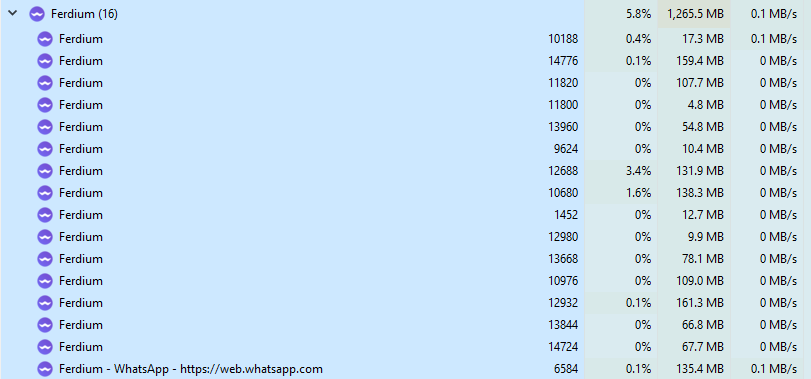
At times, Ferdium spins multiple instances of itself in threads that the windows task manager treats as different apps.These instances are on top of the normal multiple threads that are within Ferdium.
It's typically 4-10 instances that clog the CPU of my laptop (i7-11800H, not the fastest but not the slowest either). Some additional notes:
- If I manually kill these processes, Ferdium doesn't seem to be affected at all. The annoying thing is that killing these processes manually is a huge pain.
- It happens mostly at random, but I saw it happen more often when I am under my work wifi (go figure)
- I suspect it's an electron bug, but I don't know enough about it to figure it out myself.
- Happy to provide more information if needed!
Steps to reproduce
It's very hard to reproduce this process.
Debug link
No response
Screenshots
No response
Additional information
Might be related to https://github.com/ferdium/ferdium-app/issues/131 . In my case, it seems independent of the specific service (I have never used protonmail).

Could you list the services you're using? I have my potential culprits listed in #131

Good point! I have:
- 3GMails
- 2 GCals
- 1 Zenhub
- 1 Notion
- 5 to 6 Slacks
- 1 Android messages
- 1 Telegram
All of this in two separate workspaces and some of these services hibernate. In normal situations, CPU consumption is below 1%.
Good point! I have:
- 3GMails
- 2 GCals
- 1 Zenhub
- 1 Notion
- 5 to 6 Slacks
- 1 Android messages
- 1 Telegram
All of this in two separate workspaces and some of these services hibernate. In normal situations, CPU consumption is below 1%.
I think we can narrow this list down to:
- GCalc
- Zenhub
- Notion
- Telegram
- Android Messages
I know its a big ask, especially during the work day, but could you consider disabling each type of those services (ex: all GCalc) and see if CPU usage returns to normal; when you get the chance? You shouldn't have to do them one by one. I would test them myself but I do not have active Telegram, Android Messages, Notion or Zenhub accounts.
Sorry for the late reply. I don' think it's a service-specific issue, as I've been having this for a couple years now and I've tried all possible combinations of services. Also, it doesn't happen all the time so even if I did the above I might not see it happen anyways. However, because of https://github.com/ferdium/ferdium-app/issues/249 I moved from Ferdi server to Ferdium server, and I have immediately seen a drastic reduction of CPU consumption: from an average of 2-4% to 0-0.2% on idle. Is it possible that the Ferdi server was messing up with Ferdium ? I'll keep an eye out for this in the next days/weeks and update here when I have more info.
I am having the same problem, also hard to reproduce. Closing Ferdium normally (via right click on taskbar and selecting "Quit Ferdium") keeps those stray processes alive.
Services:
- Telegram
- GMail
- Discord
Telegram seems to overlap with what was reported previously so I might try to disable it once the problem reappears and report back the results.
I am using the Ferdium Server with Ferdium 6.0.0-nightly.69 on Windows 10 x64.

I have the same problem. Services used: gmail gcalender gkeep Microsoft ToDo Telegramm Whatsapp Slack
it's seperate processes and they take up to 50% of cpu (Ryzen 5 3600) and use 7 Gb of Ram.
I too have to manually kill them.

I only have 2 active services, WhatsApp being one of them, the other is GMail, and Ferdium is using almost 1.3GB of RAM. This slows my workflow, since it makes opening apps slower. Btw, I have all my services hibernating, and the option to not start services unless opened at startup.
I'm using Windows 10 21H2

macOS Monterey 12.4 just informed me that Ferdium 6.1.0 was using 91.06 GB of memory (!). And it kept increasing fast on the screenshot. Ferdium was only open for around 30 mins.

Services:
- Messenger
- Discord
- Slack (×4)

Same issue here. Using Ferdium 6.1.0 on Windows 21H1.
Services:
- Telegram
- Mattermost
It seems to happen when i start a new instance while ferdium is already up and running

Can confirm that it seems to happen when trying to open a ferdium instance while ferdium is already running

I'm on Ubuntu 20.04 LTS with the latest stable Ferdium with 26 services. CPU load from Ferdium is around 15% and kind-off acceptable. However, when I press F11 to go into full-screen mode, then CPU load goes up to 50% or more and never goes back to anything lower than that. Only if I finish full-screen mode and wait a while, it relaxes eventually.
Sounds like rendering might be affecting the CPU load?

I also have this problem on Windows 11 - I have two services set not to hibernate, and the rest are all hibernating (the grey dot appears next to them). However I have ten instances of Ferdium running using 1.3GB of RAM. My assumption was if i turn off "enable notifications" and "enable hibernation" and then force hibernate them i should only see instances for those services that are active?

Same problem here at least by 6 months. Windows 11 23h2
. Whatsapp (2 instances) . Telegram (1 instance)

This happens to me as well, and can easily be reproduced by trying to open Ferdium again while the application is already open. Each time, or some of the time... it will open a new thread in the background using about 10% CPU indefinitely... try it a few times and you got a big bottleneck going on
To resolve, one has to open Task Manager and kill the offending processes

I have constant 100% in my case making laptop fan going nuts already.
It would have been nice if there was a way to show CPU consumption per app to troubleshoot which service(s) cause it. E.g. some CPU indicator right there over icons or just a separate panel or any other way really . In my case it is mostly Slacks which are enabled ATM + google calendar + mattermost . Disabled "non-essential" for now but didn't yet pin point who is the culprit

Hi! I've opened dublicate of the issue here https://github.com/ferdium/ferdium-app/issues/1720 Should i do something with it?

FINALY I'VE FOUND OUT HOW TO REPRODUCE IT!
- Setup several windows virtual screens
- Pin ferdium on the windows bar
- Run ferdium on the second screen
- Go back to the first screen and look at the icon, it has not "active status" background
- Click on ferdium icon on the first screen and you will spawn ferdium process
high cpu usage. with me as well. 30% of my cpu usage goes towards Ferdium
Version: 6.7.4 Server: No Server Electron: 30.0.6 Chrome: 124.0.6367.207 Node.js: 20.11.1 Platform: Windows 11 Arch: x64 Build date: Sat May 18 2024 06:51:10 GMT+0200 (South Africa Standard Time) Git SHA: https://github.com/ferdium/ferdium-app/commit/cb7f45986746948e69ff2400c98cad10c5b2c76f Git branch: release

Same here
Services whatsapp Skype Discord Reddit Messenger Skype LinkedIn X ChatGPT TempMail
Version: 6.7.6 Server: No Server Electron: 31.3.1 Chrome: 126.0.6478.185 Node.js: 20.15.1 Platform: Windows 10 Arch: x64 Build date: Tue Aug 06 2024 01:46:54 GMT+0800 (Singapore Standard Time) Git SHA: 5bed770b Git branch: release
