

 ferdium
WhatsApp Update Hangs
Preflight Checklist
- [X] I agree to follow the Code of Conduct that Ferdium Recipes adheres to.
- [X] I have searched the issue tracker for a bug report that matches the one I want to file, without success.
Ferdium Version
6.4.1
Recipe Name
Recipe Version
3.5.1
Last Known working version of the recipe
No response
Steps to reproduce
Try updating the service.
Expected Behavior
WhatsApp to update and start.
Actual Behavior
Update hangs indefinitely. Restart doesn't help.
Screenshots
Additional Information
No response

Hello @mkozjak, thank you for logging this issue.
If you press reload on the service several times it will work. Or maybe restart Ferdium

@SpecialAro This time pressing reload on the service several times or restarting Ferdium doesn't work.
@SpecialAro This time pressing reload on the service several times or restarting Ferdium doesn't work.
Try reloading Ferdium (restart)
first start this week:
- WA opens normal but need to be updated
- hit update
- update hangs
- restart ferdium
- again update WA
- update is done
- double or tripple click on a text message to copy text -> white screen
- restart ferdium -> WA needs update...
- why always update notification after restart ferdium?

Can you please try the following (I'm not facing this issue so I'm not entirely sure if this would help):
WARN: You will need to login back again in whatsapp at the end of the steps
- With whatsapp open in ferdium press:
SHIFT + CTRL + ALT + Ito open the service dev tools. - Navigate to the Application tab
- Navigate to Storage (on the left tab)
- Select all check boxes there (except the "Simulate custom storage quota")
- Click on "Clear Site data"
- Restart Ferdium (or reload)
Can you please try the following (I'm not facing this issue so I'm not entirely sure if this would help):
WARN: You will need to login back again in whatsapp at the end of the steps
* With whatsapp open in ferdium press: `SHIFT + CTRL + ALT + I` to open the service dev tools.

* Navigate to the Application tab

* Navigate to Storage (on the left tab)

* Select all check boxes there (except the "Simulate custom storage quota")

* Click on "Clear Site data"

* Restart Ferdium (or reload)
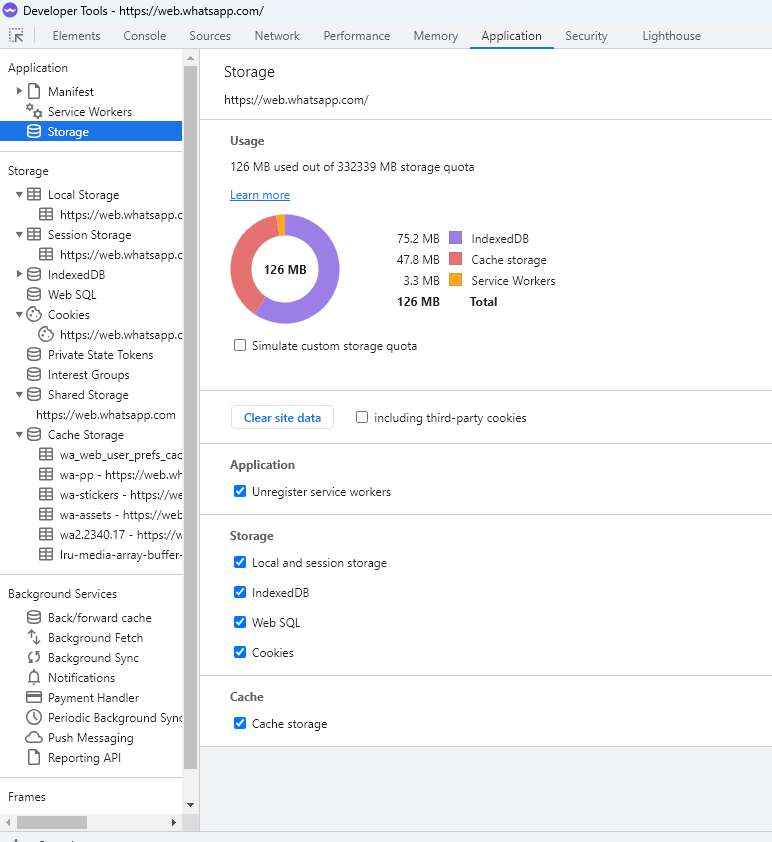
This seemed to have fixed it for me!

Nope.
You'd expect that clearing all locally stored data would cause everything to be reloaded from the WA servers, and that this would give you the updated version. Somehow that's not the case, and clicking "Update" still causes a hang.
I do see messages like this in the console (since it's open):
DevTools failed to load source map: Could not load content for https://web.whatsapp.com/main.c67209117d434cf3019f.js.map: Unexpected token '<', "<!DOCTYPE "... is not valid JSON
DevTools failed to load source map: Could not load content for https://web.whatsapp.com/vendors~lazy_loaded_high_priority_components~lazy_loaded_low_priority_components.e4bc397bdb594c85b9eb.js.map: Unexpected token '<', "<!DOCTYPE "... is not valid JSON
DevTools failed to load source map: Could not load content for https://web.whatsapp.com/lazy_loaded_high_priority_components~lazy_loaded_low_priority_components.12250710008ae65f67eb.js.map: Unexpected token '<', "<!DOCTYPE "... is not valid JSON
I wonder if those are related to the issue at hand.

Still running v. 6.5.0.nightly17 and whatsapp hangs on update buffer bar. Reloading the service does nothing.
It's definitely not a whatsapp cache issue, since ElectronIM runs Wapp just fine.
I've cleared every browser cache and temp files I could find (with Windows 10 Manager) and Wapp still doesn't load up in Ferdium.

Please update to the latest nightly or stable as I'm not facing the issue you are describing.
Please update to the latest nightly or stable as I'm not facing the issue you are describing.
I'm still running 6.4.0 and also don't have that kind of problems. In fact I noticed that the update warning has disappeared since my last post here which was made just after I couldn't get it to apply. I quit Ferdium every evening before putting the computer to sleep so there's a chance that whatever code was updated ended up being loaded like it should.
Or the update itself was problematic and just withdrawn...
Now running 6.6.0 and I've had it happen twice already that the Whatsapp service doesn't load at all when starting Ferdium. In both cases the service wasn't the active/front one on start.
That's becoming a problem because you can't see from the icon that the service isn't up and running, you only discover that when you activate the service. In both cases I had to disable and re-enable the service in order to get the pre-update version to load.
It would be really nice if someone could figure out what on earth is going on here!
please try with the latest version of ferdium - i too dont face this issue.

Hi everyone ! I allow myself to get back on this thread.
I have a similar issue with WhatsApp (and ChatGPT / Cloudflare).
WA stays stuck at the QRCode loading and show this message :
I do a clean storage and restart Ferdium, like said previously in this thread, but the dev tool shows this :
And the connection with ChatGpt and CloudFlare ( same, stay stuck at human verification) seems to be in the mobx file :
What could be the culprit of these issues ?
Hope these infos will help to find a possible bug. Thanks by advance for your help !

Could this issue be related to this thread ? https://github.com/pedroslopez/whatsapp-web.js/issues/1390
Thanks by advance for your help !
FWIW, I had a hang yesterday in 6.7.1 after starting Ferdium for the day. I don't know if there was an update or not, I had another service active and when I switched to WhatsApp I found it hanging as described. Disabling and re-enabling didn't work, I had to restart Ferdium...
Thank you for you response ! Maybe I have found the issue with WhatsApp having a database error.
I am using the portable install of Ferdium on a side drive. Here is the path : " D:\SETUP \ +PortableApps\PortableApps\FerdiumPortable "
And I have tried to change the name of the folders with one letter (special characters work too), and there is no longer database error with small names folders.
Maybe the path is too long for WhatsApp recipe to create the database. I have enabled long paths in Windows registry but the issue remains.
Of course, I can change the names folders to " D:\SETUP \ +\PortableApps\F " but it is kind a weird tree structure. (The PortableApps apllication needs this "PortableApps" folder to run all the apps in its library)
How to run WhatsApp in Ferdium portable even if the folder path is very long ?
Thanks by advance for your help !
Some update since last comment.
WhatsApp works now. I have done a defragmentation disk and the recipe doesn't hang up and connects immediately.
So, if you have this issue on portable Ferdium, try to defragment your HDD to resolve WhatsApp recipe.