
procedural-gl-react
 procedural-gl-react copied to clipboard
 felixpalmer
Can't addOverlay
Hi,
Using create-react-app with hooks. Map loads well, but calling addOverlay doesn't seem to work. The blue-fot.png is on public folder root.
  const aref = useRef();

  const featureCollection = {
    type: 'FeatureCollection',
    features: [
      {
        geometry: {
          type: 'Point',
          coordinates: [13.6, 47.23, 2500],
        },
        type: 'Feature',
        id: 0,
        properties: {
          image: './blue-dot.png',
        },
      },
    ],
  };

  useEffect(() => {
    console.log(aref);
    if (aref.current) {
      // @ts-ignore
      aref.current.addOverlay(featureCollection);
      console.log('addd');
      // @ts-ignore
      // aref.current.onOverlayAdded = function (name) {
      //   console.log('Overlay added:', name);
      // };
    }
  }, [aref]);

...

 <ProceduralMap
        ref={aref}
        datasource={datasource}
        compassVisible={false}
        displayLocation={{
          latitude: 47.23,
          longitude: 13.6,
        }}
      />


This is the current ProceduralMap object I get from react component
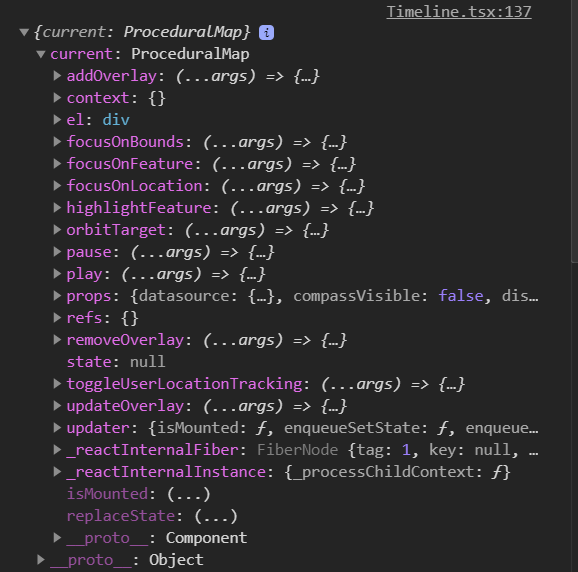
As you can see there are lots of functions missing like onOverlayAdded...etc.
I can add a Basic Line, but can't add marker and text marker or image markers, following the same logic on the documentation.
I've updated the example repo to show adding an overlay and responding to clicks on features. It works fine for me with an image marker.
The relevant part is here:
export default class Example extends React.Component {
  constructor( props ) {
    super( props );
    this.map = React.createRef();
  }

  componentDidMount() {
    // Once map is initialized add an overlay
    const map = this.map.current;
    map.addOverlay( overlay );
  }

  render() {
    return React.createElement( ProceduralMap, {
      ref: this.map,
      datasource,

      // Configure UI elements to show
      compassVisible: true,

      // Configure initial map location
      displayLocation: {
        latitude: 47.25,
        longitude: 13.56
      },

      // Define callbacks
      onFeatureClicked: id => {
        // The id passed here is defined in the overlay
        const map = this.map.current;

        // Simply focus on the feature when clicked
        map.focusOnFeature( id );
      }
    } );
  }
}
As to your other point, the onOverlayAdded etc functions are missing because you haven't defined them. They are callbacks that you define on the map component. If they are not defined then it is expected that they will not be present and thus they won't get called. Again, see the above example to see how to define these.
Hum...strange, I'm using React with hooks. I'm unable to get the same results:
import overlay from "overlay.js"
.
.

const component =()=>{
.
.
.
const NASADEM_APIKEY = "xxxxxxxxxxxxxxx";
  const MAPTILER_APIKEY = "xxxxxxxxxxx";

  const datasource = {
    elevation: {
      apiKey: NASADEM_APIKEY,
    },
    imagery: {
      apiKey: MAPTILER_APIKEY,
      urlFormat: "https://api.maptiler.com/tiles/satellite/{z}/{x}/{y}.jpg?key={apiKey}",
      attribution:
        "<a href="https://www.maptiler.com/copyright/">Maptiler</a> <a href="https://www.openstreetmap.org/copyright">OpenStreetMap</a> contributors",
    },
  };

  const aref = createRef();

  useEffect(() => {
    if (aref.current) {
      aref.current.addOverlay(overlay);

      aref.current.onOverlayAdded = function (name) {
        console.log("Overlay added:", name);
      };
    }
  }, []);

  return (
    <div>
      <ProceduralMap
        ref={aref}
        datasource={datasource}
        compassVisible={false}
        displayLocation={{
          latitude: 47.25,
          longitude: 13.56,
        }}
      />
    </div>
  );
};
I can see the maps, but no added custom overlay. This same approach works with the basic line however.
Without seeing what you have in overlay.js I can't help debug this. That why it would be useful to be able to take a look at a live example. My guess is that there is something wrong with the overlay you've defined
Sorry, I'm using the exact same overlay.js file you have here: https://github.com/felixpalmer/procedural-gl-react-example/blob/main/overlay.js
Ok, so I found a solution, but I think this should be included on documentation or the component itself.
The font awesome css was missing on my index.html
<link href="https://maxcdn.bootstrapcdn.com/font-awesome/4.6.3/css/font-awesome.min.css" rel="stylesheet">