
TW5-TiddlyMap
 TW5-TiddlyMap copied to clipboard
 felixhayashi
Multi line node labels
I have a quick question. Whilst I know I can use the label setting of a node to use it as a replacement for the tiddly title, sometimes it would be nice to have a long title, but wrap it when displayed on the map node.
Is there any way of accomplishing this at the moment that I'm missing?
Cheers,
Geoff.

Hi @gtothill, This is indeed not implemented at the moment, but it would be quite useful. I'll try to make this configurable.

@felixhayashi - thanks for considering this in due course - I think it would allow a greater 'information density' in the map and although counter somewhat to the 'zen' of mind mapping, it would be helpful in some contexts. All the best.
Hi @gtothill Titles will now automatically wrap and continue in a newline. once a width-theshold of 160px is reached. While possible in theory, it is not officially supported yet to individually adjust this threshold – so I hope this default value of 160px suits your needs for now. In case it doesn't please comment.
Hi @felixhayashi Just to say I think this is perfect. Actually 160 px works very well - maps are much more readable and I find myself having to create custom labels far less frequently. Thank you so much for all this work. I used to use Mindjet Mindmanager every day and now all my work lives in Tiddlymap / Tiddlywiki. I cannot tell you how many different approaches I tried until I found your project. Thanks again and keep well. Geoff.
Thanks @gtothill, it is always nice to get such positive feedback :slightly_smiling_face: I know there are still several things to improve with TiddlyMap (usability, layout, integration etc.) and unfortunately the lack of free time prevents me from routinely tackling these issues, but every now and then I try to put in some effort to improve or fix a few things :smile:. So feel free to continue creating issues and making comments if you feel that something is missing, it is appreciated (although I can never promise if or when something gets implemented). Have a nice day Felix
Hi Felix, is it possible to make this settable? In the latest release, if the node name has long text it wraps regardless of the spaces in the text, so it truncates the word. This makes it difficult to read. Even having it as feature to enable and disable in the edit node would be great. Thanks and keep up the great work. Tiddlymap is fantastic Adrian

Hi @adriankelly1, it could be made configurable but would it be possible that you post a screenshot of what exactly is not looking right? Because the wrapping should be done based on the spaces and only in case of words longer than 160px it forcefully breaks the word :thinking:
Hi @felixhayashi Many thnkas for considering this.
Please see attached three nodes which exhibit the problems. I understand the text is very long and I understand that I can use the caption field but it is still an issue. The words economically in the first node and transmission are truncated, if the node size was configurable, we could work around it.
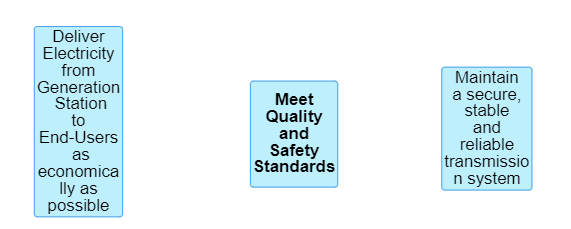
I have dug through vis.js and vis-network. Those libraries don't have it set up to create a menu option to configure maximum width. However, it is still configurable, on a per node/view/node-type/tiddlymap basis. You just have to touch a little bit of json. The json is in the following locations:
- To edit all nodes across all views:
- Edit the
textof$:/plugins/felixhayashi/tiddlymap/config/vis/user
- Edit the
- To edit all nodes in one view:
- Edit the
config.visof$:/plugins/felixhayashi/tiddlymap/graph/views/$(view name)$
- Edit the
- To edit a particular node type:
- Edit the
styleof$:/plugins/felixhayashi/tiddlymap/graph/nodeTypes/$(node type)$
- Edit the
- To edit a particular node for all views:
- Edit the
tmap.styleof the node's corresponding tiddler.
- Edit the
- To edit a particular node locally to one view:
- Edit the json entry in the
textof$:/plugins/felixhayashi/tiddlymap/graph/views/$(view name)$/map
- Edit the json entry in the
You need to add the following json:
{"widthConstraint":{"maximum":600}}
Or not 600, but whatever you want. This will integrate with whatever other settings you have, so if you have the shape set, it might look like this:
{"widthConstraint":{"maximum":600},"shape":"ellipse"}
Exactly what you put varies slightly depending on view/node/node-type/etc, but it shouldn't be hard to figure out. And once it's set, changing other settings through the TiddlyMap menu won't reset it.
If this becomes a popular request, maybe I'll add some custom bits to the configuration menus, but that's way more of a headache than it sounds. Until then, people can do this, and I will close this issue in the meantime.
