pytorch3d
 pytorch3d copied to clipboard
 facebookresearch
SoftDepthShader: The size of tensor a (2) must match the size of tensor b (201) at non-singleton dimension 3
🐛 Bugs / Unexpected behaviors
I'm attempting to use SoftDepthShader with the tutorial cow_mesh and 200 views, like so:
from pytorch3d.renderer.mesh.shader import SoftDepthShader

raster_settings = RasterizationSettings(
    image_size=128, blur_radius=0.0, faces_per_pixel=1
)

depth_renderer = MeshRenderer(
    rasterizer=MeshRasterizer(cameras=cameras, raster_settings=raster_settings),
    shader=SoftDepthShader(
        device=device, cameras=cameras, lights=lights, blend_params=blend_params
    ),
)
depths = depth_renderer(meshes, cameras=cameras, lights=lights)
and I'm getting an error:
Traceback (most recent call last):
  File "fit_textured_volume.py", line 45, in <module>
    target_cameras, target_images, target_silhouettes, target_depths = generate_cow_renders(num_views=200)
  File "/home/odin/odin/perception-3d/generate_cow_renders.py", line 157, in generate_cow_renders
    depths = depth_renderer(meshes, cameras=cameras, lights=lights)
  File "/opt/conda/lib/python3.8/site-packages/torch/nn/modules/module.py", line 1110, in _call_impl
    return forward_call(*input, **kwargs)
  File "/opt/conda/lib/python3.8/site-packages/pytorch3d/renderer/mesh/renderer.py", line 62, in forward
    images = self.shader(fragments, meshes_world, **kwargs)
  File "/opt/conda/lib/python3.8/site-packages/torch/nn/modules/module.py", line 1110, in _call_impl
    return forward_call(*input, **kwargs)
  File "/opt/conda/lib/python3.8/site-packages/pytorch3d/renderer/mesh/shader.py", line 442, in forward
    return (probs * dists).sum(dim=3).unsqueeze(3)
RuntimeError: The size of tensor a (2) must match the size of tensor b (201) at non-singleton dimension 3
To debug, I copy/pasted the shader from here:
class SoftDepthShader(ShaderBase):
    def forward(self, fragments: Fragments, meshes: Meshes, **kwargs) -> torch.Tensor:
        if fragments.dists is None:
            raise ValueError("SoftDepthShader requires Fragments.dists to be present.")

        cameras = super()._get_cameras(**kwargs)

        N, H, W, K = fragments.pix_to_face.shape
        device = fragments.zbuf.device
        mask = fragments.pix_to_face >= 0

        zfar = kwargs.get("zfar", getattr(cameras, "zfar", 100.0))

        # Sigmoid probability map based on the distance of the pixel to the face.
        prob_map = torch.sigmoid(-fragments.dists / self.blend_params.sigma) * mask

        # append extra face for zfar
        dists = torch.cat(
            (fragments.zbuf, torch.ones((N, H, W, 1), device=device) * zfar), dim=3
        )
        probs = torch.cat((prob_map, torch.ones((N, H, W, 1), device=device)), dim=3)

        # compute weighting based off of probabilities using cumsum
        probs = probs.cumsum(dim=3)
        probs = probs.clamp(max=1)
        probs = probs.diff(dim=3, prepend=torch.zeros((N, H, W, 1), device=device))

        return (probs * dists).sum(dim=3).unsqueeze(3)
and started a debugger. probs is of shape [200, 128, 128, 2] and dists is of shape [200, 128, 128, 201]. My guess is that this bit:
        dists = torch.cat(
            (fragments.zbuf, torch.ones((N, H, W, 1), device=device) * zfar), dim=3
        )
was supposed to be something like:
        dists = torch.cat(
            (fragments.zbuf, torch.ones((N, H, W, 1), device=device) * zfar.unsqueeze(1).unsqueeze(2).unsqueeze(3).expand(N, H, W, 1)), dim=3
        )
When I use this, I get these:
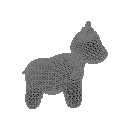
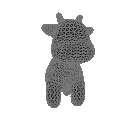
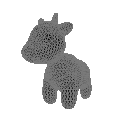
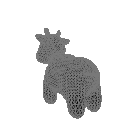
I'm still working out how to use fit_textured_volume.ipynb to learn a density map from the depths, but at least the mesh has depth values now.

If you want 200 renders, then cameras, lights and meshes must all be 200-long batches. The renderer is not designed to do broadcasting. I suspect this is the problem.

Still using the tutorial fit_textured_volume.ipynb code, I changed the light instantiation in generate_cow_renders.py from this:
https://github.com/facebookresearch/pytorch3d/blob/c8af1c45ca9f4fdd4e59b49172ca74983ff3147a/docs/tutorials/utils/generate_cow_renders.py#L108
to this:
    light_locs = [[0.0, 0.0, -3.0] for _ in range(num_views)]
    lights = PointLights(device=device, location=light_locs)
where len(lights) is now equal to num_views instead of 1. But still the same error. Maybe I'm missing something.
@d4l3k any idea?
Not sure -- you might want to put print statements in the shader to see the shapes
Here's my configs:
        sigma = 1e-4 / 3
        raster_settings = RasterizationSettings(
            image_size=(240, 320),
            faces_per_pixel=10,
            blur_radius=np.log(1.0 / 1e-4 - 1.0) * sigma,
            # perspective_correct=False,
        )
        self.rasterizer = MeshRasterizer(
            raster_settings=raster_settings,
        )
        self.shader_depth = SoftDepthShader(
            device=device,
            cameras=cameras,
        )
...
                cameras = CustomPerspectiveCameras(
                    T=T,
                    K=K,
                    image_size=torch.tensor(
                        [[h // 2, w // 2]], device=device, dtype=torch.float
                    ).expand(BS, -1),
                    device=device,
                )
                render_args = dict(
                    cameras=cameras,
                    zfar=100.0,
                    znear=0.2,  # empirically from voxel we don't see closer than 1.3
                    # cull backfaces to prevent the ground becoming the ceiling
                    cull_backfaces=True,
                    eps=1e-8,  # minimum scaling factor for transform_points
                )
                fragments = self.rasterizer(meshes, **render_args)
                depth = self.shader_depth(fragments, meshes, **render_args)[..., 0]
I'm not actually setting any lights at all