
pytorch3d
 pytorch3d copied to clipboard
 facebookresearch
Render white image with PerspectiveCamera but project normally on OpenCV
If you do not know the root cause of the problem/bug and wish someone to help you, please post according to this template:
🐛 Bugs / Unexpected behaviors
Currently, I am working on school project shoe try-on that required rendering 3D shoes based on R and T get from OpenCV. I got key points 2D, 3D, and customized camera matrix then put them through solvePnP and some other functions of cv2 to get R, T matrix. The project points worked well on cv2, however, when I use 'cameras_from_opencv_projection' of pytorch3d then it rendered nothing. Another point is that this function also works well on a different image of mine (with different 2D keypoints only). I do not know why, can u guys help me, please? Note that: image '3DR_Phase1_000051_9Labs' work normally and image '3DR_Phase1_000046_8Labs' work incorrectly
NOTE: Please look at the existing list of Issues tagged with the label 'bug`. Only open a new issue if this bug has not already been reported. If an issue already exists, please comment there instead..
Instructions To Reproduce the Issue:
Please include the following (depending on what the issue is):
- Any changes you made (
git diff) or code you wrote
# lib
import os
import sys
import torch
import os
import torch
import cv2
import numpy as np
import json
import matplotlib.pyplot as plt
# Util function for loading meshes
from pytorch3d.io import load_objs_as_meshes, load_obj

# Data structures and functions for rendering
from pytorch3d.structures import Meshes
from pytorch3d.vis.plotly_vis import AxisArgs, plot_batch_individually, plot_scene
from pytorch3d.vis.texture_vis import texturesuv_image_matplotlib
from pytorch3d.renderer import (
    look_at_view_transform,
    FoVPerspectiveCameras,
    PerspectiveCameras,
    PointLights,
    DirectionalLights,
    Materials,
    RasterizationSettings,
    MeshRenderer,
    MeshRasterizer,
    SoftPhongShader,
    TexturesUV,
    TexturesVertex
)
from pytorch3d import utils

# device
if torch.cuda.is_available():
    device = torch.device("cuda:0")
    torch.cuda.set_device(device)
else:
    device = torch.device("cpu")

# path
name = '3DR_Phase1_000051_9Labs'
img_path = f'{name}.jpg'
json_path = f'{name}.json'

# read image
img = cv2.imread(img_path)
img = cv2.cvtColor(img, cv2.COLOR_BGR2RGB)
kps = get_keypoint_object(json_path)
# get keypoints
shs = [[], []]
new_img = np.copy(img)
for id, kp in enumerate(kps):
  id = id // NUM_TYPE_KEYPOINT
  shs[id].append([int(kp.x), int(kp.y)])
shs = np.array(shs, dtype=np.int32)


# file object
obj_path = 'left4.obj'
verts, faces_idx, _ = load_obj(obj_path)
faces = faces_idx.verts_idx

# Initialize each vertex to be white in color.
verts_rgb = torch.ones_like(verts)[None]  # (1, V, 3)
textures = TexturesVertex(verts_features=verts_rgb.to(device))

# Create a Meshes object
mesh = Meshes(
    verts=[(verts).to(device)],
    faces=[faces.to(device)],
    textures=textures
)

# some id on shoe 3D
idx = [10515, 3671, 22194, 3429, 3576, 13856, 13565, 9463] # shoe right

# shoe points 3D shoe right
points_3D = verts.numpy()[idx, :]

# shoe points 2D of shoe right
points_2D = shs[1].astype(np.float32)

# opencv
# camera matrix
distortion_coeffs = np.zeros((4,1))
size = img.shape
focal_length_x = size[0]
focal_length_y = size[0]
focal_length = size[0]
center = (size[1]/2, size[0]/2)
matrix_camera = np.array(
                         [[focal_length_x, 0, center[0]],
                         [0, focal_length_y, center[1]],
                         [0, 0, 1]], dtype = "double"
                         )
# solvePnP
success, vector_rotation, vector_translation = cv2.solvePnP(points_3D, points_2D, matrix_camera, distortion_coeffs)
# convert to rotation matrix
rmat, jac = cv2.Rodrigues(vector_rotation)
# project 3D point by opencv
project_point3D, jab = cv2.projectPoints(verts.numpy(), vector_rotation, vector_translation, matrix_camera, distortion_coeffs)
# vis
prj_img_cv2 = np.copy(img)
for p in project_point3D:
    cv2.circle(prj_img_cv2, (int(p[0,0]), int(p[0,1])), 1, (0,0,255), -1)


# pytorch 3d camera params
sz = torch.from_numpy(np.array(img.shape[0:2]).reshape(1, 2)).to(device)
R = torch.from_numpy(rmat.astype(np.float32).reshape(1,3,3)).to(device)
T = torch.from_numpy(vector_translation.astype(np.float32).reshape(1,3)).to(device)
mtx_cam = torch.from_numpy(matrix_camera.astype(np.float32).reshape(1,3,3)).to(device)
# camera
cameras = utils.cameras_from_opencv_projection(R, T, mtx_cam, sz)
# raster settings
raster_settings = RasterizationSettings(
    image_size=(img.shape[0], img.shape[1]),
    blur_radius=0.0,
    faces_per_pixel=1,
)
# mesh render
renderer = MeshRenderer(
    rasterizer=MeshRasterizer(
        cameras=cameras,
        raster_settings=raster_settings,
    ),
    shader=SoftPhongShader(
        device=device,
        cameras=cameras,
        # lights=lights
    )
)

# render
render_img = renderer(mesh)[0,...,:3].cpu().numpy().astype(np.uint8) * 255

plt.subplot(1,2,1)
plt.imshow(prj_img_cv2)
plt.title("Project points with opencv")

plt.subplot(1,2,2)
plt.imshow(render_img)
plt.title("render object pytorch3d")

plt.show()
- The exact command(s) you ran: Here is the link to the data that you can check:
- What you observed (including the full logs):
For image '3DR_Phase1_000051_9Labs':
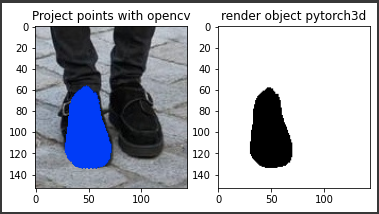 For image '3DR_Phase1_000046_8Labs':
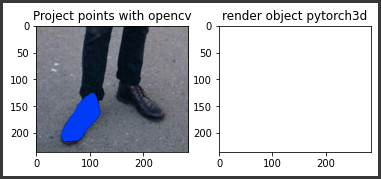
I have checked the issue for days but not work. Please help me :(((

I realized that if the vector translation in index 2 (z axis) be negative then the renderer will render nothing. Any idea about that?
Also that the projected points from transform_points_screen and opencv are completely equal. Still don't get why render nothing ?
Can you use the plotly_vis functionality to plot the mesh and the (new) camera together? That should help you see what is going wrong.

Sorry for late reply, I did try and found this
 the camera direction was not correct and i dont know why :(
Can you use the plotly_vis functionality to plot the mesh and the (new) camera together? That should help you see what is going wrong.
I am a newbie in pytorch3d :((( so i don't know how to fix this, can you please help me on this?
also see that when plot mesh I see that the object wihout camera seem to be different. what is the point here?


Sorry - I missed this. You can see in the first plot that the camera is not facing the object. This should help debug. The difference in the plot may just be an axis difference because the camera has to be fitted in.
Same problem. I use cv2.solvePnP to get R and t, and construct a camera like:
camera = cameras_from_opencv_projection(R, T, K, img_size)
And the projection seems correct, I validate it by:
out_screen = camera.transform_points_screen(points_3d, image_size=img_size)
The projected points out_screen DO align with points_2d, but the camera is somewhat "behind" the object.


The most strange thing is, camera.transform_points_screen seems to work really well, but the results of rendering are confusing.
I also tried to use camera.transform_points_screen to project all the vertexes of the object onto the screen, the pixel coordinates also fall in the region of the screen ( 0<x<W and 0<y<H), but still nothing in the rendering results.
The exact issue that I faced, I solved this by using epnp algorithm to find initialized rotation matrix and translation vector of the iterative pnp algorithm