
habitat-sim
 habitat-sim copied to clipboard
 facebookresearch
Unable to find_path using --compute_action_shortest_path
❓ Questions and Help
I want to sample a lot of rgb-depth pairs from Replica dataset using example/example.py.
However, only when I use --compute_action_shortest_path, it often fails in find_path function in habitat_sim/nav/greedy_geodesic_follower.py. How can I avoid this error?
Here's the failure example using apartment_1/habitat/mesh_semantic.ply as the scene. If I use apartment_0/habitat/mesh_semantic.ply, it somehow works.
$ python examples/example.py --scene ../Replica-Dataset/downloaded_data/apartment_1/habitat/mesh_semantic.ply --depth_sensor --save_png --compute_action_shortest_path
sim_cfg.physics_config_file = ./data/default.phys_scene_config.json
==== Initialized Sensor Spec: =====
Sensor uuid:  color_sensor
Sensor type:  SensorType.COLOR
Sensor position:  [0.  1.5 0. ]
===================================
==== Initialized Sensor Spec: =====
Sensor uuid:  depth_sensor
Sensor type:  SensorType.DEPTH
Sensor position:  [0.  1.5 0. ]
===================================
==== Initialized Sensor Spec: =====                                           [15/4918]
Sensor uuid:  color_sensor
Sensor type:  SensorType.COLOR
Sensor position:  [0.  1.5 0. ]
===================================
==== Initialized Sensor Spec: =====
Sensor uuid:  depth_sensor
Sensor type:  SensorType.DEPTH
Sensor position:  [0.  1.5 0. ]
===================================
WARNING: Logging before InitGoogleLogging() is written to STDERR
I1229 01:24:04.615319 54460 WindowlessContext.cpp:100] [EGL] Detected 8 EGL devices
I1229 01:24:04.708307 54460 WindowlessContext.cpp:121] [EGL] Selected EGL device 0 for
CUDA device 0
I1229 01:24:04.718119 54460 WindowlessContext.cpp:135] [EGL] Version: 1.5
I1229 01:24:04.718153 54460 WindowlessContext.cpp:136] [EGL] Vendor: NVIDIA
Renderer: Tesla V100-SXM2-32GB/PCIe/SSE2 by NVIDIA Corporation
OpenGL version: 4.6.0 NVIDIA 418.39
Using optional features:
    GL_ARB_ES2_compatibility
    GL_ARB_direct_state_access
    GL_ARB_get_texture_sub_image
    GL_ARB_invalidate_subdata
    GL_ARB_multi_bind
    GL_ARB_robustness
    GL_ARB_separate_shader_objects
    GL_ARB_texture_filter_anisotropic
    GL_ARB_texture_storage
    GL_ARB_texture_storage_multisample
    GL_ARB_vertex_array_object
    GL_KHR_debug
Using driver workarounds:
    nv-egl-incorrect-gl11-function-pointers
    no-layout-qualifiers-on-old-glsl
    nv-zero-context-profile-mask
    nv-implementation-color-read-format-dsa-broken
    nv-cubemap-inconsistent-compressed-image-size
    nv-cubemap-broken-full-compressed-image-query
    nv-compressed-block-size-in-bits
I1229 01:24:08.431694 54460 simulator.py:130] Loaded navmesh ../Replica-Dataset/downloaded_data/apartment_1/habitat/mesh_semantic.navmesh
start_state.position     [ 7.4124813 -1.6001365 -6.5011973] start_state.rotation
quaternion(0.917429506778717, 0, 0.397898316383362, 0)
Traceback (most recent call last):
  File "examples/example.py", line 67, in <module>
    perf = demo_runner.example()
  File "/raid/home/inoue/2dao/external/habitat-sim/examples/demo_runner.py", line 394,
in example
    self._sim_settings["goal_position"]
  File "/raid/home/inoue/2dao/external/habitat-sim/.env/lib/python3.6/site-packages/habitat_sim-0.1.3-py3.6-linux-x86_64.egg/habitat_sim/nav/greedy_geodesic_follower.py", line 121, in find_path
    raise errors.GreedyFollowerError()
habitat_sim.errors.GreedyFollowerError

The goal position is hard coded for the default scene so there is an interesting(ish) path for the agent to take (https://github.com/facebookresearch/habitat-sim/blob/master/examples/settings.py#L29). This point isn't navigable in that scene. You can sample new target locations via the https://aihabitat.org/docs/habitat-sim/habitat_sim.nav.PathFinder.html#get_random_navigable_point method. You can either check to see if the point is reachable by computing the geodesic distance between the start and target location like here (https://github.com/facebookresearch/habitat-sim/blob/master/examples/demo_runner.py#L97) or by just running the greedy follower and letting it error out.

When I get start/end position by get_random_navigable_point, it works!
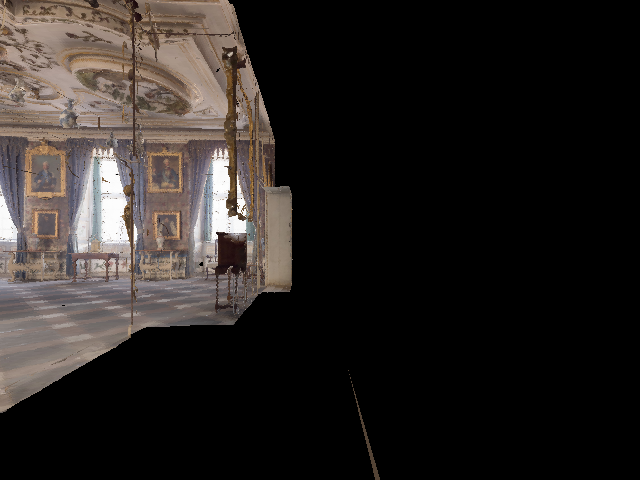
However, sometimes it seems the agent is out of the room, and the some or complete part of the view is rendered with black. Is there any way to make sure that the agent is inside the room in each step in do_time_steps function?
The https://aihabitat.org/docs/habitat-sim/habitat_sim.nav.PathFinder.html#island_radius function returns the size of the connected component a point is part of. When creating sampling spawn locations for various datasets, we reject locations where this function returns less than 1.5