
atom-ide-ui
 atom-ide-ui copied to clipboard
 facebookarchive
compatibility with linter-spell
Description
When hovering over several warnings produced by the linter-spell package (with linter-spell-latex) the change options differ and sometimes are incomplete:
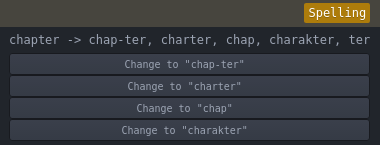

Expected Behavior
The options should contain at least few "Change to..." items and constant "Ignore", "Add to personal dictionary", and "Add to LaTeX dictionary" (in case of LaTeX) options.
Actual Behavior
it is rather random how the options are displayed. Sometimes there are only "Change to..." options and sometimes there are other.
Versions
- Atom: 1.21.1 x64
- Client OS: Ubuntu Gnome 16.04
- atom-ide-ui: 0.5.3
Additional Details
- Installed packages (
apm ls --installed): ├── [email protected] ├── [email protected] ├── [email protected] ├── [email protected] ├── [email protected] ├── [email protected] ├── [email protected] ├── [email protected] ├── [email protected] ├── [email protected] ├── [email protected] ├── [email protected] ├── [email protected] ├── [email protected] ├── [email protected] ├── [email protected] ├── [email protected] ├── [email protected] ├── [email protected] └── [email protected]


Yeah it's converting the linter solutions to code actions. I think we artifically constrained the number of actions to 4 due to UI constraints... combined with JavaScript's unstable sort, that's probably leading to the behavior here. Shouldn't be too hard to patch up.

The same problem happens here with atom 1.23.3. Is it possible to add a scrollbar in the UI to remove the 4-action constraint?

Yup, this is a great candidate for a PR! The limit is enforced here:
https://github.com/facebook-atom/atom-ide-ui/blob/master/modules/atom-ide-ui/pkg/atom-ide-diagnostics-ui/lib/ui/DiagnosticsCodeActions.js#L20-L28
I'd be open to increasing that limit and adding some kind of overflow UI.