

 facebook
Bug:
React 17 not mimic autocomplete up to default browser behaviour.
Default Chrome autocomplete mimic user behaviour: on suggestion pick it fires focus event -> change event -> blur event for every changed field.

React 16
Playground https://jsfiddle.net/akany/0x4qL8np/10/.
Pick chrome suggestion, check console logs.
Each field has focus/change/blur events in chain.

React 17
Playground https://jsfiddle.net/akany/0x4qL8np/11/
Pick chrome suggestion, check console logs.
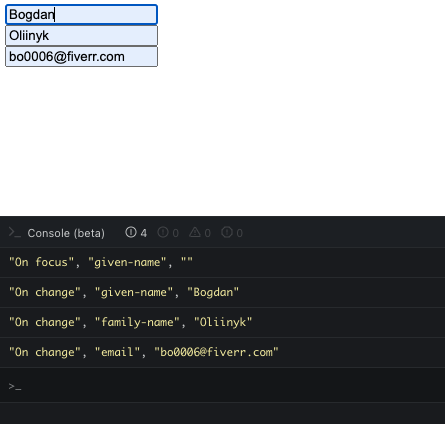
Each field has only change event.
How to setup Chrome suggestion
Need to add chrome address. There are many articles about it, one of it https://www.tech-recipes.com/internet/google/google-chrome/how-to-add-an-address-in-google-chrome/.
The current behavior
Suggestion event chain is not up to browser, just change events are fired. React 17+
The expected behavior
Suggestion event chain is up to browser: focus -> change -> blur.

this is because it is upto the browser which method they wanna use for filling up the fields
In your case it was
focus to el1 or clicking on el1; changing data of el1; blur then moving up to the next autocomplete element. as you know it can have 1 focus at a time. thats the reason for this behaviour.

This issue has been automatically marked as stale. If this issue is still affecting you, please leave any comment (for example, "bump"), and we'll keep it open. We are sorry that we haven't been able to prioritize it yet. If you have any new additional information, please include it with your comment!
![github-actions[bot] avatar](https://avatars.githubusercontent.com/in/15368?v=4 "Published by a pub.dev verified publisher")
Closing this issue after a prolonged period of inactivity. If this issue is still present in the latest release, please create a new issue with up-to-date information. Thank you!