

 facebook
Bug: <img/> renders twice in firefox with react 18
React version: 18.2.0
Steps To Reproduce
- Insert a tag
<img/>with src - Go to Firefox inspect tool to the tab network
- Reload the page and watch image request in network
Link to code example: https://codesandbox.io/s/unruffled-jerry-9hli44?file=/src/App.js
The current behavior
There are two request for image in firefox, image renders twice

The expected behavior
There is one request and one render in firefox

It really happens, even on Chrome/Edge. But I think this is due to StrictMode. Could please try deleting StrictMode on index.js?
It will look like this.
root.render(<App />);
On StrictMode react render twice. https://reactjs.org/docs/strict-mode.html
StrictMode renders components twice (on dev but not production) in order to detect any problems with your code and warn you about them

It really happens, even on Chrome/Edge. But I think this is due to StrictMode. Could please try deleting StrictMode on
index.js?It will look like this.
root.render(<App />);On StrictMode react render twice. https://reactjs.org/docs/strict-mode.html
StrictMode renders components twice (on dev but not production) in order to detect any problems with your code and warn you about them
it doesn't help, in my example in codesandbox I tried to remove StrictMode, but the behavior is the same, there are two requests in network tab Аnd on Chrome, if you open this https://c1i5n8.csb.app/ there are no two requests in network tab
There is, check https://codesandbox.io/s/unruffled-jerry-9hli44?file=/src/index.js On Edge and Firefox I still getting 2 requests, disabling strict-mode it stops.
@MiguelMachado-dev, Just check this example (without StrictMode): https://codesandbox.io/s/goofy-stonebraker-pf0wg7?file=/src/index.js (https://pf0wg7.csb.app/)
And there is screenshot with two requests:

What i'm doing wrong?

Not sure, it does not happen to me. We should then wait for more people to see this. It only happen to me when using StrictMode.
Edge:

Firefox:

Both browsers up to date.

@MiguelMachado-dev How can I contribute to fixing this bug?
Do you know how to fix it?
If you know, you can fork the project and open a PR. Or a solution, you can comment here how he can fix it properly.
Hi! I repeated this case in https://codesandbox.io/ with clean HTML and get same result, then I try same code with corgi in https://codepen.io/sult4novars/pen/NWMRzRX and get one request)

Maybe it depends on OS? I have MacOS 12 (M1), Firefox 104.0.2
And I reproduced it on codepen: https://codepen.io/sult4novars/pen/NWMRzRX
Maybe it depends on OS? I have MacOS 12 (M1), Firefox 104.0.2
And I reproduced it on codepen: https://codepen.io/sult4novars/pen/NWMRzRX
i have same params MacOS 12.6 (M1, 8gb ), Firefox 104.0.2

Maybe it depends on OS? I have MacOS 12 (M1), Firefox 104.0.2
And I reproduced it on codepen: https://codepen.io/sult4novars/pen/NWMRzRX
ooo I reproduced to but when I reload page this case not reproduced but i check status and see NS_BINDING_ABORTED and search this status, and what I found https://stackoverflow.com/questions/704561/ns-binding-aborted-shown-in-firefox-with-httpfox
Maybe it depends on OS? I have MacOS 12 (M1), Firefox 104.0.2
And I reproduced it on codepen: https://codepen.io/sult4novars/pen/NWMRzRX
try with new image https://codepen.io/sult4novars/pen/NWMRzRX
when I first reload:

when i try to reload many times
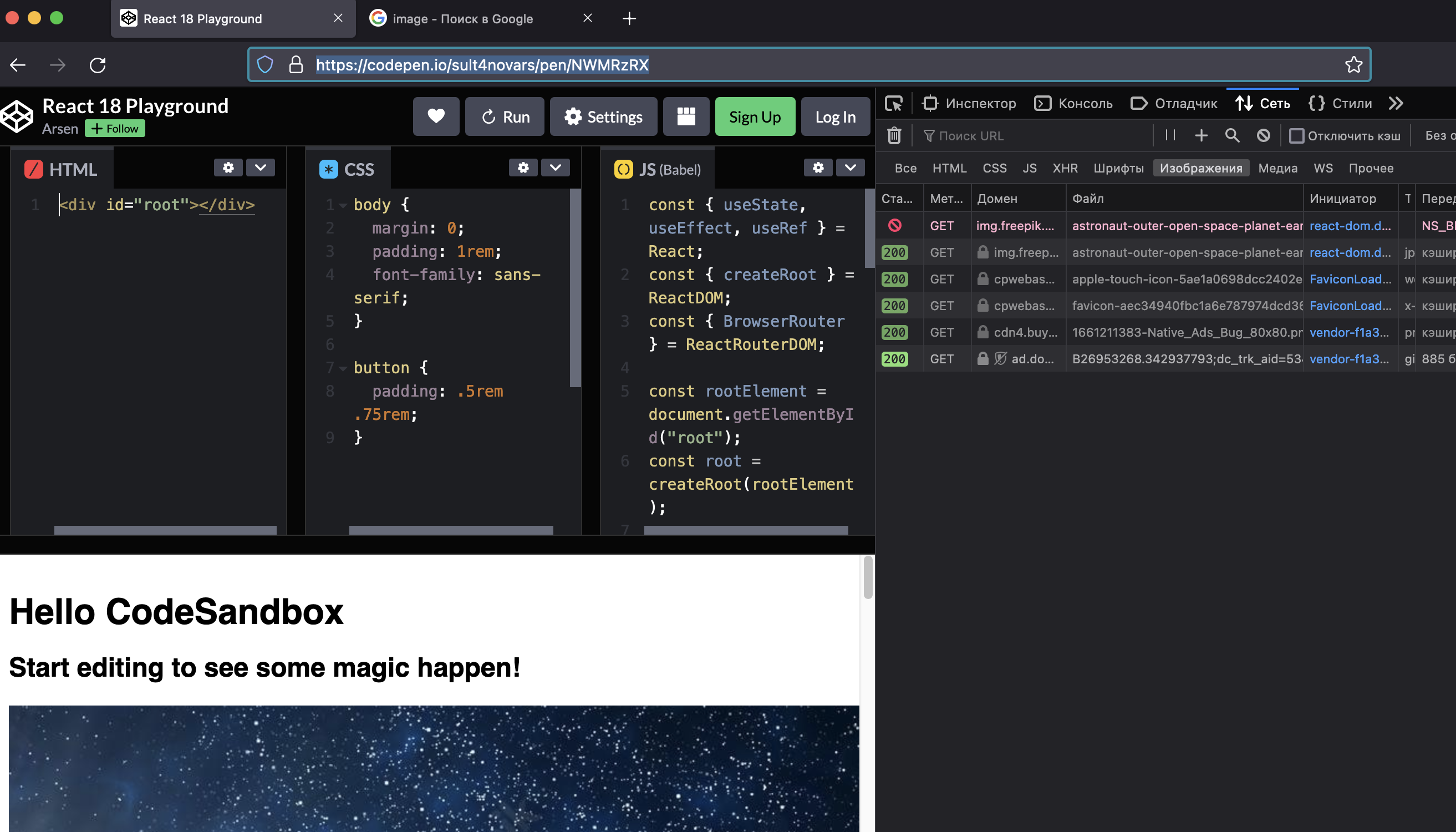
when i try my example with react 17, there are not two requests in firefox https://codesandbox.io/s/wizardly-lena-yobcgz?file=/src/index.js
Firefox is simply ignoring the cache expires value when you force reload the page. The NS_BINDING_ABORTED tries to indicate that the browser checks whether the img is stored in the cdn cache which is obviously not in this case as there are no extra cache expires headers being sent.
The request gets blocked because the page(codepen here) hasnt loaded yet and there is already another request (get image) being sent while the page request is yet to return completely. This isnt a typical React bug IMHO but more of a failsafe method Firefox implemented.
You can easily see the next reload request sent for the same img is served via cache as cache gets set to current whenever missing an expiry header. Have a look at the stack trace in dev console


We are observing the same behaviour. Firefox 115, Ubuntu Linux 23.04 and macOs. Unable to test on Windows yet.
Here is some details.
The first request is initiated in react-dom.development.js, line 855:
node.setAttribute("src", "https://.../korgi-na-trave-960x540-1-960x540.jpg");
Here is the stack trace.
setValueForProperty           react-dom.development.js:855:12
setInitialDOMProperties       react-dom.development.js:9720:26
setInitialProperties          react-dom.development.js:9921:26
finalizeInitialChildren       react-dom.development.js:10950:23
completeWork                  react-dom.development.js:22193:40
completeUnitOfWork            react-dom.development.js:26596:16
performUnitOfWork             react-dom.development.js:26568:23
workLoopSync                  react-dom.development.js:26466:22
renderRootSync                react-dom.development.js:26434:7
performConcurrentWorkOnRoot   react-dom.development.js:25738:74
...
The second request is initiated here:
function commitMount(domElement, type, newProps, internalInstanceHandle) {
  // Despite the naming that might imply otherwise, this method only
  // fires if there is an `Update` effect scheduled during mounting.
  // This happens if `finalizeInitialChildren` returns `true` (which it
  // does to implement the `autoFocus` attribute on the client). But
  // there are also other cases when this might happen (such as patching
  // up text content during hydration mismatch). So we'll check this again.
  switch (type) {
    case 'button':
    case 'input':
    case 'select':
    case 'textarea':
      if (newProps.autoFocus) {
        domElement.focus();
      }

      return;

    case 'img':
      {
        if (newProps.src) {
          domElement.src = newProps.src; // <<<<<<<<<<<<<<<<<<<<<<<<<<<<<<<<<<<<< HERE
        }

        return;
      }
  }
}
commitMount                       react-dom.development.js:11038
commitLayoutEffectOnFiber         react-dom.development.js:23407
commitLayoutMountEffects_complete react-dom.development.js:24688
commitLayoutEffects_begin         react-dom.development.js:24674
commitLayoutEffects_begin         react-dom.development.js:24656
commitLayoutEffects               react-dom.development.js:24612
commitRootImpl                    react-dom.development.js:26823
commitRoot                        react-dom.development.js:26682
finishConcurrentRender            react-dom.development.js:25981
performConcurrentWorkOnRoot       react-dom.development.js:25809
...
node, in the first snippet, and domElement, in the 2nd, are the very same variable: the real <img> DOM node.
The point is the browser is replacing the source of the imgage twice.
If the first request has not been completed when the src attribute is set the second time, the browser aborts the first request, leading to the NS_BINDING_ABORTED error.
This occurs despite the src value is the same both time.
Note that the src is always converted to a fully qualified URL (have a look : https://github.com/facebook/react/commit/f0dd459e0d97081cb3c313ec52285e3e422f8dbf):
const n = document.createElement("img");
n.src = "/favicon.ico"
console.log(n.src); // prints https://wherever.you.are/favicon.ico
This behaviour has been introduced in https://github.com/facebook/react/commit/086fa8ee2f80f0dc34b7d145be72f9843fca975d
Using Chromium, the request is only initated once, at the very end of the process.

This issue has been automatically marked as stale. If this issue is still affecting you, please leave any comment (for example, "bump"), and we'll keep it open. We are sorry that we haven't been able to prioritize it yet. If you have any new additional information, please include it with your comment!
![github-actions[bot] avatar](https://avatars.githubusercontent.com/in/15368?v=4 "Published by a pub.dev verified publisher")
Closing this issue after a prolonged period of inactivity. If this issue is still present in the latest release, please create a new issue with up-to-date information. Thank you!
@maxencelaurent I am observing the very same behavior you describe. Have you been able to solve or workaround it somehow? Thanks!

I have the same issue.
I does not happen in Chrome, but in Firefox 126.0b4 (64-bit)

I can reproduce this as well in Firefox 126.0 (and older versions as well), as a previous comment mentioned this is caused by the "fix" where commitMount() sets the src attribute to the same value to trigger load/error events at the correct time.
Changing in ReactDOMHostConfig.js (for React 18.3.1)
from
if ((newProps: any).src) {
    ((domElement: any): HTMLImageElement).src = (newProps: any).src;
}
to
if ((newProps: any).src && ((domElement: any): HTMLImageElement).complete !== false) {
    ((domElement: any): HTMLImageElement).src = (newProps: any).src;
}
fixes it for me and the events still get fired, however I am not sure if this fix is safe in all cases and browsers
