

 facebook
createPortal: support option to stop propagation of events in React tree
Do you want to request a feature or report a bug?
Feature, but also a bug cause new API breaks old unstable_rendersubtreeintocontainer
What is the current behavior? We cannot stop all events propagation from portal to its React tree ancestors. Our layers mechanism with modals/popovers completely broken. For example, we have a dropdown button. When we click on it, click opens popover. We also want to close this popover when clicking on same button. With createPortal, click inside popover fires click on button, and it's closing. We can use stopPropagation in this simple case. But we have tons of such cases, and we need use stopPropagation for all of them. Also, we cannot stop all events.
What is the expected behavior? createPortal should have an option to stop synthetic events propagation through React tree without manually stopping every event. What do you think?

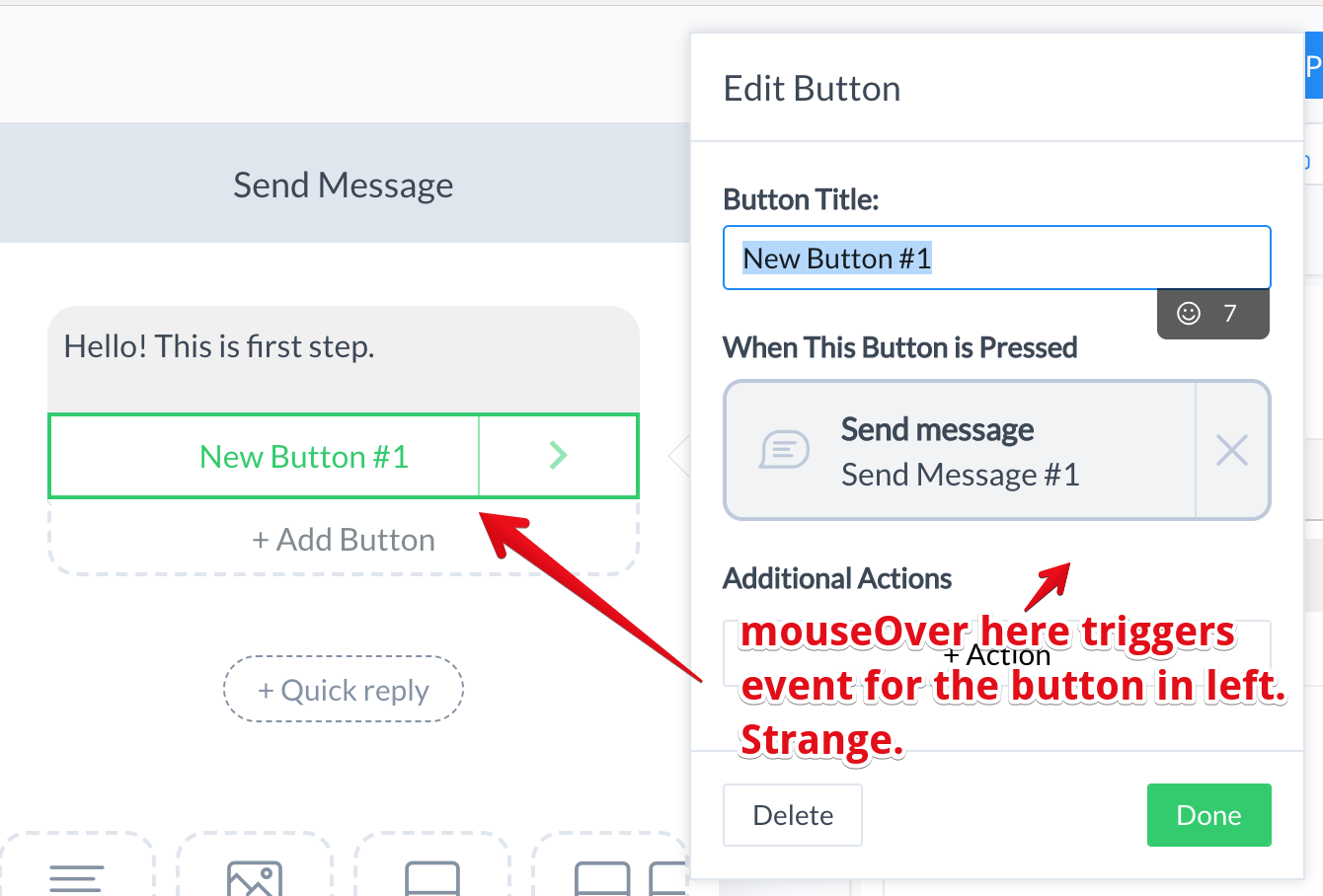
Can you move portal outside of the button?
e.g.
return [
  <div key="main">
    <p>Hello! This is first step.</p>
    <Button key="button" />
  </div>,
  <Portal key="portal" />
];
Then it won't bubble through the button.

It was my first thought, but!) Imagine, that we have mouseEnter handler in such component container:
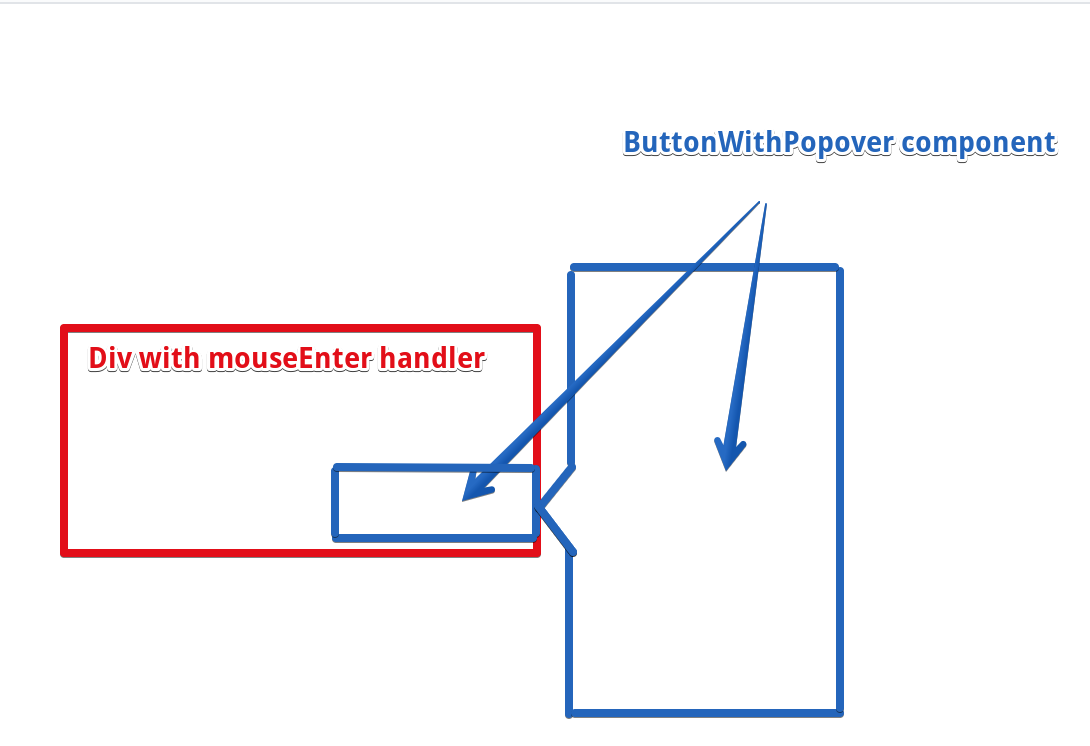
With unstable_rendersubtreeintocontainer i need nothing to do with events in ButtonWithPopover component – mouseEnter simply works when mouse really enters div and button DOM element, and not fired when mouse is over popover. With portal, event fires when mouse over popover – and actually NOT over div in this moment. So, i need to stop propagation. If i do it in ButtonWithPopover component, i will break event firing when mouse is over button. If i do it in popover and i'm using some common popover component for this application, i also can break logic in other app parts.
I really don't understand purpose of bubbling through React tree. If i need events from portal component – i simply can pass handlers through props. We were do it with unstable_rendersubtreeintocontainer and it worked perfect.
If i will open a modal window from some button deep in react tree, i will receive unexpected firing of events under modal. stopPropagation will also stop propagation in DOM, and i will not get events that i really expect to be fired(
@gaearon I would suggest this is more of a bug than a feature request. We have a number of new bugs caused by mouse events bubbling up through portals (where we were previously using unstable_rendersubtreeintocontainer). Some of these can't be fixed even with an extra div layer to filter mouse events because e.g. we rely on mousemove events propagating up to the document to implement draggable dialogs.
Is there a way to workaround this before this is addressed in a future release?

I think it's being called a feature request, because the current bubble behavior of portals is both expected and intended. The goal is that subtree act like real child of their parents.
What would be helpful is additional use cases or situations (like the ones you're seeing) that you don't feel are served by the current implementation, or are difficult to workaround

I understand that this behavior is intended, but I think it's a significant bug that it's not disable-able.
In my mind library working with DOM should preserve DOM implementation behavior not break it.
For example:
class Container extends React.Component {
  shouldComponentUpdate = () => false;
  render = () => (
    <div
      ref={this.props.containerRef}
      // Event propagation on this element not working
      onMouseEnter={() => { console.log('handle mouse enter'); }}
      onClick={() => { console.log('handle click'); }}
    />
  )
}

class Root extends React.PureComponent {
  state = { container: null };
  handleContainer = (container) => { this.setState({ container }); }

  render = () => (
    <div>
      <div
        // Event propagation on this element not working also
        onMouseEnter={() => { console.log('handle mouse enter'); }}
        onClick={() => { console.log('handle click'); }}
      >
        <Container containerRef={this.handleContainer} />
      </div>
      {this.state.container && ReactDOM.createPortal(
        <div>Portal</div>,
        this.state.container
      )}
    </div>
  );
}
When I work with DOM, I expect to receive events like DOM implementation does it. In my example events are propagated through Portal, working around it's DOM parents, and this can be considered as a bug.

Folks thanks for the discussion, however I don't think it's all that helpful to argue whether something is a bug or not. Instead i'd be more productive to discuss the use cases and examples that are not met by the current behavior, so we can better understand if the current way is the best way for the future.
In general we want the API to handle a diverse set of use-cases while hopefully not overly limiting others. I can't speak for the core team, but I'd imagine that making it configurable is not a likely solution. Generally React leans for a consistent api over configurable ones.
I also understand that this behavior is not how the DOM works, but i don't think that's in itself a good reason to say it shouldn't be that way. Lots of react-dom's behavior is different from how the DOM works, may events are already different from the native version. onChange for instance is completely unlike the native change event, and all react events bubble regardless of type, unlike the DOM.
Instead i'd be more productive to discuss the use cases and examples that are not met by the current behavior
Here's two examples that are broken for us in our migration to React 16.
First, we have a draggable dialog which is launched by a button. I attempted to add a "filtering" element on our Portal use which called StopPropagation on any mouse* an key* events. However, we rely on being able to bind a mousemove event to the document in order to implement the dragging functionality -- this is common because if the user moves the mouse at any significant rate, the cursor leaves the bounds of the dialog and you need to be able to capture the mouse movement at a higher level. Filtering these events breaks this functionality. But with Portals, the mouse and key events are bubbling up from inside the dialog to the button that launched it, causing it to display different visual effects and even dismiss the dialog. I don't think it's realistic to expect every component that will be launched via a Portal to bind 10-20 event handlers to stop this event propagation.
Second, we have a popup context menu which can be launched by either a primary- or secondary-mouse click. One of the internal consumers of our library has mouse handlers attached to the element that launches this menu, and of course the menu also has click handlers for handling item selection. The menu is now reappearing on every click as the mousedown/mousedown events are bubbling back up to the button that launches the menu.
I can't speak for the core team, but I'd imagine that making it configurable is not a likely solution. Generally React leans for a consistent api over configurable ones.
I implore you (and the team) to reconsider this position in this particular case. I think event bubbling will be interesting for certain use cases (although I can't think of any offhand). But I think it will be crippling in others, and it introduces significant inconsistency in the API. While unstable_rendersubtreeintocontainer was never super-supported, it was what everyone used to render outside of the immediate tree, and it didn't work this way. It was officially deprecated in favor of Portals, but Portals break the functionality in this critical way, and there doesn't seem to be an easy workaround. I think this can be fairly described as quite inconsistent.
I also understand that this behavior is not how the DOM works, but i don't think that's in itself a good reason to say it shouldn't be that way.
I understand where you're coming from here, but I think in this case (a) it's a fundamental behavior which (b) currently has no workaround, so I think "the DOM doesn't work this way" is a strong argument, if not a completely convincing one.
And to be clear: my request that this be considered a bug is mostly so that it gets prioritized for a fix sooner rather than later.
My mental model of a Portal is that it behaves as if it is on the same place in the tree, but avoids problems such as "overflow: hidden" and avoids scrolling for drawing/layout purposes.
There are many similar "popup" solutions that happen inline without a Portal. E.g. a button that expands a box right next to it.
Take as an example the "Pick your reaction" dialog here on GitHub. That is implemented as a div right next to the button. That works fine now. However, if it wants to have a different z-index, or be lifted out of an overflow: scroll area that contains these comments, then it will need to change DOM position. That change is not safe to do unless other things like event bubbling is also preserved.
Both styles of "popups" or "pop outs" are legit. So how would you solve the same problem when the component is inline in the layout as opposed to floating outside of it?

The workaround that worked for me is calling stopPropagation directly under portal rendering:
return createPortal(
      <div onClick={e => e.stopPropagation()}>{this.props.children}</div>,
      this.el
    )
That works great for me since I have single abstraction component that uses portals, otherwise you will need to fix up all your createPortal calls.

@methyl this assumes you know every event that you need to block from bubbling up the tree. And in the case I mentioned with draggable dialogs, we need mousemove to bubble up to document, but not to bubble up the render tree.
Both styles of "popups" or "pop outs" are legit. So how would you solve the same problem when the component is inline in the layout as opposed to floating outside of it?
@sebmarkbage I'm not sure this question makes sense. If I had this problem inlining the component, I wouldn't inline it.
I think some of problem here is the some use cases of renderSubtreeIntoContainer are being ported to createPortal when the two methods are doing conceptually different things. The concept of Portal was being overloaded I think.
I agree that in the Modal dialog case, you almost never want the modal to act like a child of the button that opened it. The trigger component is only rendering it because it controls the open state. I think tho it's a mistake to say that the portal implementation is therefore wrong, instead of saying that createPortal in the button is not the right tool for this. In this case the Modal is not a child of the trigger, and shouldn't be rendered as if it were. One possible solution is to keep using renderSubtreeIntoContainer, another user-land option is to have a ModalProvider near the app root that handles rendering modals, and passes down (via context) a method to render an arbitrary modal element need to the root
renderSubtreeIntoContainer can't be called from inside of render or lifecycle methods in React 16, which pretty much precludes its use for the cases I've been discussing (in fact, all our components which were doing this completely broke in the migration to 16). Portals are the official recommendation: https://reactjs.org/blog/2017/09/26/react-v16.0.html#breaking-changes
I agree that the concept of Portals might have ended up overloaded. Not sure I love the solution of a global component and context for it, though. It seems like this could be easily solved by a flag on createPortal specifying whether events should bubble through. It would be an opt-in flag which would preserve API compatibility with 16+.
I will try to clarify our use-case of the portals and why we would love to see an option for stopping events propagation. In ManyChat app, we are using portals to create a 'layers'. We have the layer system for the whole app that used by several types of components: popovers, dropdowns, menus, modals. Every layer can expose a new layer, e.g. button on a second level of menu can trigger the modal window where the other button can open the popover. In most cases layer is the new branch of UX that solves it's own task. And when new layer is open, the user should interact with this new layer, not with others in bottom. So, for this system, we've created a common component for rendering to layer:
class RenderToLayer extends Component {
  ...
  stop = e => e.stopPropagation()

  render() {
    const { open, layerClassName, useLayerForClickAway, render: renderLayer } = this.props

    if (!open) { return null }

    return createPortal(
      <div
        ref={this.handleLayer}
        style={useLayerForClickAway ? clickAwayStyle : null}
        className={layerClassName}
        onClick={this.stop}
        onContextMenu={this.stop}
        onDoubleClick={this.stop}
        onDrag={this.stop}
        onDragEnd={this.stop}
        onDragEnter={this.stop}
        onDragExit={this.stop}
        onDragLeave={this.stop}
        onDragOver={this.stop}
        onDragStart={this.stop}
        onDrop={this.stop}
        onMouseDown={this.stop}
        onMouseEnter={this.stop}
        onMouseLeave={this.stop}
        onMouseMove={this.stop}
        onMouseOver={this.stop}
        onMouseOut={this.stop}
        onMouseUp={this.stop}

        onKeyDown={this.stop}
        onKeyPress={this.stop}
        onKeyUp={this.stop}

        onFocus={this.stop}
        onBlur={this.stop}

        onChange={this.stop}
        onInput={this.stop}
        onInvalid={this.stop}
        onSubmit={this.stop}
      >
        {renderLayer()}
      </div>, document.body)
  }
  ...
}
This component stops propagation for all event types from React docs, and it allowed us to update to React 16.
Does this need to be tied to portals? Rather than sandboxing portals, what if there was just a (for example) <React.Sandbox>...</React.Sandbox>?

Even that seems needlessly complex to me. Why not simply add an optional boolean flag to createPortal allowing the bubbling behavior to be blocked?
@gaearon this is a pretty unfortunate situation for a certain slice of us -- could you or someone dear to you have a look at this? :)
I'd add that my current thinking is that both use cases should be supported. There are really use cases where you need context to flow from the current parent to the subtree but to not have that subtree act as a logical child in terms of the DOM. Complex modals are the best example, you just almost never want the events from a form in a modal window to propagate up to the trigger button, but almost certainly need the context passed through (i18n, themes, etc)
I will say that that usecase could be mostly solved with a ModalProvider closer to the app root that renders via createPortal high enough that event propagation doesn't affect anything, but that starts to feel like a workaround as opposed to a well designed architecture. It also makes library provided modals more annoying for users since they are no longer self contained.
i would add tho in terms of API i don't think createPortal should do both, the modal case really wants to just use ReactDOM.render (old skool) because it's pretty close to a distinct tree except that context propagation is often needed
We just had to fix an extremely difficult-to-diagnose bug in our outer application's focus management code as a result of using the workaround that @kib357 posted.
Specifically: calling stopPropagation on the synthetic focus event to prevent it from bubbling out of the portal causes stopPropagation to also be called on the native focus event in React's captured handler on #document, which meant it did not make it to another captured handler on <body>. We fixed by moving our handler up to #document, but we had specifically avoided doing that in the past so as not to step on React's toes.
The new bubbling behavior in Portals really feels like the minority case to me. Be that opinion or truth, could we please get some traction on this issue? Maybe @gaearon? It's four months old and causing real pain. I think this could fairly be described as a bug given that it's a breaking API change in React 16 with no completely-safe workaround.
@craigkovatch I'm still curious how you would solve my inline example. Let's say the popup is pushing the size of the box down. Inlining something is important since it is pushing something down in the layout given its size. It can't just hover over.
You could potentially measure the popover, insert a blank placeholder with the same size and try to align it on top but that's not what people do.
So if your popover need to expand the content in place, like right next to the button, how would you solve it? I suspect that the pattern that works there, will work in both cases and we should just recommend the one pattern.
I think in general this is the pattern that works in both scenarios:
class Foo extends React.Component {
  state = {
    highlight: false,
    showFlyout: false,
  };

  mouseEnter() {
    this.setState({ highlight: true });
  }

  mouseLeave() {
    this.setState({ highlight: false });
  }

  showFlyout() {
    this.setState({ showFlyout: true });
  }

  hideFlyout() {
    this.setState({ showFlyout: false });
  }

  render() {
    return <>
      <div onMouseEnter={this.mouseEnter} onMouseLeave={this.mouseLeave} className={this.state.highlight ? 'highlight' : null}>
        Hello
        <Button onClick={this.showFlyout} />
      </div>
      {this.state.showFlyout ? <Flyout onHide={this.hideFlyout} /> : null}
    </>;
  }
}
If the Flyout is a portal, then it works and it doesn't get any mouse over events when hovering over the portal. But more importantly, it also works if it is NOT a portal, and it needs to be an inline flyout. No stopPropagation needed.
So what is it about this pattern that doesn't work for your use case?
@sebmarkbage we are using Portals in a completely different fashion, rendering into a container mounted as the final child of <body> which is then positioned, sometimes with a z-index. The React documentation suggests this is closer to the design intention; i.e. rendering into a totally different place in the DOM. It doesn't seem to me that our use cases are similar enough for discussion to belong on this thread. But if you want to brainstorm/troubleshoot together, I'd be more than happy to discuss further in another forum.
No my use case is both. Sometimes one and sometimes the other. That's why it is relevant.
The <Flyout /> can choose to render into the final child of body or not but as long as you hoist the portal itself out to a sibling of the hovered component rather than a child of it, your scenario works.
I think there's a plausible scenario where that is inconvenient and you want a way to teleport things from deeply nested components but in that scenario you're probably fine with the context being the context from the intermediate point. But I think of those as two separate issues.
Maybe we need a slots API for that.
class Foo extends React.Component {
  state = {
    showFlyout: false,
  };

  showFlyout() {
    this.setState({ showFlyout: true });
  }

  hideFlyout() {
    this.setState({ showFlyout: false });
  }

  render() {
    return <>
      Hello
      <Button onClick={this.showFlyout} />
      <SlotContent name="flyout">
        {this.state.showFlyout ? <Flyout onHide={this.hideFlyout} /> : null}
      </SlotContent>
    </>;
  }
}

class Bar extends React.Component {
  state = {
    highlight: false,
  };

  mouseEnter() {
    this.setState({ highlight: true });
  }

  mouseLeave() {
    this.setState({ highlight: false });
  }

  render() {
    return <>
      <div onMouseEnter={this.mouseEnter} onMouseLeave={this.mouseLeave} className={this.state.highlight ? 'highlight' : null}>
        <SomeContext>
          <DeepComponent />
        </SomeContext>
      </div>
      <Slot name="flyout" />
    </>;
  }
}
The portal would then get the context of Bar, not DeepComponent. Context and event bubbling then still share the same tree path.
@sebmarkbage the modal case usually does require context from the point it's rendered. It's slightly unique of a case I think, the component is a logical child of the thing that rendered it but not a structural one (for lack of a better word), e.g. You usually want things like form context (relay, formik, redux form, whatever) but not DOM events to pass through. One also ends up rendering such modals fairly deep in trees, next to their triggers, so they stay componenty and reusable, more so than because they belong there structurally
I think this case is generally different to the flyout/dropdown case createPortal serves. Tbc I think the bubbling behavior of portals is good, but not for modals. I also think this could handled with Context and some sort of ModalProvider reasonably well, but that's kinda annoying especially for libraries.
as long as you hoist the portal itself out to a sibling of the hovered component rather than a child of it, your scenario works.
Not sure I follow. There's still the problem of e.g. keyDown events bubbling through an unexpected DOM tree.