

 facebook
two instance of react in my react native project
Description
I have a project with an old native screen and reactNativeActivity
I added react activity According to the instructions all are working as well
but when I come to install the flipper I need to call this code
getReactNativeHost().getReactInstanceManager() from MainApplication.java file
since I did I get two instances of react
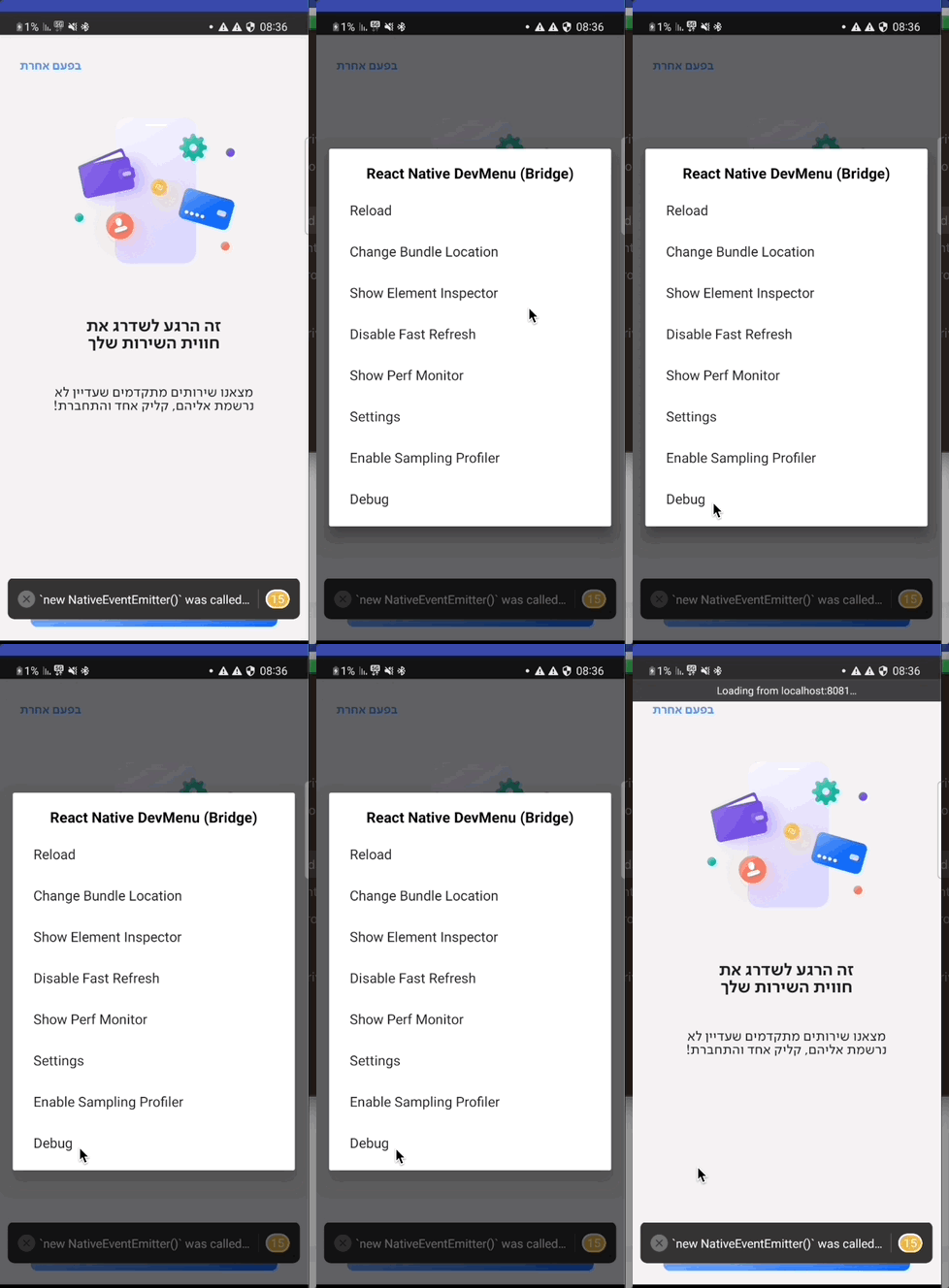
I noticed it when I press on d in my CLI to open the dev menu then I press on reload or debug, the dev menu is not closed
when I check that, I see getReactInstanceManager method call to createReactInstanceManager ,
https://github.com/facebook/react-native/blob/f4e56fdf1946d2e54d8db7b445df001cf6ebfdb0/ReactAndroid/src/main/java/com/facebook/react/ReactNativeHost.java#L37-L46
even I create other instance in my reactNativeActivity.java file in onCreate method
   mReactInstanceManager = ReactInstanceManager.builder()
                .setApplication(getApplication())
                .setCurrentActivity(this)
                .setBundleAssetName("index.android.bundle")
                .setJSMainModulePath("index")
                .addPackages(packages)
                .setUseDeveloperSupport(BuildConfig.DEBUG)
                .setInitialLifecycleState(LifecycleState.RESUMED)
                .setJsEngineAsHermes(true)
                .build();
React Native Version
0.69.7
Output of npx react-native info
System: OS: macOS 13.1 CPU: (8) arm64 Apple M1 Memory: 108.36 MB / 16.00 GB Shell: 5.8.1 - /bin/zsh Binaries: Node: 16.19.0 - /opt/homebrew/opt/node@16/bin/node Yarn: 1.22.17 - /opt/homebrew/bin/yarn npm: 8.19.3 - /opt/homebrew/opt/node@16/bin/npm Watchman: 2022.11.07.00 - /opt/homebrew/bin/watchman Managers: CocoaPods: 1.11.3 - /Users/--------.rvm/gems/ruby-2.7.2/bin/pod SDKs: iOS SDK: Platforms: DriverKit 22.2, iOS 16.2, macOS 13.1, tvOS 16.1, watchOS 9.1 Android SDK: Not Found IDEs: Android Studio: 2021.3 AI-213.7172.25.2113.9123335 Xcode: 14.2/14C18 - /usr/bin/xcodebuild Languages: Java: 11.0.11 - /usr/bin/javac npmPackages: @react-native-community/cli: Not Found react: 18.0.0 => 18.0.0 react-native: 0.69.7 => 0.69.7 react-native-macos: Not Found npmGlobalPackages: react-native: Not Found
Steps to reproduce
integrate into an existing project
https://reactnative.dev/docs/0.69/integration-with-existing-apps
call this code getReactNativeHost().getReactInstanceManager() from the MainApplication.java file (before I create an instance of react-native in `reactNativeActivity``
Snack, code example, screenshot, or link to a repository

| :warning: | Newer Version of React Native is Available! |
|---|---|
| :information_source: | You are on a supported minor version, but it looks like there's a newer patch available. Please upgrade to the highest patch for your minor or latest and verify if the issue persists (alternatively, create a new project and repro the issue in it). If it does not repro, please let us know so we can close out this issue. This helps us ensure we are looking at issues that still exist in the most recent releases. |
![github-actions[bot] avatar](https://avatars.githubusercontent.com/in/15368?v=4 "Published by a pub.dev verified publisher")

as we said when I press on d in cli
I get two layers of the dev menu (gif attached)
also in flipper when I chose the Hermes debugger I got a list with two Hermes instance
what I do to solve that
override createReactInstanceManager in reactNativeHost in MyApplication
then in my ReactNativActivity I did not create ReactInstanceManager but only call to getReactInstanceManager of reactNativHost that he cares to be only one instance of react
ReactNativeActivity.java
mReactRootView = new ReactRootView(this);

MainApplication myApp = (MainApplication) getApplication();
mReactInstanceManager = myApp.getReactNativeHost().getReactInstanceManager(); //cal to get instance without create new instace

Bundle bundle = getIntent().getExtras();
mReactRootView.startReactApplication(mReactInstanceManager, "AppName", bundle);
ReactNativeActivityModule.isReactLoaded = false;
setContentView(mReactRootView);
in MainApplication.java
private final ReactNativeHost mReactNativeHost = new ReactNativeHost(this) {
    @Override
    public boolean getUseDeveloperSupport() {
        return BuildConfig.DEBUG;
    }

    @Override
    protected List<ReactPackage> getPackages() {
        @SuppressWarnings("UnnecessaryLocalVariable")
        List<ReactPackage> packages = new PackageList(this).getPackages();

        return packages;
    }

    @Override
    protected String getJSMainModuleName() {
        return "index";
    }

    @Override
    protected ReactInstanceManager createReactInstanceManager() {

        ReactInstanceManager mReactInstanceManager = ReactInstanceManager.builder()
                .setApplication(getApplication())
                .setBundleAssetName("index.android.bundle")
                .setJSMainModulePath("index")
                .addPackages(getPackages())
                .setUseDeveloperSupport(BuildConfig.DEBUG)
                .setInitialLifecycleState(LifecycleState.BEFORE_CREATE)
                .build();

        return mReactInstanceManager;
    }

};
@cortinico What do you think of my solution? Note that this is not the same as the official documentation found here https://reactnative.dev/docs/integration-with-existing-apps
What do you think of my solution?
It's hard to say what was going on, given that I could not see your original code.
This issue is stale because it has been open 180 days with no activity. Remove stale label or comment or this will be closed in 7 days.
This issue was closed because it has been stalled for 7 days with no activity.