

 facebook
Android: textInput: secureTextEntry toggle causes keyboard change; keyboard does not automatically come up
Description: When enabling the user to toggle the secure text entry flag on a text input, on Android, two issues are occurring:
- The keyboard does not automatically come up when rendering; the user must tap on the field.
- Tapping the 'eye' icon to toggle the secureTextEntry flag from false to true switches the keyboard type.
React Native version:
System: OS: Windows 10 10.0.17134 CPU: (4) ia32 Intel(R) Pentium(R) CPU G4560T @ 2.90GHz Memory: 1.65 GB / 7.43 GB Binaries: Node: 12.10.0 - C:\Program Files (x86)\nodejs\node.EXE Yarn: 1.10.1 - C:\Users\mjfiandaca\AppData\Roaming\npm\yarn.CMD npm: 6.13.4 - C:\Program Files (x86)\nodejs\npm.CMD SDKs: Android SDK: API Levels: 23, 25, 26, 27, 28 Build Tools: 23.0.1, 25.0.1, 26.0.3, 27.0.3, 28.0.0, 28.0.3 System Images: android-23 | Intel x86 Atom, android-23 | Google APIs Intel x86 Atom, android-23 | Google APIs Intel x86 Atom_64, android-26 | Google APIs Intel x86 Atom, android-26 | Google APIs Intel x86 Atom_64, android-27 | Google APIs Intel x86 Atom, android-27 | Google Play Intel x86 Atom, android-28 | Intel x86 Atom, android-28 | Intel x86 Atom_64, android-28 | Google APIs Intel x86 Atom, android-28 | Google APIs Intel x86 Atom_64, android-28 | Google Play Intel x86 Atom IDEs: Android Studio: Version 3.5.0.0 AI-191.8026.42.35.6010548 npmPackages: react: 16.8.6 => 16.8.6 react-native: 0.60.6 => 0.60.6
Steps To Reproduce
- Sign onto the provided snack.
- Intermittently, the keyboard will not come up (I tested this several times; sometimes, no keyboard, sometimes, app starts, flashes, and then the keyboard comes up).
- Tap on the 'eye' icon to toggle the secure text entry.
- Notice the keyboard changes.
Expected Results
The keyboard should not change based on the secure text entry value.
Snack, code example, screenshot, or link to a repository:
https://snack.expo.io/@mjfiandaca/toggle-securetextentry

Sounds like you're still hitting this. Is this true on latest version? (60 is a couple versions behind now)

| :warning: | Using Old Version |
|---|---|
| :information_source: | It looks like you are using an older version of React Native. Please upgrade to the latest version, and verify if the issue persists. If it does not, please let us know so we can close out this issue. This helps us ensure we are looking at issues that still exist in the current release. |
![github-actions[bot] avatar](https://avatars.githubusercontent.com/in/15368?v=4 "Published by a pub.dev verified publisher")
I can still reproduce this on the expo snack I referenced above, which is using expo v36.0.0. According to this webpage https://docs.expo.io/versions/latest/#each-expo-sdk-version-depends-on-a that expo version is using rn 0.61.4.
And my own app is now at 0.62.0, and it is still an issue there as well.
Hey there, it looks like there has been no activity on this issue recently. Has the issue been fixed, or does it still require the community's attention? This issue may be closed if no further activity occurs. You may also label this issue as a "Discussion" or add it to the "Backlog" and I will leave it open. Thank you for your contributions.
![stale[bot] avatar](https://avatars.githubusercontent.com/in/1724?v=4 "Published by a pub.dev verified publisher")
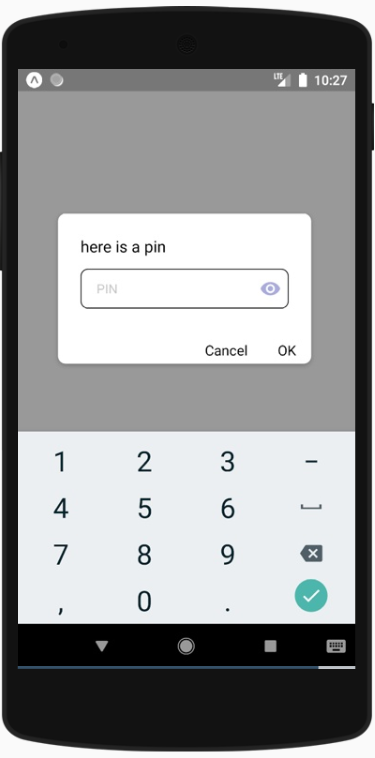
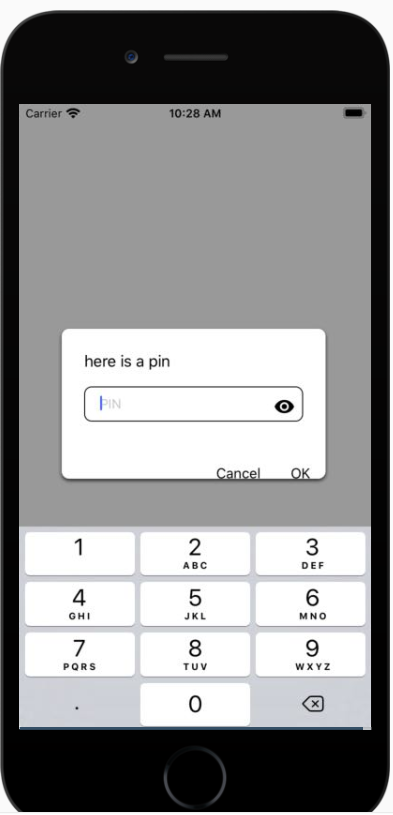
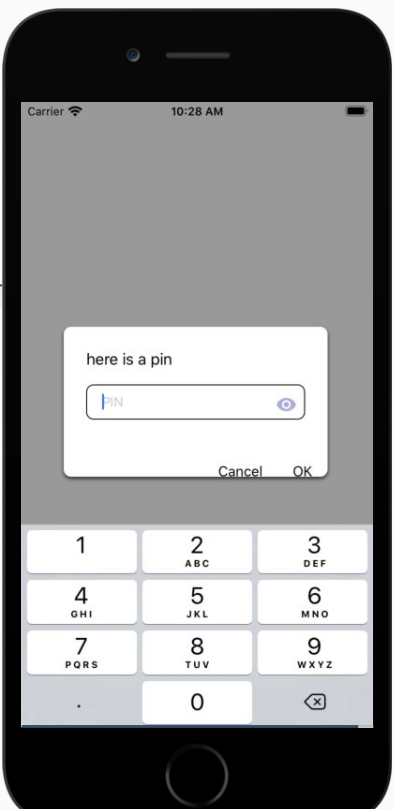
Confirmed repro on provided Snack.
Android
| Launch | Press TextInput | Toggle Eye |
|---|---|---|
 |
 |
 |
iOS
| Launch | Press TextInput | Toggle Eye |
|---|---|---|
 |
|
 |

Any update on this? If you change keyboardType on Android you have to re-focus the text-input for the keyboard to come back up. This is a pain for things like toggling secureTextEntry.

A few updates on this item.
- I traced this back (I believe) to the code in ReactTextinputManager.java (node_modules -> react-native -> ReactAndroid -> src -> main -> java -> com -> facebook -> react -> views -> textinput).
When the prop secureTextEntry is true, the code sets the input type to InputType.TYPE_NUMBER_VARIATION_PASSWORD (versus keeping the input type a number).
@ReactProp(name = "secureTextEntry", defaultBoolean = false) public void setSceureTextEntry(ReactEditText view, boolean password) { updateStatedInputTypeFlag( view, password ? 0 : InputType.TYPE_NUMBER_VARIATION_PASSWORD | InputType.TYPE_TEXT_VARIATION_PASSWORD, password ? InputType.TYPE_TEXT_VARIATION_PASSWORD : 0); checkPasswordType(view);
Then within check password type, it will switch it to the numbered type with the password variant.
I am having trouble finding documentation on the android developer site which actually shows the different keyboards (with a picture!), but here is the android doc: https://developer.android.com/reference/android/text/InputType#TYPE_NUMBER_VARIATION_PASSWORD
So, this seems to be working as it is coded; but the question remains....should it be switching the type if the intended keyboard type was number, to include password variants, or should it just keep the keyboard the same in the case of numeric types?
An alternate would be, if there is a possibility of toggling the secure text entry flag, then the keyboard which appears when secureTextEntry is true should be available as a keyboard type in react native.
-
With RN v. 0.63.2, the keyboard is coming up appropriately when autofocus is true so for my part, that issue was resolved.
-
Someone marked this as an iOS issue as well; it is only android.


I think the possible solution would be to let us revert back the Keyboard type from 'visible-password' to the one that is being set when the secureText entry is set to True ( In Android ). The possible workaround was to toggle the boolean value in secureTextEntry with state variable and set the keyboardType to 'visible-password' once the secureTextEntry is set to false but, the password won't revert back to obscured text once the keyboard is set to 'visible-password'.
We need fix on this issue. Or is there any other workaround ? I heard that the facebook app is also build with React Native? But they are doing fine on toggling password visibility in Android. Is there anything that we're missing or still unaware of ?
The minimum reproducable example
class RewriteExample extends React.Component<$FlowFixMeProps, any> {
  constructor(props) {
    super(props);
    this.state = {show: true};
  }
  render() {
    return (
      <>
        <TextInput
          keyboardType={'numeric'}
          secureTextEntry={!this.state.show}
        />
        <Button title="show" onPress={() => this.setState({show: !this.state.show})} />
      </>
    );
  }
}
I was trying to understand which flag is applied and the correlated limitations from the Android API (https://github.com/facebook/react-native/issues/26799#issuecomment-656689550)

Still has the, Keyboard change issue on Android, Please provide Any Working Solution...


Hey there, it looks like there has been no activity on this issue recently. Has the issue been fixed, or does it still require the community's attention? This issue may be closed if no further activity occurs. You may also label this issue as a "Discussion" or add it to the "Backlog" and I will leave it open. Thank you for your contributions.


Solution is to import Pressable from react-native ... (note: I am using ui kitten library) const renderIcon = (props) => ( Pressable onPress={toggleSecureEntry}> <Icon {...props} name={secureTextEntry ? 'eye-off' : 'eye'} /> Pressable );

is there an update on this ? did anyone find a way to get the same numbers keyboard type that's used when secure text entry flag is set to true on android ?


