

 facebook
Compile error due to openssl 1.1.1 not found and expansion pattern contains no parameter packs in Badge.h
I compile folly with sh build.sh and I get error like this.
  Could NOT find OpenSSL, try to set the path to OpenSSL root folder in the
  system variable OPENSSL_ROOT_DIR: Found unsuitable version "1.0.2k", but
  required is at least "1.1.1" (found /usr/lib64/libcrypto.so, )
Call Stack (most recent call first):
  /tmp/fbcode_builder_getdeps-ZrootZworkspaceZfollyZbuildZfbcode_builder-root/installed/cmake-oEnQc7tyvzak2AqbNBv_vVnk6i-xRj-xl9zpSQAzh7E/share/cmake-3.20/Modules/FindPackageHandleStandardArgs.cmake:592 (_FPHSA_FAILURE_MESSAGE)
  /tmp/fbcode_builder_getdeps-ZrootZworkspaceZfollyZbuildZfbcode_builder-root/installed/cmake-oEnQc7tyvzak2AqbNBv_vVnk6i-xRj-xl9zpSQAzh7E/share/cmake-3.20/Modules/FindOpenSSL.cmake:570 (find_package_handle_standard_args)
  CMake/folly-deps.cmake:81 (find_package)
  CMakeLists.txt:118 (include)
My os is centos 7.9 and I install openssl with yum install openssl11* -y.

CentOS 7 uses OpenSSL 1.0.2 for its system openssl. In order to use the copy of OpenSSL 1.1.1 that's provided by the openssl11 package, you'll need to pass the path to it to cmake.

CentOS 7 uses OpenSSL 1.0.2 for its system openssl. In order to use the copy of OpenSSL 1.1.1 that's provided by the
openssl11package, you'll need to pass the path to it to cmake.
Thank you for your advise. I solve it with sh build.sh --extra-cmake-defines='{"CMAKE_PREFIX_PATH":"/usr/include/openssl11"}'.
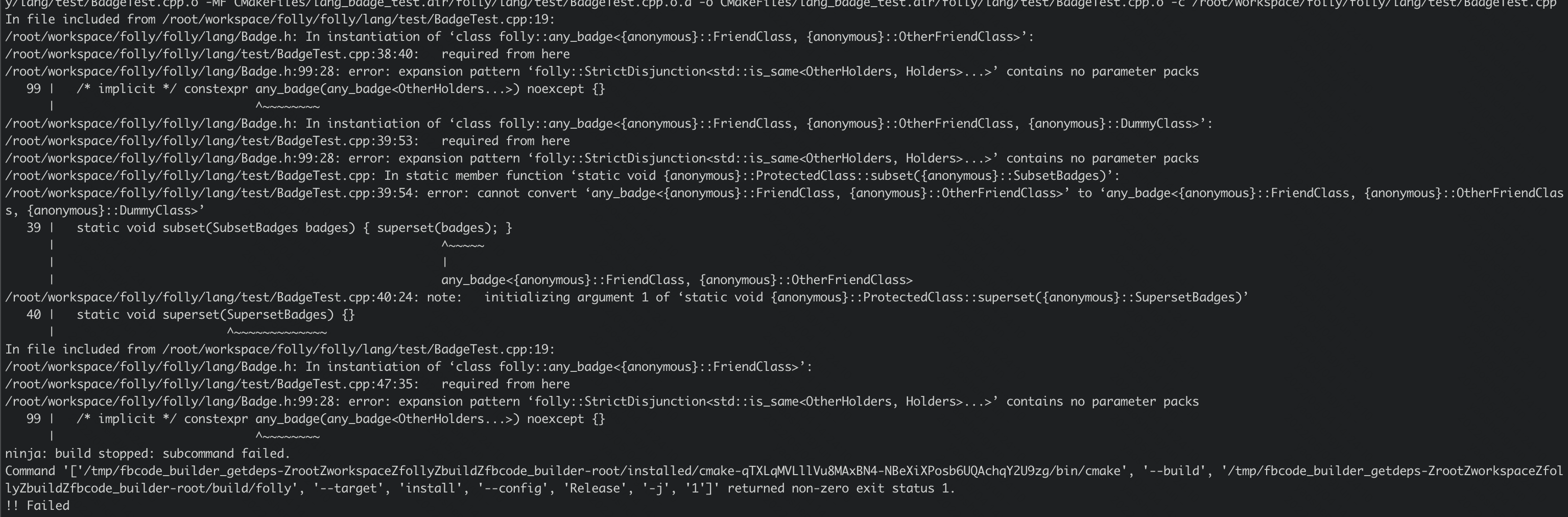
But I get another error as follows.
Not sure if it helps in this case, however just -DCMAKE_PREFIX_PATH:PATH=/usr/include/openssl11 was not enough for me on RHEL/CentOS 7 with openssl11(-devel), while building another software project, because the linking against the newer OpenSSL 1.1.1 failed. There, -DOPENSSL_ROOT_DIR:PATH="%{_includedir}/openssl11;%{_libdir}/openssl11" did the trick for me (I just discovered your approach while searching a solution for my software project).
