

 facebook
Flow fails to parse a valid package.json file
My project has a dependency on https://github.com/creationix/http-parser-js/blob/master/package.json. Flow throws this error:
Error: node_modules/http-parser-js/package.json:1 1: { ^ Unexpected end of input
It looks like it's because these two lines here: https://github.com/creationix/http-parser-js/blob/master/package.json#L21-L22 contain ä and ü. But this should be valid json?

I've re-encoded http-parser-js/package.json in UTF8, and published http-parser-js to NPM, please let me know if it fixes the issue for you.

I think that package.json is supposed to be UTF8 encoded, however one could argue that NPM parses it without complaints, you may want your system to be able to parse it as well, so even if this "fixes" the issue in this case there might still be a bug here in flow.
@Jimbly Thanks! I was also running into this issue, and it's fixed for me now that I bumped to 0.4.6.

Hi,
I've been bitten by this issue, having to deploy an update to a legacy Node.js app. I have discovered an issue of interest.
Installing the http-parser-js npm module on Linux (Ubuntu 14.04 LTS) with Node 0.8.27 (I know, legacy!) does not install the http-parser.js file. It only copies the package.json and README.md files.
I managed to determine that this issue goes back to 0.4.3, and that 0.4.2 of the module does install the http-parser.js file.
I will isolate which commit introduces the issue of npm install not installing the http-parser.js file when installing the http-parser-js module.

I found the commit that resulted in this occurring:
https://github.com/creationix/http-parser-js/commit/0bd74fde0627e0e549dfe341ddfe06f521515ee0
So the current version of the package.json file still has files as an empty array, which could explain why this is failing to install the file on older versions of npm on Linux.
@paulbjensen Your issue sounds unrelated to this bug (other than that it's happening with the same module), perhaps open a new bug on the appropriate project and it can be discussed there.
Ah, sorry, didn't see you already did over at https://github.com/creationix/http-parser-js/issues/41 ; will continue discussion there.

I don't think it is anymore, as http-parser-js doesn't appear to be an explicit dependency of flow (at least not from a scan of the yarn.lock file).
http-parser-js was never a dependency of flow. The issue, as I understood it, was that flow parses a project's dependencies, and was failing to parse a package.json that NPM had no problem with (though was possibly technically incorrect). In theory a project explicitly depending on [email protected] would probably get the offending package.json. I have no idea if this is still and issue, and really have no idea what flow is, other than what I've read in this one bug, so could be totally misled =).
Yeah, there is still parse error with this
 Even VSCode can't display it properly
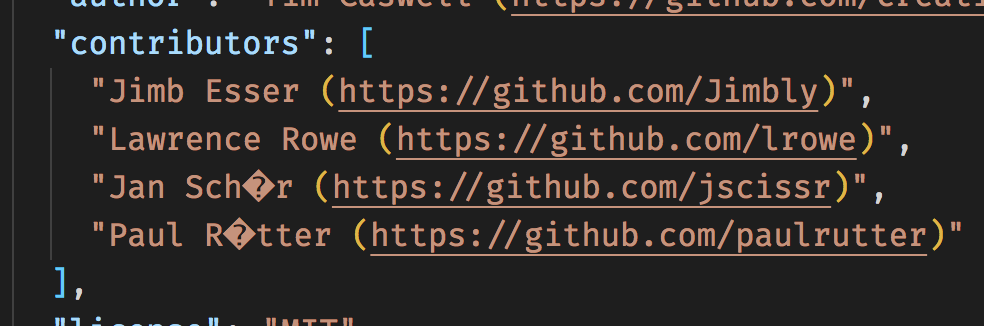
Yeah, I think it was saved with ASCII encoding (Notepad will view it fine ; ), instead of UTF8, so has bytes that are not valid when interpreted as UTF8.
Hello, My workflow is giving me the following error when running. I have check package.json, there isn't anything wrong. Character 'l' appears when executing the package.json command. There is a parsing issue. I don't know how to solve it. out: npm ERR! JSON.parse Unexpected token l in JSON at position 0 while parsing near 'l{

