

 fable-compiler
Leaflet
The translated Leaflet.fs seems to be missing the implementation of the top-level IExports. Tried it again with ts2fable and the latest leaflet/index.d.ts and get the same result. Shouldn't the top-level IExports be implemented, or have I misunderstood how to use it? To use Leaflet.fs I currently have to implement it myself using let [<Import("*","leaflet")>] L: Leaflet.IExports = jsNative.

Ups, I totally forgot we had these bindings here. I guess the exports object can be added (cc @MangelMaxime) but there are also more idiomatic bindings for the ReactLeaflet component (example).

Yes, we are actually using the ReactLeaflet.fs binding, but it references Leaflet.fs, e.g https://github.com/fable-compiler/fable-react/blob/master/src/Fable.ReactLeaflet/ReactLeaflet.fs#L18 so if you want to do something more advanced with ReactLeaflet, you need to fight with Leaflet.fs.
For some libraries ts2fable seems to not be able to generate the import statements.
You can just add the import to a global namespace so you can access it everywhere.

@MangelMaxime Do you mean somewhere in Leaflet/ReactLeaflet or in my own code? The real problem is that I have 40 students using ReactLeaflet (and other libraries) and whenever they want to do something more advanced, they hit their head against the screen and feel there's something wrong with Fable/Elmish. I think ts2fable needs a fix for this.
Do you mean somewhere in Leaflet/ReactLeaflet or in my own code?
For now in your code. You probably have a global Helpers module, you can place it here so L is accessible from anywhere in your application.
I think ts2fable needs a fix for this.
No sure we can fix it easily because leaflet type definition use export as namespace L;
Which is something coming from Typescript to say that L is accesible from the normal state when you load the library from a script tag. But there is no L module created in the leaflet library.
When if you have something like:
declare module "console" {
    export = console;
}
Then ts2fable generate something like let [<Import("*","module")>] console: Console = jsNative which is normal because here there is indeed a module created in the type definition.
@humhei Should we consider export as namespace L; as a module declaration ?
Should we consider export as namespace L; as a module declaration ?
if not exists export as namespace L ,
https://github.com/DefinitelyTyped/DefinitelyTyped/blob/master/types/leaflet/index.d.ts#L13
export class Class {
    static extend(props: any): {new(...args: any[]): any} & typeof Class;
    static include(props: any): any & typeof Class;
    static mergeOptions(props: any): any & typeof Class;

    static addInitHook(initHookFn: () => void): any & typeof Class;
    static addInitHook(methodName: string, ...args: any[]): any & typeof Class;
}
The global exported type should also be accessiable by users
Luckily it was collected to Global type IExports
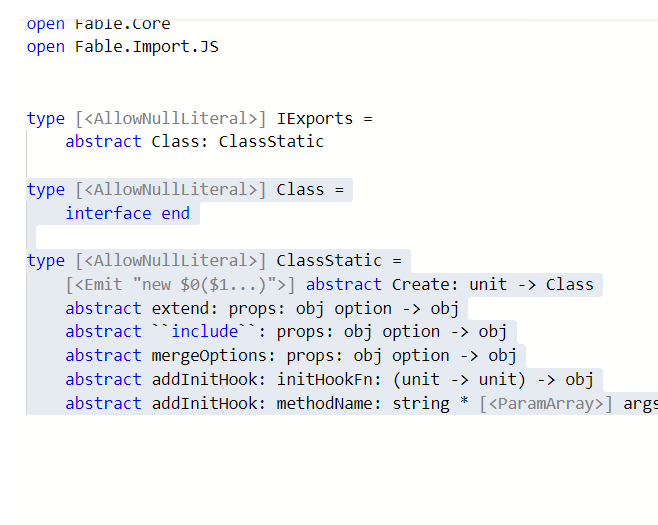
So maybe adding a addition global variable is enough
let [<Import("*","leaflet")>] leafletGlobal : IExports = JSNative
