

 eycorsican
wintun support
Hello, recently, I added wintun support for leaf. I used tunio as the frontend of wintun and to make my code as less invasive as possible, I wrapped the tunio api in the way similar to rust-tun. And I put the tunio_wrapper code in the path leaf/leaf/app/inbound/tunio_wrapper (I'm not sure whether it should be put here). I'm a newbie in rust. If you have any advice, please tell me.
What I have done:
- Wrapped the tunio api in the way similar to rust-tun
- implemented the bind to interface feature on windows platform. I found that on *nix a socket can be used after binding to interface (used setsockopt) without bind function. But on windows after binding to interface, an explicit calling bind function is needed.
- add windows default route (refered sing-tun code)
- change the default tun ip to standard private ip. The former IP is not a standard private ip. Setting such an ip for tun seems to be forbidden on windows.
Build Requirement
- clang toolchain and msvc toolchain (for tunio)
- ~~leaf uses
pnet_datalinkto get network information, this requires on windows, see libpnet:~~- ~~You must use a version of Rust which uses the MSVC toolchain.~~
- ~~You must have WinPcap or npcap installed (tested with version WinPcap 4.1.3) (If using npcap, make sure to install with the "Install Npcap in WinPcap API-compatible Mode")~~
- ~~You must use Packet.lib from the WinPcap Developers pack. You can place it in any of the locations listed in the %LIB%/$Env:LIB environment variables. For the 64 bit toolchain it is in WpdPack/Lib/x64/Packet.lib, for the 32 bit toolchain, it is in WpdPack/Lib/Packet.lib.~~
Running Requirement
- ~~leaf uses pnet_datalink to get network information. On windows it requires WinPcap or npcap to be installed.~~
- As always, wintun.dll should be placed in the same directory of leaf executable. See wintun
Limitation
- tun gateway setting not implemented
- gateway mode not supported
- IPV6 auto route not tested
about netstack-lwip
I found that netstack-lwip can't be built directly. I requires a user implementation of lwip_strerr function, see (https://github.com/eycorsican/netstack-lwip/pull/6) . Since
my pr of netstack-lwip has not been accepted. I changed the netstack-lwip dependency to my fork temporarily.
Another solution may be implementing lwip_strerr in leaf.
I think the dependency on pnet_datalink on windows is troublesome.
Maybe replace it separately for windows platform later?

I replaced pnet_datalink with netconfig crate on windows and winpcap dependency is no more needed.
It seems that wintun requires msvc toolchain while leaf uses gnu toolchain. So the ci test failed. I tried using msvc as github action toolchain and it can pass the test. see the forked branch (https://github.com/vincentliu77/leaf/tree/tunio-msvc) and the action result (https://github.com/vincentliu77/leaf/actions/runs/4509957161)


I think the function get_default_interface failed to get the default interface alias. Can you show more log and what's you operating system. I only tested on windows 11.
os: Windows 11 Pro Insider Preview 22H2
my config
[General]
dns-server = 8.8.8.8
tun = auto
loglevel = debug

[Proxy]
Direct = direct
SOCKS5 = socks,192.168.0.105,7890

[Rule]
FINAL, SOCKS5
the log
[2023-03-31 17:13:43][DEBUG] default handler [Direct]
[2023-03-31 17:13:45][DEBUG] default interface ip: None None
[2023-03-31 17:13:45][DEBUG] tun auto configured
[2023-03-31 17:13:45][DEBUG] set tun name "utun233"
[2023-03-31 17:13:45][DEBUG] set tun address "172.21.0.2"
[2023-03-31 17:13:45][WARN] tunio_wrapper: destination setting is not implemented
[2023-03-31 17:13:45][DEBUG] create and start tun device
[2023-03-31 17:13:46][INFO] start tun inbound
[2023-03-31 17:13:49][DEBUG] added udp session 172.21.0.2:5353 -> 224.0.0.251:5353 (1)
[2023-03-31 17:13:49][DEBUG] picked default route [Direct] for 172.21.0.2:5353 -> 224.0.0.251:5353
[2023-03-31 17:13:57][ERROR] failed to get interface index
[2023-03-31 17:13:57][DEBUG] dispatch 172.21.0.2:5353 failed: The operation completed successfully. (os error 0)
[2023-03-31 17:13:57][DEBUG] added udp session 172.21.0.2:137 -> 172.21.0.255:137 (1)
[2023-03-31 17:13:57][DEBUG] picked default route [Direct] for 172.21.0.2:137 -> 172.21.0.255:137
[2023-03-31 17:13:57][DEBUG] added udp session 172.21.0.2:5353 -> 224.0.0.251:5353 (2)
[2023-03-31 17:13:57][DEBUG] picked default route [Direct] for 172.21.0.2:5353 -> 224.0.0.251:5353
[2023-03-31 17:13:58][DEBUG] added udp session 172.21.0.2:51769 -> 167.179.67.29:21116 (3)
[2023-03-31 17:13:59][DEBUG] picked default route [Direct] for 172.21.0.2:51769 -> 167.179.67.29:21116
[2023-03-31 17:13:59][ERROR] failed to get interface index
[2023-03-31 17:14:00][ERROR] failed to get interface index
[2023-03-31 17:14:06][DEBUG] picked default route [Direct] for 172.21.0.2:49468 -> 239.255.255.250:1900
[2023-03-31 17:14:06][DEBUG] added udp session 172.21.0.2:49468 -> 239.255.255.250:1900 (4)
[2023-03-31 17:14:06][DEBUG] dispatch 172.21.0.2:137 failed: The operation completed successfully. (os error 0)
[2023-03-31 17:14:06][DEBUG] dispatch 172.21.0.2:5353 failed: The operation completed successfully. (os error 0)
[2023-03-31 17:14:06][ERROR] failed to get interface index
[2023-03-31 17:14:06][DEBUG] dispatch 172.21.0.2:51769 failed: The operation completed successfully. (os error 0)
[2023-03-31 17:14:06][ERROR] failed to get interface index
[2023-03-31 17:14:06][DEBUG] dispatch 172.21.0.2:49468 failed: The operation completed successfully. (os error 0)
I can't get the correct default interface name due to Chinese garbled characters
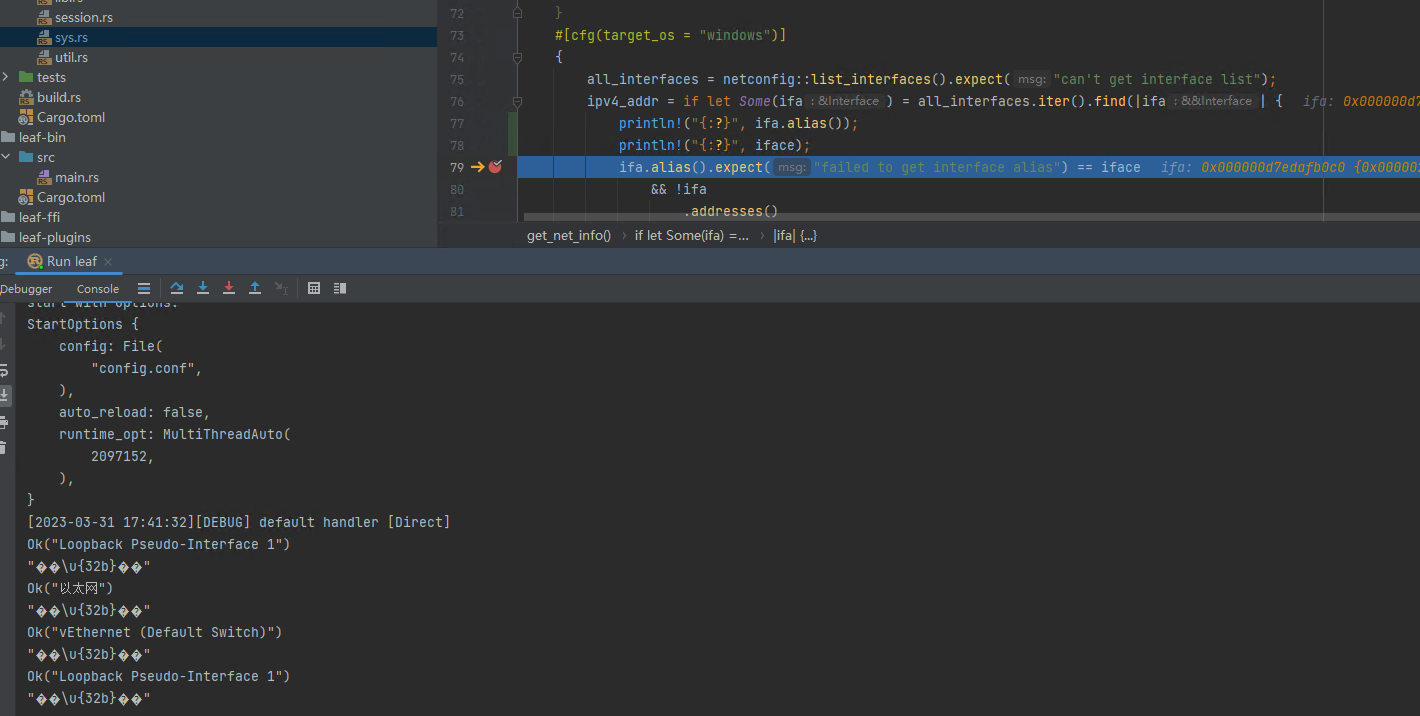
Hello, I reproduced the error just now. It's related to windows encoding. I use the utf8 as the default system encoding, So I didn't encounter such an error. But if disabled the utf-8 encoding in windows, this error occurred. Temporarily, you can set the system encoding to utf-8, see (https://blog.csdn.net/qq_37151416/article/details/110951127) .
This error might result from the command-line style implementation of function get_default_interface in cmd_windows.rs.
I'm working on it and may fix it later.
not work when running "curl www.google.com" in command line.
Here are some logs:

my config
[General]
dns-server = 223.5.5.5
tun = auto
loglevel = debug

[Proxy]
Direct = direct
SOCKS5 = socks,192.168.0.105,7890

[Rule]
FINAL, SOCKS5
@lemos1235 Turn off domain sniffing and fake dns:
[General]
always-real-ip = *
routing-domain-resolve = false
It seems that udp packet not transport by tun? for example nslookup www.baidu.com , the target ip should be the tun ip. I tested that with clash windows.
Hello,the udp packet transport works for me. the nslookup request won't be proxied because it's hijacked by fakedns module
by default. You can check that by disabling fakedns module. I use quic test as a way to test udp.
and here is my config file if you need it.
{
    "log":{
        "level":"debug"
    },
    "inbounds": [
        {
            "protocol": "tun",
            "settings": {
                "auto":true,
                "fakeDnsInclude":["baidu.com"]
            }
        }
    ],
    "dns":{
        "servers": [
            "114.114.114.114",
            "1.1.1.1"
        ]
    },
    "outbounds": [
        {
            "protocol":"direct",
            "tag":"direct_out"
        },
        {
            "tag":"chain_out",
            "protocol": "chain",
            "settings": {
                "actors": [
                    "quic",
                    "trojan"
                ]
            }
        },
        {
            "protocol": "quic",
            "tag": "quic",
            "settings": {
                "address": "SERVER IP",
                "port": SERVER PORT,
                "serverName": "SERVER NAME",
                "alpn":["h3"]
            }
        },
        {
            "protocol": "trojan",
            "tag": "trojan",
            "settings": {
                "password": "PASSWORD"
            }
        },
        {
            "protocol": "drop",
            "tag": "drop_out"
        }
    ],
    "router":
    {
        "rules": [
            {
                "ip":[
                    "0.0.0.0/0"
                ],
                "target":"chain_out"
            }
        ]
    }
}
I tested your latest code. The issue I encountered before, where I can't access Google through the socks5 proxy, and I'm not sure why (it works fine on macOS). Additionally, there's a slight delay of around 50ms when accessing Baidu on Windows(compared to normal access), but when using Clash for Windows, there's almost no delay.
Hello, sorry for late reply. I closely examined the udp problem. Here are my findings:
- The
nslookupcommand failed due to dns problem. Since I didn't set the default dns server for tun interface. In this case, windows will use the dafault dns server of other interfaces and google.com may not by properly resolved. I fixed this in the latest commit by add default dns server for tun. I set the default dns to 8.8.8.8 and 1.1.1.1. This is not a good solution since dns servers are hard coded. - The udp doesn't work for a localhost socks5 server. This is not restricted to windows. I tested on Linux. It has the same problem. So this is a problem of leaf. I think the localhost socket binding of udp is not handled properly. But in other cases udp works for me (for example, a socks proxy in local area network). Certainly, this happens only when auto tun is enabled.
- I don't know how to test the delay. If you can tell me I might test that.
refer to this https://stackoverflow.com/questions/18215389/how-do-i-measure-request-and-response-times-at-once-using-curl
