
expo-cli
 expo-cli copied to clipboard
 expo
expo
when I run expo start show me that I don't have @types/react installed, even already installed
Summary
I expect that I can run normally my project without run into this loop, that show me that I don't have @types/react installed, even already installed.
Environment
    System:
      OS: macOS 12.5
      Shell: 5.8.1 - /bin/zsh
    Binaries:
      Node: 14.19.3 - ~/.nvm/versions/node/v14.19.3/bin/node
      Yarn: 1.22.18 - ~/.nvm/versions/node/v14.19.3/bin/yarn
      npm: 6.14.17 - ~/.nvm/versions/node/v14.19.3/bin/npm
      Watchman: 2022.06.13.00 - /usr/local/bin/watchman
    Managers:
      CocoaPods: 1.11.3 - /usr/local/bin/pod
    SDKs:
      iOS SDK:
        Platforms: DriverKit 21.4, iOS 15.4, macOS 12.3, tvOS 15.4, watchOS 8.5
    IDEs:
      Android Studio: 2021.2 AI-212.5712.43.2112.8609683
      Xcode: 13.3/13E113 - /usr/bin/xcodebuild
    npmPackages:
      expo: ^46.0.0 => 46.0.2
      react: 18.0.0 => 18.0.0
      react-dom: 18.0.0 => 18.0.0
      react-native: 0.69.3 => 0.69.3
      react-native-web: ~0.18.7 => 0.18.7
    npmGlobalPackages:
      eas-cli: 0.52.0
      expo-cli: 5.4.7
    Expo Workflow: bare
Please specify your device/emulator/simulator platform, model and version
Emulator pixel 3 and iPhone 11 Pro Max
Error output
✔ It looks like you're trying to use TypeScript but don't have the required dependencies installed. Would you like to install
@types/react? … yes

- Installing @types/react@~18.0.0
> yarn add --dev @types/react@~18.0.0
- Installing @types/react@~18.0.0
yarn add v1.22.18
[1/4] 🔍  Resolving packages...
[2/4] 🚚  Fetching packages...
[3/4] 🔗  Linking dependencies...
[4/4] 🔨  Building fresh packages...
success Saved 0 new dependencies.
✨  Done in 2.12s.
✔ Installed @types/react@~18.0.0
It looks like you're trying to use TypeScript but don't have the required dependencies installed.

Please install @types/react by running:

yarn add --dev @types/react@~18.0.0

If you're not using TypeScript, please remove the TypeScript files from your project and delete the tsconfig.json.
Reproducible demo or steps to reproduce from a blank project
Installing expo bare workflow -> creating a file tsconfig.json and run expo start


see: https://blog.expo.dev/expo-sdk-46-c2a1655f63f7
you should run npx expo start starting with sdk 46, rather using the globally installed expo-cli
let me know if this issue persists after you have done that

You can skip this check with the environment variable EXPO_NO_TYPESCRIPT_SETUP=1.

It's still not working, and now, I can't run my project. @brentvatne
https://user-images.githubusercontent.com/21963291/186133973-747fccf8-148f-46ed-80d2-5b6b7f861059.mov
@EvanBacon I put inside my .zshrc file the environment variable but it didn't work.
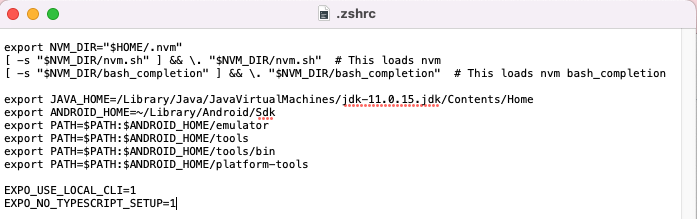
you need to use export - like with the other env vars above that. also, EXPO_USE_LOCAL_CLI=1 isn't needed on sdk 46+, it is the default
hey @ildaneta, did you reolve this isssue, I'm also facing the same after upgrading a project from sdk 44 to sdk 46.

Hi @jarapamikaella!
So, with the line above inserted in my zshrc file, resolved my problem!
export EXPO_NO_TYPESCRIPT_SETUP=1