

 exeldro
Weird move transition lag on all transitioning sources?
Hey guys already tried posting my issue on reddit to avoid possibly posting a duplicate issue here. Didnt get any replies yet so i figured id TLDR it in here. Im having an issue with the transitions, where i change between scenes 1 2 and 3, scene 1 having a background and a cam in the top right, scene 2 having no background just a cam in the top right, and scene 3 having a background and a cam in the bottom left. Whenever any of the sources disappear or whenever the camera has to move from the top right to the top right via a move transition, every source that moves/transitions wind up rubberbanding around as if its playing at 4 or 5 fps. Does anyone know whats going on? I even tried making a new scene collection to rule stuff out, i might still try a fresh obs install later tonight. Anyways heres yt vid of my test recording i did to create a log file: https://youtu.be/cfmYnh7oWeA And heres the log file itself: https://obsproject.com/logs/SFq_NZWxpWfZZMHK

It looks like you set the easing mode to elastic or bounce with a short duration for the transition, can you try Cubic easing for example?
Hey exeldro! Thanks so much for getting back to me so fast <3 I really hope i wasnt being a bother with my duplicate post(s)? Anyways yeah so i just tried cubic and it works, however it looks so terrible id rather just not use any move transitions than have to use the cubic one.
The whole point is to have the bounce option work right? Otherwise why is there a bounce option to begin with? I think i pointed this out in one of my posts but i probably totally forgot to mention it in here. When i change the duration from say 300ms to 1200ms the rubberbanding only gets worse.
The goal atm is just to get a simple working bounce move transition between scenes to replace the current fade transition i use for everything by default, then im gonna start trying more and more advance stuff with this plugin.
Just in case it helps i did another recording, but i did not include a log i was hoping the last log would suffice since its basically the same thing as what i just did.
Anyways heres the link: https://youtu.be/JU2IpxX6wbo
Let me know if theres anything i can do on my end to make this process easier/faster for either of us. <3
It looks like you have easing in and easing out enabled. As you can see on easings.net it wants to do 8 bounce curves. 300 ms at 60 fps gives you 18 frames to do the animation. That is just above 2 frames for 1 bounce curve.
Am i not supposed to have easing in and out enabled? I was following a youtube video where the guy told me to go and add a move scene transition and to make it default settings except to change the appearing and disappearing items positions to none and transitions to fade, and then to pick the easing function that i like the most.
What is a bounce curve? I was shown easings.net but told that website is basically just a visual aid for picking the easing function youll probably want for whatever application. How do i see this info about 8 bounce curves?
Man im looking at the "Check easings for changes:" buttons and i didnt know you could get a visual preview of "this function" compared to a linear one. Even the bounce animation on here looks like its rubberbanding... why is it doing that??? Its not supposed to be doing that right?
Okay so i just did some more tinkering and i found quintic at like 500-800ms duration is almost what i want, it doesnt have any bounce but its better than like 90% of the other options. I noticed that elastic didnt look as bad as bounce on easings.net so i wanted to try that, so i set everything from quintic to elastic hoping for the same effects as on the site preview but its all choppy and rubberbandy at 800ms just like bounce
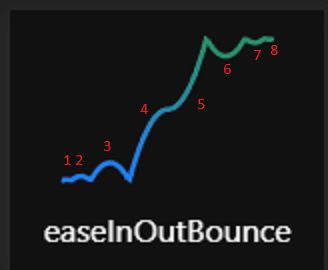
Okay so your saying it cant do those 8 bounces in 300ms? That still doesnt explain all the stutter and rubberbanding at 1200ms and higher for both bounce and elastic transitions. I wish i understood what the limitation was with the bounces. I mean maybes its a tiny bit unrealistic to do 300ms but even say 600ms... I dont see why it cant do the animation in 600ms, theoretically, 100ms should still be possible its not like it has to show every frame right? It just hast to complete the animation frames you would see @ 60fps right? Like even one blurry frame is still it technically doing the whole animation or well i guess ud need the starting frame then the blur frame then the finished frame after.
Is there not a bounce option that only has say 4 bounce curves in it instead of 8?