

 executablebooks
Thebe kernel is not the same as the notebook's kernel
Description
The html files created when the book is build contain the code below that is not implemented in the code and even worse: It overwrites my own defined kernel!
Is this a bug or do I need to change a setting to stop jupyter book from adding this kernel configuration to the html files during build?
    <script type="text/x-thebe-config">
    {
        requestKernel: true,
        binderOptions: {
            repo: "binder-examples/jupyter-stacks-datascience",
            ref: "master",
        },
        codeMirrorConfig: {
            theme: "abcdef",
            mode: "python"
        },
        kernelOptions: {
            kernelName: "python3",
            path: "./."
        },
        predefinedOutput: true
    }
    </script>
Implementation
This is likely a bug due to using an outdated thebe. See https://github.com/executablebooks/sphinx-thebe/issues/32 or https://github.com/executablebooks/sphinx-thebe/issues/24 for ways to test whether the latest thebe removes this problem.

Just a quick question - are you trying to use Thebe for interactive online execution? That's what this code block is doing. What is your expected outcome?

Hi @choldgraf ,
Thanks for your help!
Are you trying to use Thebe for interactive online execution? Yes
In my jupyter notebook I have a configuration for my own kernel stated in a markdown cell as prescribed by the thebe documentation. As a result, when I build my book I het a notebook.html containing both kernels [Kernel A (see above) and kernel B (my own kernel)]. Since in the html the config for kernel A is located below kernel B, it automatically loads kernel A, where I need kernel B to be loaded. Kernel A's environment does not support widgets that interactively adjust plots. My goal is to create a plot, where the plotcan be adjusted using a slider widget.
Your help is much appreciated.
I think I just encountered this issue. I have .ipynb using the Julia kernel (example) and it works correctly in Binder (:rocket: -> Binder), but Thebe tries to use the Python kernel.
My source .ipynb has
 "metadata": {
  "celltoolbar": "Slideshow",
  "kernelspec": {
   "display_name": "Julia 1.6.2",
   "language": "julia",
   "name": "julia-1.6"
  },
  "language_info": {
   "file_extension": ".jl",
   "mimetype": "application/julia",
   "name": "julia",
   "version": "1.6.2"
  },
  "rise": {
   "enable_chalkboard": true
  }
 },
and the Sphinx-generated HTML page:
    <script type="text/x-thebe-config">
    {
        requestKernel: true,
        binderOptions: {
            repo: "cu-numpde/fall21",
            ref: "main",
        },
        codeMirrorConfig: {
            theme: "abcdef",
            mode: "julia-1.6"
        },
        kernelOptions: {
            kernelName: "julia-1.6",
            path: "./slides"
        },
        predefinedOutput: true
    }
    </script>
    <script>kernelName = 'julia-1.6'</script>

Hmmm - that's strange. Here is where the kernel is loaded:
https://github.com/executablebooks/sphinx-thebe/blob/c036ac41a3b681ed4c2ab3b92edee4a3d2d2e1f0/sphinx_thebe/init.py#L97-L106
That said, we recently had to downgrade the version of thebe. Once this issue is resolved it'll be updated: https://github.com/executablebooks/sphinx-thebe/issues/32
perhaps this is a regression because of the old version of Thebe?
Thanks, I'll watch that issue. Is there a good way to test quickly/locally, or is there a workaround, such as adding "thebe-kernel": "julia-1.6", to the notebook metadata?
yeah it should just grab the kernelspec from the notebook automatically. If you'd be willing, one way to use the latest thebe would be to resolve https://github.com/executablebooks/sphinx-thebe/issues/24 and then you could configure sphinx-thebe to use whatever thebe package you like to try out a newer version and see if that fixes the issue
I think I also have this issue. See this page as an example, specifically the first code block on the page (under the heading "Executable Code"). When launched using the Binder button on the page, the cell executes correctly in OCaml and prints "Hello world". When launched in Thebe using Live Code, the cell instead uses the Python kernel. Screenshot of that below. I have tried adding the metadata suggested just above (see here), but that did not resolve the issue.
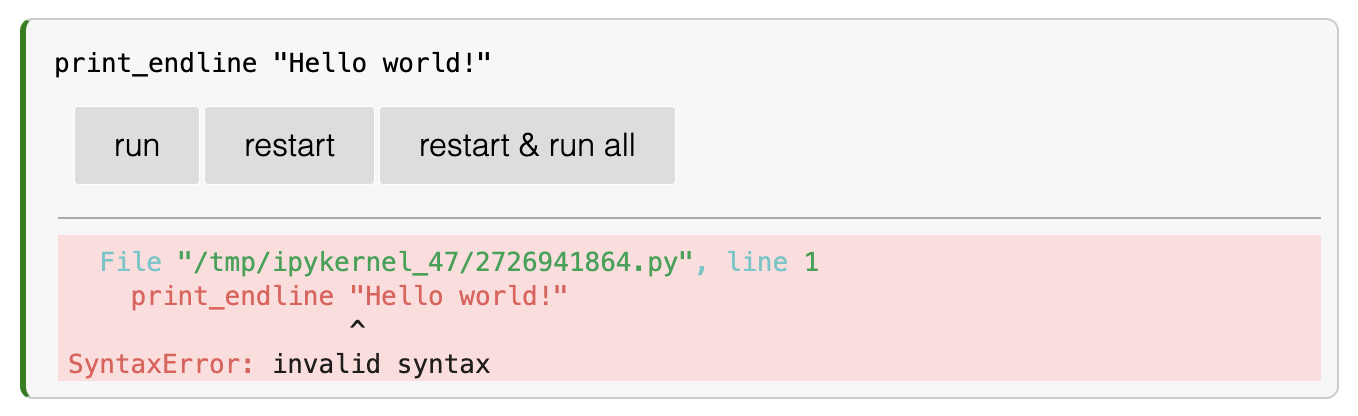

This is also an issue I'm running into in this book when trying to use a kernel for R, and I can't figure out a work-around from within the _config.yml file. It seems like the html is generated to use the "ir" kernel just fine when building the book:
  <script type="text/x-thebe-config">
   {
       requestKernel: true,
       binderOptions: {
           repo: "smburns47/Psyc158",
           ref: "main",
       },
       codeMirrorConfig: {
           theme: "abcdef",
           mode: "r"
       },
       kernelOptions: {
           kernelName: "ir",
           path: "./."
       },
       predefinedOutput: true
   }
   </script>
   <script>kernelName = 'ir'</script>

             </div>

           </main>
           <footer class="footer-article noprint">
But the code block in the page fails when it tries to use a python kernel:
---------------------------------------------------------------------------
NameError                                 Traceback (most recent call last)
/tmp/ipykernel_49/1365441918.py in <module>
      2
      3 # Run the code and see what happens
----> 4 my_vector <- c(1,2,3,4,5)
      5 my_vector2 <- c(10,10,10,10,10)
      6

NameError: name 'my_vector' is not defined
Is this potentially an issue with sphinx-thebe, since it seems like the kernel is defaulting to python even in their own "coding in R" docs? https://sphinx-thebe.readthedocs.io/en/latest/configure.html. This is I think thebe version 0.8.2

Hi,
Thank you for working on this issue.
I am still seeing the issue persisting in sphinx-thebe documentation itself here: https://sphinx-thebe.readthedocs.io/en/latest/configure.html Although, the kernel is set to R
thebe-kernel: ir

ahh I think that's actually because the docs build was broken and they didn't update, if you hard refresh it should work now, thanks for catching :-)
For some reason, here it's not working https://learningc.org/chapters/chapter06-pointers/intro.html.
Could it be because you need to update dependencies in https://github.com/executablebooks/jupyter-book/blob/0008de05e08676337bf5c1ed69084f6f2ab051ae/pyproject.toml?