

 executablebooks
Images embeded in a notebook are not rendered in the HTML output
Description
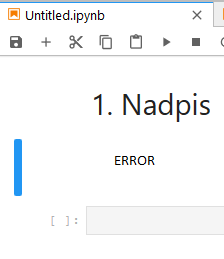
It is possible to embded a picture in a markdown cell. This can be done by command

To Reproduce
- Create a notebook (.ipynb file)
- Insert a markdown cell
- Insert in the cell an embeded image. The possible code could be seen bellow.
- Build a book and check the appearance.
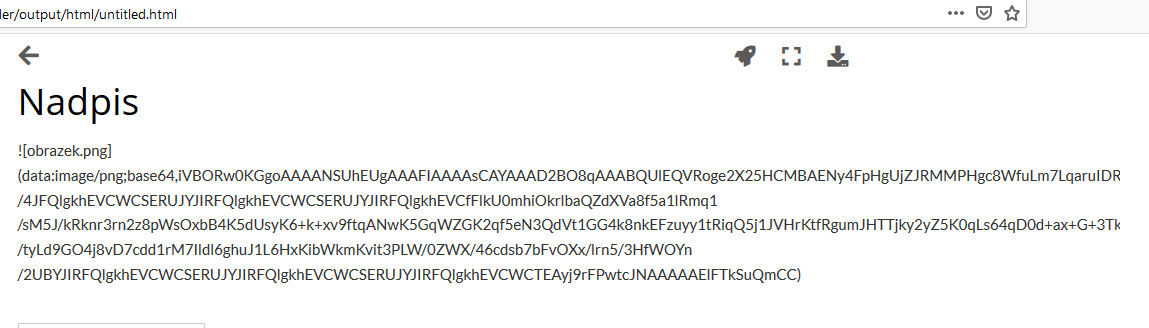
Expected behavior Html page should contain the embded image; however, the original code is in the place.

Environment jupyterbook has been run in a Docker environment defined by this Dockerfile:
FROM jupyter/tensorflow-notebook

RUN pip install jupyter-book
RUN pip install jupyter-client==6.1.7

USER root
RUN apt update -y
RUN apt upgrade -y
RUN apt install latexmk -y

USER jovyan

RUN pip install pydata-sphinx-theme~=0.3.0

COPY . .

CMD ["jupyter-book", "build", "--builder", "html", "."]
Attachments There are attached three pictures, one which encoded version is used, second which illustrates functional embeding in a notebook in the jupyterlab and the last one shows the real result.


Thanks for opening your first issue here! Engagement like this is essential for open source projects! :hugs:
If you haven't done so already, check out EBP's Code of Conduct. Also, please try to follow the issue template as it helps other community members to contribute more effectively.
If your issue is a feature request, others may react to it, to raise its prominence (see Feature Voting).
Welcome to the EBP community! :tada:
![welcome[bot] avatar](https://avatars.githubusercontent.com/in/4141?v=4 "Published by a pub.dev verified publisher")
If anyone else comes across this, there is a more active discussion in https://github.com/executablebooks/MyST-NB/issues/230 (and an old one in https://github.com/executablebooks/jupyter-book/issues/321), but no solution yet.

As I came across this problem and found this discussion I thought I would share a quickfix that works for me. The attached images are base64-encoded in the notebook and referenced by name "attachment:<filename>". If we decode the image data and write to a file with a name that has this pattern, jb build will recognize the image file as is and copy it to the _build/html folder. The images are then displayed when viewing the book in the browser.
import base64
import json
import sys

with open(sys.argv[1]) as f:
    nb = json.load(f)

attachments = [cell.get('attachments') for cell in nb['cells']]
attachments = [a for a in attachments if a]

for attachment in attachments:
    for name, data in attachment.items():
        for filetype, encoded in data.items():
            print(f'{name} ({filetype})')
            img_data = base64.b64decode(encoded)
            with open(f'attachment:{name}', 'wb') as img:
                img.write(img_data)

Thanks for the workaround! It works well for me in old version of JupyterLab, but in newer versions it seems like images across cells are getting the same names and not a unique ID, so some modification would be needed. Interestingly, I noticed that quarto supports image attachments in notebooks by default, so maybe there is something from their solution that could be adapted in JupyterBook as well?