

 exadel-inc
SIngle Container version of Compreface
Is your feature request related to a problem? Please describe. We're using Compreface as the recog engine of Double Take (an Home Assistant addon): https://github.com/jakowenko/double-take
Double Take dev (@jakowenko) created the addons for Double Take and other recognition frameworks: DeepStack and Facebox, but our preferred solution is Compreface. Unfortunately we can only build an addon starting from a single container, while Compreface requires five separate containers, unlike DeepStack and Facebox.
Describe the solution you'd like A single-container build of Compreface, so we can create an Home Assistant addon for Double Take users, that right now are using DeepStack only because there's an addon available, while we recommend Compreface for best recognition results.

I don't think that running CompreFace in one image is a good idea. Now if something wrong - you can just restart one of the services, while others continue to work. But I got the idea - it should make it much easier to run with Home Assistant. I'll add it to our backlog and try to make it as soon as we have resources for it.
I haven't used HA, but I see that it has another thing - integrations. In this case, you have to run CompreFace himself, but there is still an integration with HA. Will it work for you?

I agree with you, but in order to use CompreFace as an addon in HassOS, we need a single container, it's a pre-requirement in order to have a supported addon in the HA environment. And I'm not asking this just for myself, there are literally hundreds of users that are using Double Take + Frigate to do face recognition automation, and unfortunately they are forced to use DeepStack now because it's the only addon available, while advanced users are installing CompreFace manually, even if HA doesn't support it, because of its superior recognition capabilities.
We are recommending users to use CompreFace but the feedback is that it's too hard to install. So we need to develop the addon to install it directly in HA, like it has been done for DeepStack. It's a pity these users have to revert to an inferior solution like DeepStack, they deserve CompreFace, I hope you can understand this and help us reach the objective.
As you can see here, DoubleTake is the only addon that @jakowenko has been able to implement, we are waiting for a single container version of CompreFace now so users can have the better choice.

I haven't used HA, but I see that it has another thing - integrations. In this case, you have to run CompreFace himself, but there is still an integration with HA. Will it work for you?
CompreFace addon will be used as an engine by the Double Take addon, right now we are using CompreFace in an unsupported way manually installing it into HA's docker. Once installed, Double Take gets the snapshots from Frigate, and passes them to CompreFace for recognition, then it processes the result and creates HA sensors to do the automations. It's working beautifully but this kind of setup is unsupported unfortunately so users are reverting to DeepStack. :(
Thanks for your reply and I hope you can deliver the single container version as soon as possible. :)
I second this also for the Unraid community. It would be ideal to have it in a single container that can pulled from the App store template. Currently it's a steep learning curve and requires the "compose.manager" plugin to work. So the majority of users will default to deepstack with reportedly poor recognition performance when pairing frigate with double take for facial recognition on rtsp feeds.

So the majority of users will default to deepstack with reportedly poor recognition performance when pairing frigate with double take for facial recognition on rtsp feeds.
That's the main problem we're facing now for the Double Take project: 90% of support questions are for Deepstack installation and poor recognition rate.
We need to switch them to CompreFace, but we need a single container version to be able to do that. I hope @pospielov can give us an idea of the time frame for this version to be available...
I am working on it right now and already have the first working version. There are still some problems. In an optimistic scenario, I'll publish it this week and write a short description of how to run it here. Normal readme I'll write a little bit later.
I am working on it right now and already have the first working version. There are still some problems. In an optimistic scenario, I'll publish it this week and write a short description of how to run it here
Amazing news Pospielov. Thank you so much. Users will be happy to switch from DeepStack to CompreFace, like we suggested.
Please let me know when it's ready so we can test it. Thank you.
I am working on it right now and already have the first working version. There are still some problems. In an optimistic scenario, I'll publish it this week and write a short description of how to run it here. Normal readme I'll write a little bit later.
Thank you. A lot of Unraid users have an Nvidia GPU for containers like plex so if you could include a method to pass extra parameters for the GPU custom builds also that would be ideal. Again thank you for your effort and time.
Thanks for the work on this. We greatly appreciate it and look forward to the end result.

I am working on it right now and already have the first working version. There are still some problems. In an optimistic scenario, I'll publish it this week and write a short description of how to run it here. Normal readme I'll write a little bit later.
Awesome, that's great News!
I have written the unraid docker templates for double-take and facebox, but because unraid did not support docker-compose the users are stuck to a command-line installation of compreface, which isn't ideal for the average user.
As @bigbangus mentioned, if you could add support for GPU processing, it would be awesome, but not mandatory. So just comment here, or hit me directly, if you have something to test. I would then transfer your docker stuff into an unraid app template for the Community Store.

Hi all, it looks like I managed to make a single image of CompreFace
How to run:
docker run -it --name=CompreFace -v compreface-db:/var/lib/postgresql/data -p 8000:80 exadel/compreface:0.6.1
where:
name=CompreFace - is the name of container
compreface-db - is the name of the volume. This is important to keep the data if you delete the container.
Under the hood is used supervisord. It helps to achieve similar behavior with docker-compose - if the service fails, it automatically starts it.
Some other notices:
- Compared to docker-compose we can't guarantee that DB starts before servers. I added 10 seconds of timeout between the start of DB and the first service.
- If DB starts too slow - service will fail. But
supervisordwill restart it. So in the bad scenario, you will see lots of errors in logs, but it will work - In the worst scenario it one of the services won't start, but
supervisordwill endlessly try to start it. You will see the same error in the console. In this case, write the log to me. - Single container version of CompreFace isn't tested by a standard QA process. On another hand, I reuse the images from DockerHub. So basically the only difference is with the deploy method.
- As I reuse the images from DockerHub, I managed to make all official versions of Compreface: FaceNet(default), Arcface-R100, Arcface-R100-GPU, MobileNet, MobileNet-GPU
To run the GPU version, you need to add
--runtime=nvidia:docker run -it --name=CompreFace -v compreface-db:/var/lib/postgresql/data --runtime=nvidia -p 8000:80 exadel/compreface:0.6.1-arcface-r100-gpu - The environment variables are still actual from
docker-composeversion, so to set API server limit you can run:docker run -it --name=test -e "API_JAVA_OPTS=-Xmx8g" -v compreface-test-db:/var/lib/postgresql/data --runtime=nvidia -p 8000:80 exadel/compreface:0.6.1-mobilenet-gpu
Pospielov, thank you so much, we will test and let you know in case of problems. @jakowenko will try to build an addon for Home Assistant out of this.
Thanks. I'll test once an unRAID app template is done. I look forward to that. 😀
@pospielov
Thanks for this container! Runs great on Unraid with default FaceNet and arcface-r100-gpu. But I have problems with the volume.
If I start the container without the volume, the /var/lib/postgresql/data Folder has the correct permission.
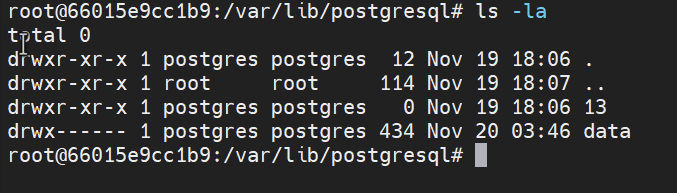
But if I configure the volume path, with
Unraid Docker Command:
/usr/local/emhttp/plugins/dynamix.docker.manager/scripts/docker create --name='CompreFace' --net='bridge' --privileged=true -e TZ="Europe/Berlin" -e HOST_OS="Unraid" -p '8800:80/tcp' -v '/mnt/user/appdata/compreface':'/var/lib/postgresql/data':'rw' --runtime=nvidia 'exadel/compreface:0.6.1-arcface-r100-gpu'
I get these errors:
2021-11-20 04:04:05,942 INFO success: compreface-postgres-db entered RUNNING state, process has stayed up for > than 0 seconds (startsecs) today at 04:04:05 2021-11-20 03:04:05.953 GMT [14] LOG: skipping missing configuration file "/var/lib/postgresql/data/postgresql.auto.conf" today at 04:04:05 2021-11-20 03:04:05.953 UTC [14] FATAL: "/var/lib/postgresql/data" is not a valid data directory today at 04:04:05 2021-11-20 03:04:05.953 UTC [14] DETAIL: File "/var/lib/postgresql/data/PG_VERSION" is missing.
021-11-20 03:06:59.579 GMT [45] LOG: skipping missing configuration file "/var/lib/postgresql/data/postgresql.auto.conf" today at 04:06:59 2021-11-20 03:06:59.579 UTC [45] FATAL: data directory "/var/lib/postgresql/data" has invalid permissions today at 04:06:59 2021-11-20 03:06:59.579 UTC [45] DETAIL: Permissions should be u=rwx (0700) or u=rwx,g=rx (0750).
and the permissions are set to 777. Strange is, if i exec into the Container and set chmod to 755 I still get the same errors.
I tested the Container on several Linux machines, and it runs fine. So that must be a problem with the unraid docker system. Any Ideas?
So ATM the Container is usable, but without a persistent data Folder.
@corgan2222 in my example I used named volume:
-v compreface-db:/var/lib/postgresql/data
The default behavior of named volume is that when it first created the volume, docker copies all content of the image to the volume with all permissions. Docker in its documentation recommends using named volumes because of portability.
When you set the exact folder to mount, docker created a bind mounts:
-v '/mnt/user/appdata/compreface':'/var/lib/postgresql/data':'rw'
By default, docker does not copy image content into bind mounts. This is why the Postgres data folder is empty inside your container and Postgres can't start.
So I would follow docker recommendations and use named volumes. In case this is impossible or you still prefer using binding to a folder, there is a workaround for such case if you still want to mount the exact folder into the docker container:
You need to create a named bind mount:
docker volume create --driver local \
    --opt type=none \
    --opt device=/mnt/user/appdata/compreface \
    --opt o=bind \
    compreface-db
And then use it as named volume during start:
docker run -it --name=CompreFace -v compreface-db:/var/lib/postgresql/data -p 8000:80 exadel/compreface:0.6.1
@pospielov Thanks for clarification, now the behavior make sense. The main problem is, that unraid user can't change the behavior of how the docker process works. This is how all docker volumes in unraid looks:
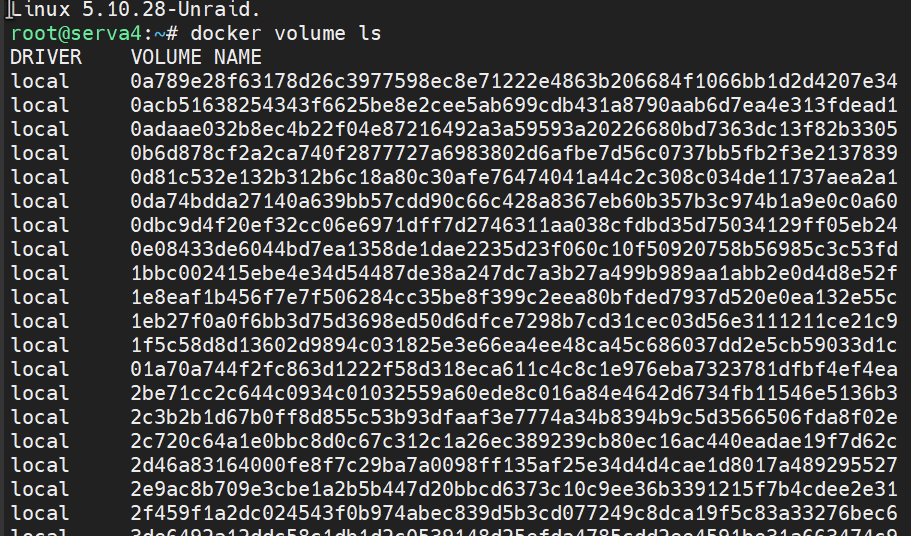
We as App's Maintainer create only XML Templates. The Unraid GUI then creates the Docker Containers. The average User did not even know that a docker run command exists. This is how the Compreface XML looks.
GUI View:

I'm not that deep into the Unraid Docker System. Do you have an Idea left, or should I forward this to the Unraid DEvs?
What if you in Host Path put value without / at the beginning? Like compreface-db
If it won't work, then probably this is intentional.
https://forums.unraid.net/topic/88920-named-volumes-vs-bind-mount/
I see that they don't recommend named volumes. I would like to put them with docker developers in one room and they argue with each other :)
So, if it won't work, this is a good idea to ask Unraid developers what is their best practices in this case.
I see one workaround - I can put a backup of all empty postgres data files somewhere and during startup check, if the /var/lib/postgresql/data folder is empty, then copy the backup files into it. But this looks like a hack, not a normal implementation.
Not sure if this helps regarding mounted volumes, but I'm running compreface now in Unraid with the modifications to docker-compose.yml below and it works fine. (not using app templates, but docker compose plugin)
@pospielov are you after performance when you decided to use a named volume instead of a bind mount? I found this thread that supports this idea: https://stackoverflow.com/questions/64629569/docker-bind-mount-directory-vs-named-volume-performance-comparison So maybe in Windows/MacOS, compreface would be quicker with named volumes? I don't know. It just seems that every docker container on Unraid (of which there are thousands) all use bind mounts to separate application from data.
version: '3.4'

###volumes:
###  postgres-data:

services:
  compreface-postgres-db:
    restart: always
    image: postgres:11.5
    restart: always
    container_name: "compreface-postgres-db"
    environment:
      - POSTGRES_USER=${postgres_username}
      - POSTGRES_PASSWORD=${postgres_password}
      - POSTGRES_DB=${postgres_db}
    volumes:
###      - postgres-data:/var/lib/postgresql/data
      - /mnt/user/appdata/compreface/postgres:/var/lib/postgresql/data
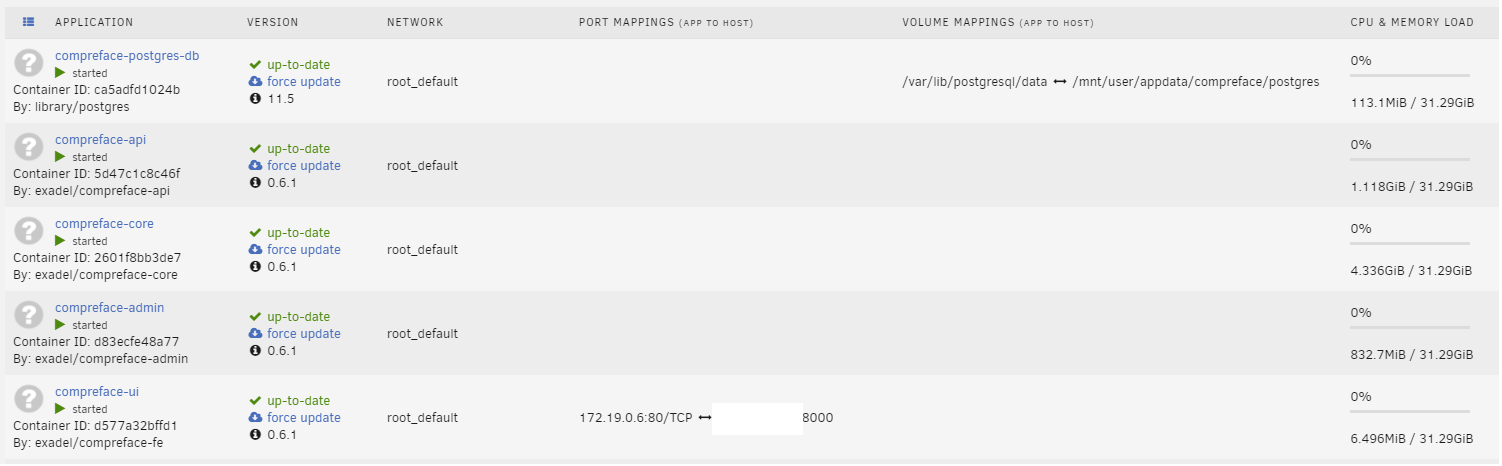
@bigbangus CompreFace uses named volumes by default because this is the only way it can work for everyone. I mean bind mounts require the path and it depends on the folder structure on our machine and the operations system. So the only way to guarantee volume creating is using named volumes.
Of course, experienced users can change it if they want. I don't expect serious performance issues during recognition with Compreface and bind mounts if you use double-take. We cache all required data for recognition in the memory. So as double-take always uses one api-key, you can be sure that CompreFace won't read from the database each recognition request. Of course, when you save a new example, CompreFace will save it to the database and sync the cache. So this may be a slow point. But I don't think this is a common operation.
Also, your docker-compose file adds even more questions. So you also use bind mounts. But in your case docker copied image content into the folder. I don't know why - probably docker-compose does something similar to what I showed as a workaround. Still, as I understand, the problem is that Unraid doesn't support it.
I don't know why - probably docker-compose does something similar to what I showed as a workaround. Still, as I understand, the problem is that Unraid doesn't support it.
Yes, that's also for me the main point. I will look into this topic next weekend, as I'm on a working trip this week. Thanks for your help so far!
@bigbangus: the reason for this ticket and @pospielov work with a single container was to bring compreface to more users. I think only a few users would install docker.compose on the command line.
@bigbangus: the reason for this ticket and @pospielov work with a single container was to bring compreface to more users. I think only a few users would install docker.compose on the command line.
Yes 100% agree. It should be in a single container to reach a greater audience. I was just trying to show it works with binding when using docker compose so why can't it work that way with templates in Unraid. What's the actual problem?
@corgan2222 Please contact Unraid team, ask what workaround they see in this case. I think this is not the first time somebody face this problem. If they won't give any solution, then I'll try to come up with something in CompreFace image
Thank you so much @pospielov for getting this single container version working.
With the help of @bentasker and @alexdelprete we got the Home Assistant add-on working with persistent storage! I'm going to let the HA community know as well which should help drive traffic towards CompreFace.

Thank you so much @pospielov for getting this single container version working.
With the help of @bentasker and @alexdelprete we got the Home Assistant add-on working with persistent storage! I'm going to let the HA community know as well which should help drive traffic towards CompreFace.
One month ago I told you we needed the CompreFace addon so users could have the best solution (I hate DeepStack). I started this thread, and here we are...sometimes magic happens. Thanks to @pospielov and @bentasker. :)
@pospielov a question: the addon is working fine, but some users let us notice that the addon is allocating 3-4GB of RAM at startup without releasing it. @bentasker that helped us creating the addon confirmed it's a java config setting. I checked in the container info and found this:
here's the allocated ram:
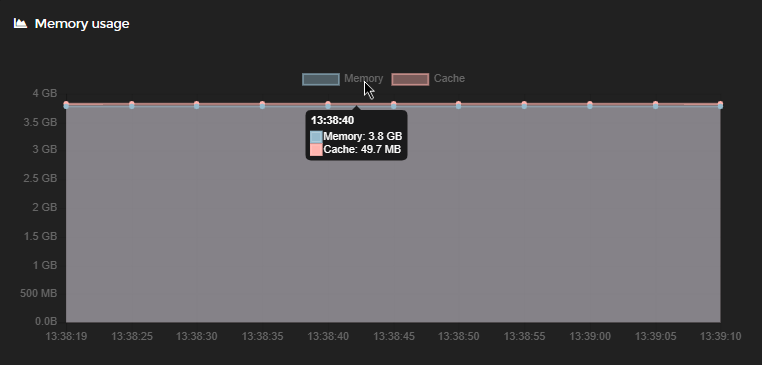
and we found these configuration env. variables:

we were wondering if we could modify API_JAVA_OPTS with a lower value than -Xmx4g.
please take into account that on average Home Assistant users are not running on very powerful systems with tons of RAM, so this might be a problem for an 8GB system with other apps/addons running. I hope we can fine tune the memory requirement.
Thanks for any suggestion. Tagging also @jakowenko so we're all aligned.
@jakowenko I have one favor to ask, could you rename CompreFace to Exadel CompreFace in your addon?
@alexdelprete Java caches in memory embedding for each subject example. In my experience, 50 000 examples need about 8Gb of RAM. So I think you can reduce this number. Java consumes all the memory it sees, but garbage collector is quite effective and we tested CompreFace for memory leaks, looks like everything ok. Also, working with mobilenet custom build will help as well, as it works with vectors of 128 numbers, not 512.
@jakowenko I have one favor to ask, could you rename CompreFace to Exadel CompreFace in your addon?
Of course, do you want anything adjusted with the description?
"Exadel CompreFace is a leading free and open-source face recognition system."
So I think you can reduce this number. Java consumes all the memory it sees, but garbage collector is quite effective and we tested CompreFace for memory leaks, looks like everything ok.
Do you think 2GB is an appropriate number? We can just set the env variable at startup, right? This is good news @jakowenko, @bentasker
Also, working with mobilenet custom build will help as well, as it works with vectors of 128 numbers, not 512.
Would this simply require pulling a different image from your repo in addon's Dockerfile, right?
Thanks a lot.