

 evshiron
Built Win Exe has mangled or unchanged icons
I'm using the --chrome-app option, but when building a Windows app, the resulting executable file shows up with mangled or missing (default) icons.
The end of my manifest.json includes this:
  "build": {
    "outputPattern": "${NAME} ${VERSION} ${PLATFORM} ${ARCH}",
    "win": {
      "icon": "icons/icon.ico"
    }
  },
  "window": {
    "icon": "icons/icon128.png"
  }
and I'm building with this command:
./node_modules/.bin/build --chrome-app --win --x64 ./src
all the source files are in the ./src subfolder in relation to the node_modules folder and package.json file. The icon.ico file (./src/icons/icon.ico) contains every necessary size, but when built it looks like this (below) in various sizes. NOTE: As a "sanity" checking, I created the one marked "Parallax IDE2.exe" in each image from ResourceHacker by opening the generated Parallax IDE.exe file, deleting all the icon resources and adding the same icon.ico file as an icon resource. The "Parallax IDE2.exe" result is exactly what I expected from the "Parallax IDE.exe" result.
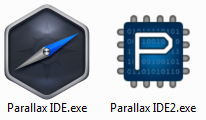
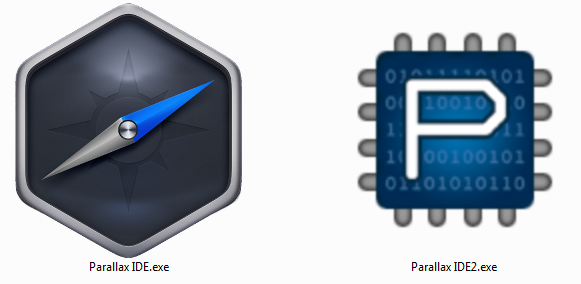
Have I perhaps missed a setting in the manifest or elsewhere?
I noticed that the generated file seems to include three different icon groups. Not sure if that's normal or not, but when replaced with a single group with ResourceHacker, all is well.

Greetings. I think this should be an issue with nwjs-builder-phoenix or its dependencies. Did you see any warnings during the build process by the way?

Thanks for the response. I'm really new to Node and NW.js, in fact, have only learned enough to get our Chrome App wrapped with it recently, so I might be missing something.
No, there were no warnings during build:
$ ./node_modules/.bin/build --chrome-app --win --x64 ./src
Starting building tasks... { tasks: [ [ 'win', 'x64' ] ], concurrent: false }
Building for win, x64 starts...
Fetching NW.js binary... { platform: 'win', arch: 'x64', version: 'lts', flavor: 'normal' }
Building targets...
Building directory target starts...
Building directory target ends within 6.22s.
Building for win, x64 ends within 6.55s.
But there were warnings during install:
$ npm install nwjs-builder-phoenix --save-dev
[email protected] C:\Temp\ParallaxIDEPkg
`-- [email protected]
  +-- [email protected]
  | `-- [email protected]
  +-- [email protected]
  +-- [email protected]
  | `-- [email protected]
  +-- [email protected]
  | +-- [email protected]
  | +-- [email protected]
  | +-- [email protected]
  | +-- [email protected]
  | | `-- [email protected]
  | `-- [email protected]
  |   `-- [email protected]
  |     +-- [email protected]
  |     `-- [email protected]
  +-- [email protected]
  | +-- [email protected]
  | `-- [email protected]
  +-- [email protected]
  | +-- [email protected]
  | | `-- [email protected]
  | `-- [email protected]
  |   +-- [email protected]
  |   +-- [email protected]
  |   | `-- [email protected]
  |   +-- [email protected]
  |   +-- [email protected]
  |   `-- [email protected]
  +-- [email protected]
  | +-- [email protected]
  | +-- [email protected]
  | `-- [email protected]
  +-- [email protected]
  +-- [email protected]
  +-- [email protected]
  | `-- [email protected]
  +-- [email protected]
  | `-- [email protected]
  +-- [email protected]
  `-- [email protected]
    +-- [email protected]
    +-- [email protected]
    | `-- [email protected]
    +-- [email protected]
    +-- [email protected]
    | `-- [email protected]
    |   `-- [email protected]
    +-- [email protected]
    +-- [email protected]
    +-- [email protected]
    +-- [email protected]
    +-- [email protected]
    `-- [email protected]
      `-- [email protected]

npm WARN optional SKIPPING OPTIONAL DEPENDENCY: 7zip-bin-mac@^1.0.1 (node_modules\7zip-bin\node_modules\7zip-bin-mac):
npm WARN notsup SKIPPING OPTIONAL DEPENDENCY: Unsupported platform for [email protected]: wanted {"os":"darwin","arch":"any"} (current: {"os":"win32","arch":"x64"})
npm WARN optional SKIPPING OPTIONAL DEPENDENCY: 7zip-bin-linux@^1.1.0 (node_modules\7zip-bin\node_modules\7zip-bin-linux):
npm WARN notsup SKIPPING OPTIONAL DEPENDENCY: Unsupported platform for [email protected]: wanted {"os":"linux","arch":"any"} (current: {"os":"win32","arch":"x64"})
npm WARN [email protected] No repository field.
Resource Hacker was previously used in nwjs-builder, but in nwjs-builder-phoenix, I wanted to reuse some common tools for Electron and switched to rcedit. rcedit doesn't do as much work as Resource Hacker though.
I wonder if you could try using the icon in /assets/project/assets/ of the repo, whose creation is described in FAQs, and see if that works as expected.
I tried the pd.ico and pd.png files like you asked. I didn't change my manifest.json, but instead just renamed my existing icon files and then renamed the pd.* files to match my original icons already referenced by manifest.json, then I rebuilt.
The results were very similar to what I saw before.
I restarted Windows (a few times), thinking that it's really Windows Explorer doing some strange things. I'm not sure what to make of the results, but I think it is more of a problem with Windows Explorer, though I don't know how to correct that (or refresh it), and perhaps a little difference exhibited by rcedit maybe?
Below is a visual comparison that's interesting. The "Parallax IDE" (left) is the one that was just built by the script. I took that file and copied it, with Windows Explorer, and renamed it to "Parallax IDE2" (middle). You can see that the proper pd icon shows up with "Parallax IDE2" with no other changes performed (just a copy and new name). In fact, the ghost image when I clicked and dragged from "Parallax IDE" also show the pd icon. Then I copied "Parallax IDE" again, and made "Parallax IDE3" with it, and then used Resource Hacker to replace the icon resource of "...IDE3" with the pd.ico file, just to see if it looks different.
The "2" and "3" look essentially proper (though pixelated) at every icon size, but the auto-built one shows our logo at this size only, and the pd logo at all other sizes I've tried. Strange, and I think only possible because of some caching the Windows Explorer is doing because the Parallax IDE logos are not even referenced by the recent build. Also, the icons show as very pixelated at this size (shown) and a couple others.
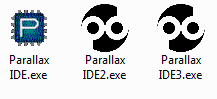
The above was all performed on my Windows VM.
Then I copied those three files to my Windows host, and they look like this:
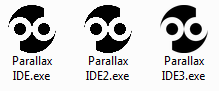
All three have the proper pd.ico resource image, but only the third one is nicely anti-aliased. All I did is use Resource Hacker to replace the icon resource with the same pd.ico resource it supposedly already had, but clearly there's a difference.
In summary, it appears Windows Explorer is just fooling me, but also, nwjs-builder-phoenix builds exe's that have icon resources that are not anti-aliased. Is there any way to change that?
:( Sorry for the inconvenience, I will add an Resource Hacker alternative soon.
Update For the first part of my problem, I found out how to make Explorer update it's icon cache:
Clear the icon cache to fix this.
- Win7:
$ ie4uinit.exe -ClearIconCache - Win10:
$ ie4uinit.exe -show
See this related issue: https://github.com/nwjs/grunt-nw-builder/issues/11
The problem is the Icon Group IDR_MAINFRAME. If you replace it with something like Resource Hacker, things work properly.
You have to run the Windows Explorer icon update in the previous post it see the correct icons (thank you for posting that tip).
