
pencil
 pencil copied to clipboard
 evolus
Ubuntu MATE: Not in window list, no window decoration, window always on top
- Operating system: Ubuntu MATE 18.04
- Pencil version: 3.1.0.ga
There are major problems with the Pencil GUI on Ubuntu MATE:
- The window does not appear on the window list (taskbar)
- There is no window decoration to move, minimize, maximize, close, or resize the window
- The window is always on top of all other windows
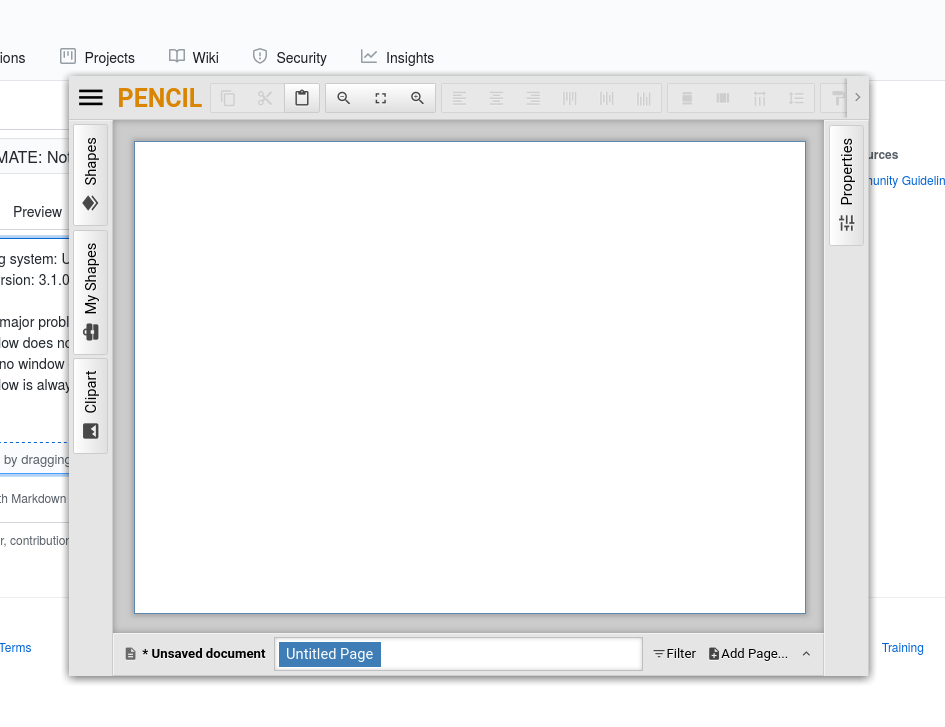

Using Ubuntu Mate 20.04 LTS, same here. One possible workaround is run Pencil with a terminal will work normally.


I've noticed the following behavior, i think it happens in MATE desktop and the bug triggers depending of the resolution
- when i run it using an ThinkPad E545 Edge default 1366x768: No window decoration and windows always on top.
- Plugging an 1920x1080 external display Pencil will run normally.
For the first display to run normally i have to run Pencil from an terminal.
Using Ubuntu Mate 20.04 LTS, same here. One possible workaround is run Pencil with a terminal will work normally.
Confirm, if run via terminal - everything is okay
No, if run via terminal, things are not okay. In that case the application runs in a small window. If I specify a command line argument, the application is started at fullscreen. Then I have a window decoration (but the application complains about the command line argument not making any sense).
So my guess is: This is an issue with how the main window is opened in the first place.
Side effect: The application does not get the focus. What ever keys I press, the key presses still are directed to the terminal window, not the application (which is running in the foreground).
Solution:
As this is a *show stopper I had a look at the sources. But I'm not familiar with Electron and not familiar with the application. I could not locate the code that must be modified in order to fix this.
Again: This is a show stopper.


@killerkalamari the command line argument trick did not work for me.
@Jeeppler I think you may have meant to tag someone else. I'm just the one who opened the bug (and I gave up on being able to use this program a long time ago).
I gave up on being able to use this program a long time ago
@killerkalamari Have you found a different program to replace it?

No, not really. IIRC, I needed to make 2 diagrams. I used LibreOffice Draw for one and dia for the other.
Actually, I resized the window of my VirtualBox VM (made it smaller), that worked.
Hi, I solved it commenting the line 78 (mainWindow.hide();) in the file ./app/index.js
