

 evanw
evanw
`module.exports` overrided by dependency
The exports seems override by he.
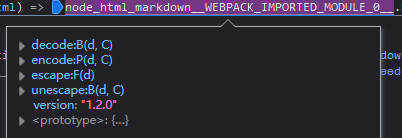
Here is the bundle I built https://github.com/SettingDust/node-html-markdown/blob/719a2a0eff811779bbd7bd56f94d844e19fec304/dist/index.browser.js

This is because the module he is an UMD module (where esbuild can only handle CJS and ESM inputs). You may have to adjust its source code to make it act as a valid CJS module.

I'm guessing what's happening here is that something on the page is using AMD and window.define exists. Since esbuild only supports ESM and CommonJS as input, it doesn't make any attempt to turn define into a module-local variable, which means that this module will call it instead of exporting itself as CommonJS. To fix this the package author could change the order of their UMD tests so that AMD is checked for after CommonJS instead of the other way around.
Closing this issue as out of scope.

I ran into this as well; in my case, the issue was that Webpack is aware of AMD define and will happily execute the define calls and replace the exports you expected with the exports from the dependency. (I'm using esbuild to produce an npm package which is then bundled in a host app with Webpack.)
I imagine you could also run into this if the host app has an AMD loader e.g. RequireJS though I haven't tested that.
Our workaround was to add var define = null; via the "banner" option e.g.
await esbuild.build({
  ...
  banner: {
      js: 'var define=null;',
  }
});
This way, any AMD snippets in the bundle will not be executed.

Our workaround was to add
var define = null;via the "banner" option e.g.
Replying to myself here; it turns out there are two issues with this approach:
(1) var define=null at the top of your build artifact will set define to null for all other code as well -- not just the code in your bundle. This is an issue if, for example, your bundle will be included in an environment where other code is using AMD to load itself.
(2) Using banner to insert code at the beginning of the bundle will cause problems because the "use strict"; directive will no longer be the first line in the file, e.g. this:
"use strict";
(() => {
   ...
becomes this:
var define=null;
"use strict";
(() => {
   ...
Then; the "use strict" no longer has any effect.
@evanw It seems like banner can be safely used only with comments, given that using any statements in banner will (silently) break the "use strict"; directive. Maybe updating the docs to explain this would be worthwhile (there's already a warning in there for CSS files)?