

 evald24
Re-enabled plugin and its commands have stopped working
I reenabled this plugin to retest, because it was failing to change plugins when changing to different profiles, and I can no longer run any of its commands from the command palette anymore. I have uninstalled, reinstalled the extension, cleared caches and removed workspaces and disabled all other plugins to no avail.

macOS 12.4 (21F79) M1 MBP 2020
Version: 1.68.1 (Universal) Commit: 30d9c6cd9483b2cc586687151bcbcd635f373630 Date: 2022-06-14T12:52:13.188Z Electron: 17.4.7 Chromium: 98.0.4758.141 Node.js: 16.13.0 V8: 9.8.177.13-electron.0 OS: Darwin arm64 21.5.0

More Info
extension version: v1.2.1
Released on 19/06/2021, 20:32:34 Last updated 19/06/2022, 11:37:42 Identifier evald24.vscode-extension-profiles

@evald24 hi I uninstalled, restarted VSC then installed 1.2.3 of the plugin and restarted VSC again. However, I still have the exact same issue.
@andrewcrook I have now released the fix and checked the work on the M1 chip. It should work now, please upgrade to version 1.2.4
Nevermind, sorry. Something is very broken with my installation of VS Code apparently
~~Hi, I am running into the same issue on unfortunately. For me it happened after I synced everything from my personal to my work machine.~~
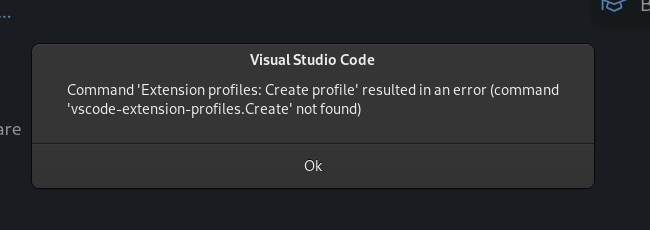
~~Extension Version: 1.2.4 Fedora Linux 36 Gnome 42.4 11th Gen Intel® Core™ i7-1185G7 × 8 VS Code 1.71.2~~
~~If I can help with any further information please let me know~~
