

 eugenp
Build sync failure due to maven-pmd-plugin
Error -
[WARNING] The POM for org.baeldung.pmd:custom-pmd:jar:0.0.1 is missing, no dependency information available Cannot resolve plugin org.apache.maven.plugins:maven-pmd-plugin:3.13.0

Hi @gaurav9822, Please clarify:
- What's the exact command you're trying to run?
- What's the working directory?

@kwoyke Just imported the tutorials maven project on intellij
- Not sure which command intellij runs in the background
- Root
I ran into this too. Not sure what maven command is being run but it happens when opening the project for the first time in IntelliJ. In my case, this just happened in the spring-websockets project. However, it's happened to me with other projects in this repo as well.

After clicking the link to clean up broken artifacts (shown below), everything works fine.
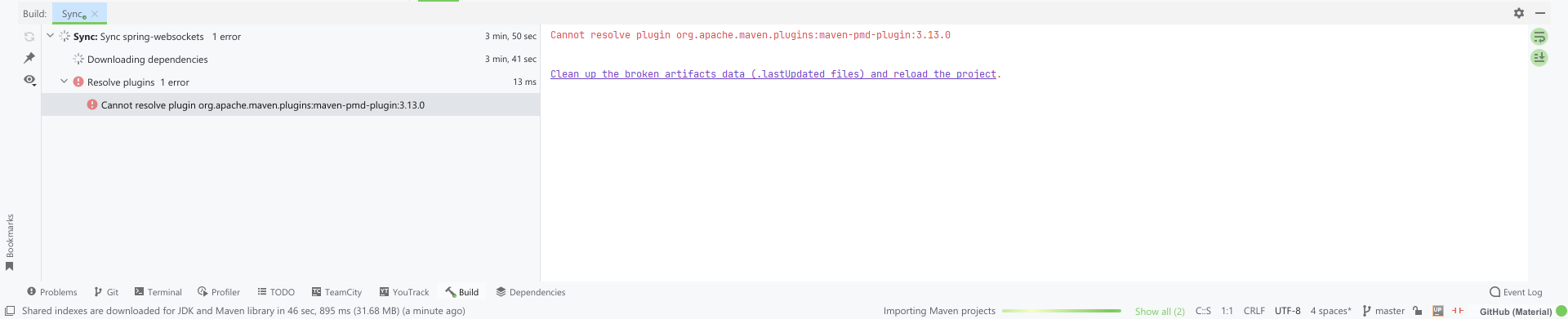

Hi @gaurav9822 @IncPlusPlus
Note that the tutorial module is a gigantic project with many submodules and dependencies. Therefore, each module might use a specific library, plugin, or even JDK version. For example, one module might use JDK 8, and the other might use JDK 11. The same applies to other libraries. Thus, configuring the entire project (tutorial) might be challenging as the IDEA may not be able to handle it automatically.
I have here my advice for you. For instance, let's assume you want to open the custom-pmd module:
- If you run your project in the IDEA: Try opening the module individually.
- If you are comfortable running commands, then go to the module's directory: cd {tutorial-location}/custom-pmd - then run: mvn clean install
I tried both, and it worked for me.
PS: If the IDEA doesn't work properly, you can run number two primarily (it downloads the external libraries). Then get back to your IDEA and try to reload your project (by right-clicking on the pom.xml file, going to the maven part, and clicking on reload project)

HI @gaurav9822
If you are still experiencing this issue,
First of all, as you may have done, get the latest tutorials repo and try again.
Please try as @ehsansasanian suggested. Also check @IncPlusPlus solution. You can check / configure / remove momentarily your settings.xml, and delete your local repo ~m2/repository, and try again
